Setup Schemes : Follow the under mentioned steps : -
•
|
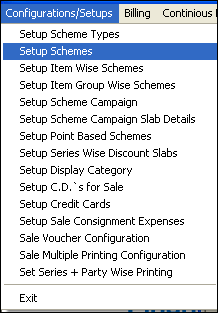
Select the Setup Schemes from the list as shown in the figure.
|
•
|
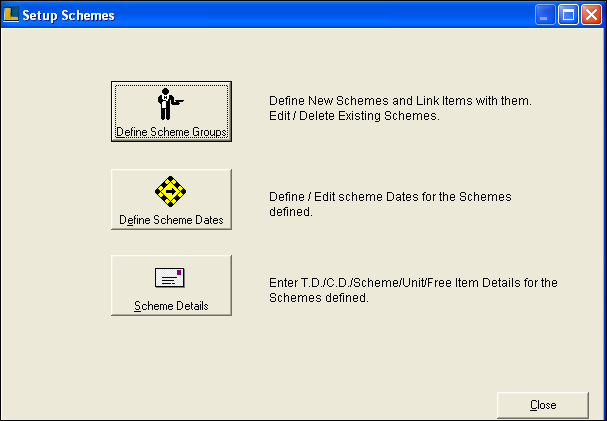
Setup Schemes window appears.Click on Define Scheme Groups button.
|
To Define Schemes :
•
|
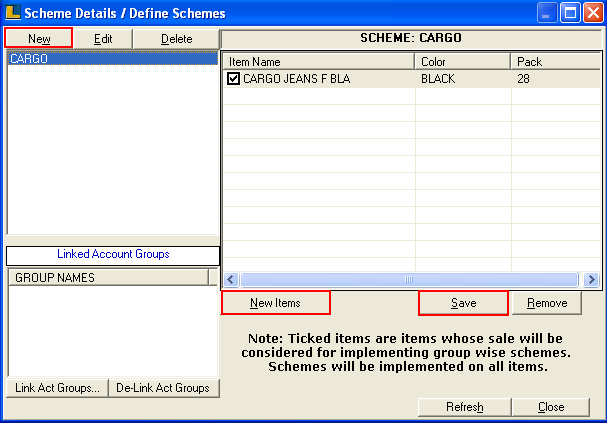
Scheme Details / Define Schemes window appears.
|
•
|
Click New button or press Alt+w to define new scheme.
|
•
|
To link the items with the defined scheme click on New Items button or press Alt+N.
|
•
|
Click on Save button or press Alt+S to save.
|
To Define Scheme Dates :
•
|
Click the Define Scheme Dates button in Setup Schemes window.
|
•
|
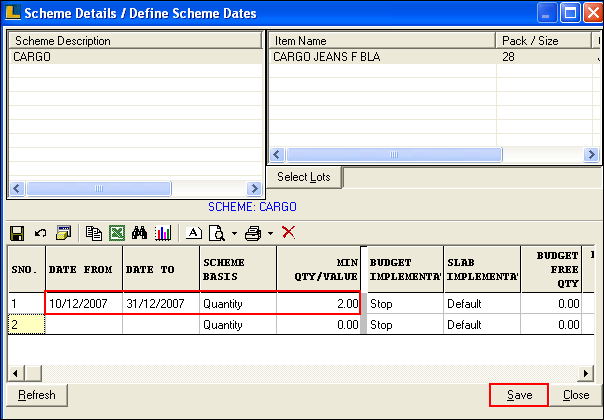
Scheme Details / Define Scheme Dates window appears.
|
•
|
Select the Scheme Name and enter period for which scheme is implemented.
|
•
|
Select the Scheme basis either Quantity or Value and enter minimum quantity or value.
|
•
|
Click on Save button or press Alt+S to save.
|
Scheme Details :
•
|
Click the Scheme Details button in Setup Schemes window.
|
•
|
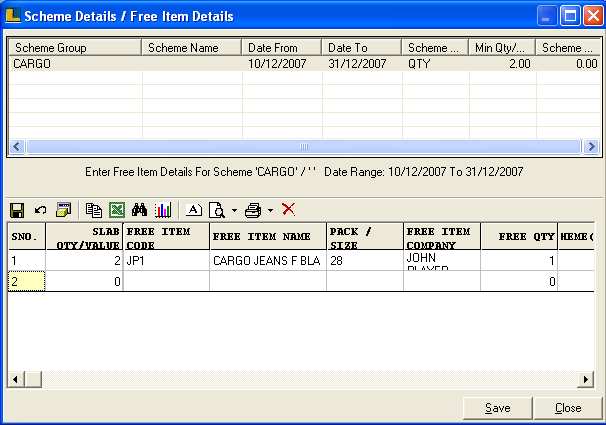
Scheme Details / Free Item Details window appears.
|
•
|
Select the Scheme Group and then enter the details like Slab Qty/Value,Free Item Name,Code & Company,Free Quantity.
|
•
|
Click on Save button or press Alt+S to save.
|
|