Enter Customer Opening Balance

Enter Customer Opening Balance : Introduction To Enter Customer Opening Balance.

Top  Previous  Next

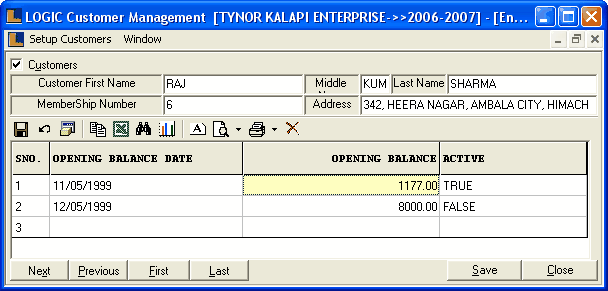
Enter Customer Opening Balance : This form is used to enter opening balance of Retail Customer. Opening Balance means the Total Purchase made by the retail customer. This is used while giving customer bonus discount based on purchases made till date.


EnterCustomerOpeningBalance


•

Customers

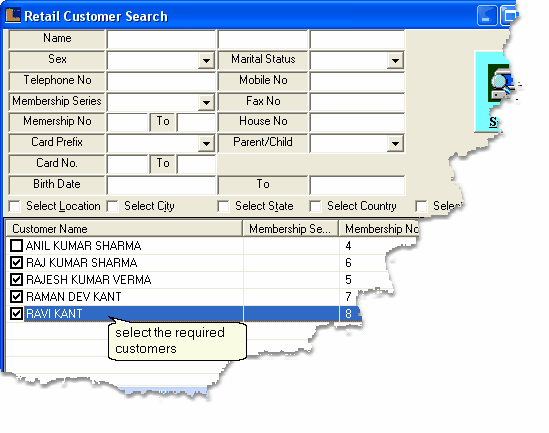
To select the customers check the box > Retail Customer Search dialog box > select the required customers > click ok.

The detailed information related to each customer is displayed.Click next button to get details related to each customer.


EnterCustomerOpeningBalance_Cust

•

New Entries

•

Opening Balance Date : Enter the opening balance date manually,it is a mandatory column can't be left blank.


EnterCustomerOpeningBalance_OBDate


•

Opening Balance : Enter the opening balance manually,it is a mandatory column can't be left blank.


EnterCustomerOpeningBalance_OBal


•

Active : If the customer account is active then checked the box for True otherwise unchecked the box for False.


EnterCustomerOpeningBalance_Active

•

Buttons

•

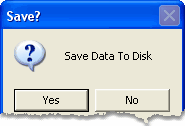
Save : Used to save the changes made by user.Click > Save dialog box > click Yes to save the changes.


EnterCustomerOpeningBalance_Save

Save Dialog Box


•

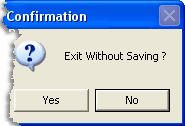
Close : Click > Confirmation dialog box > click Yes to exit.


EnterCustomerOpeningBalance_Close


Confirmation Dialog Box


•

Next : Used to move to the next record in the grid.

•

Previous : Used to move to the previous record in the grid.

•

First : Used to move to the first record in the grid.

•

Last : Used to move to the last record in the grid.


Copyright © 2011, LOGIC ERP Solutions Pvt. Ltd.