Setup Item Group Wise Schemes : Follow the under mentioned steps : -
•
|
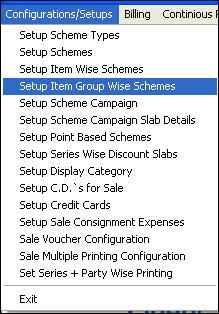
Select the Setup Item Group Wise Schemes from the list as shown in the figure.
|
•
|
Setup Item Group Wise Schemes window appears.
|
•
|
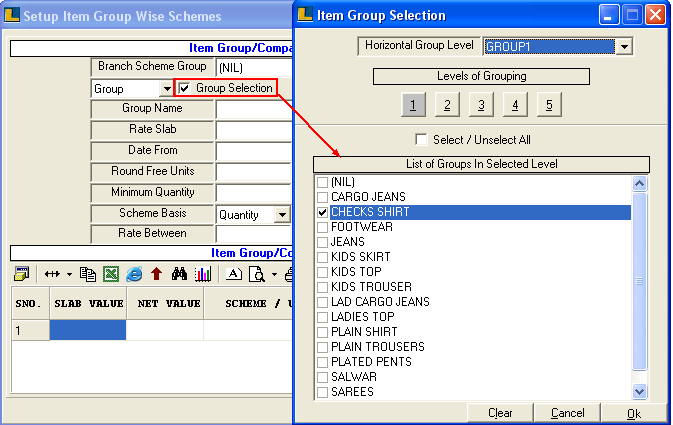
Select the Item Group as shown in the figure.
|
•
|
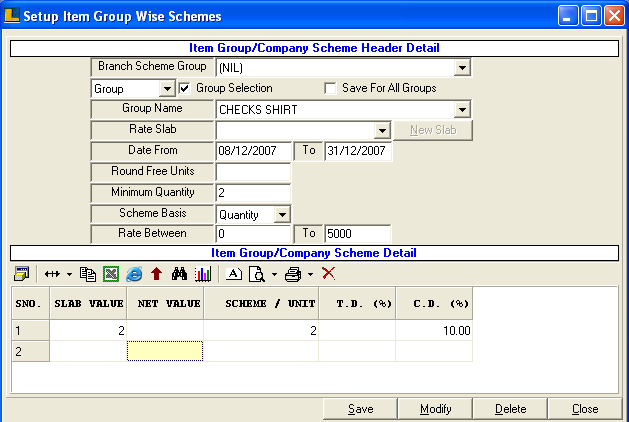
Enter Dates,Minimum Quantity and Scheme basis in the Header Details.
|
•
|
Enter the details like slab value,scheme / unit of the scheme in the Scheme Details.
|
•
|
Click Save button or press Alt+S to save.
|
|