Cloud-Based vs On-Premise Retail Billing Software: Which Is Best for Your Store?

Summary
How to choose the best retail billing software for your retail business is no longer a struggle. Explore detailed comparison of cloud retail billing software and on-premises retail billing software.
Introduction
In today’s highly competitive retail environment, billing systems influence customer experience, inventory accuracy, financial reporting, compliance, scalability, and long-term profitability. As retailers expand across locations, adopt omnichannel models, and serve customers who expect speed and convenience, choosing the right billing software architecture becomes a strategic decision rather than a technical one.
The challenging part in making the right choice retailers face today is between cloud-based retail billing software and on-premise retail billing software. Each approach offers distinct advantages, limitations, and long-term implications. This article provides a comprehensive, unbiased, and deeply detailed analysis to help retailers determine which solution best fits their business model, industry, and growth plans.
What is Retail Billing Software?
Retail Billing Software is an all-in-one system that helps retail businesses manage their sales transactions, billing processes, and customer invoices efficiently. It automates the process of generating bills for products or services sold, reducing manual errors and saving time.
Key features of retail billing software typically include:
- Invoice Generation: Quickly creates bills for customers with product details, prices, taxes, and discounts.
- Inventory Management: Tracks stock levels in real-time and alerts when products are low.
- Sales Tracking: Monitors daily, weekly, or monthly sales and generates reports for better business insights.
- Customer Management: Stores customer details and purchase history for loyalty programs or marketing.
- Tax Calculation: Automatically calculates applicable taxes like GST, VAT, or sales tax.
- Multiple Payment Options: Supports cash, card, UPI, or digital wallet payments.
Cloud-Based Retail Billing Software Explanation
What Is Cloud-Based Billing Software?
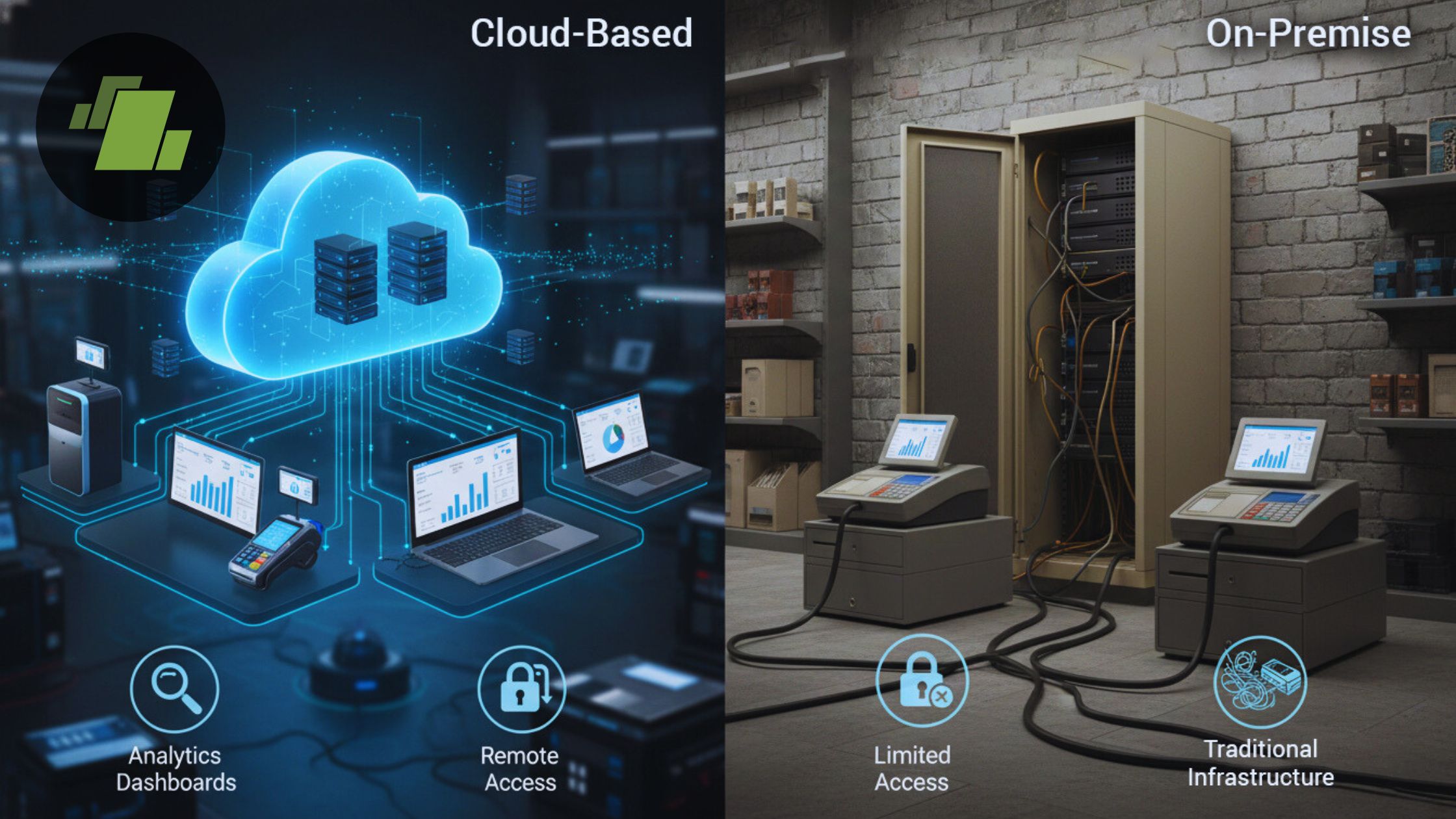
Cloud-based retail billing software is hosted on remote servers managed by a software provider. Retailers access the system via the internet using computers, tablets, or POS terminals. The software operates on a subscription model, commonly referred to as Software as a Service (SaaS).
How Cloud Billing Software Works?
When a transaction occurs:
- The cashier scans items or selects products
- The system calculates price, tax, and discounts
- Transaction data syncs to a centralized cloud database
- Inventory updates instantly across all locations
- Sales data becomes available in real time for reporting
Most cloud systems also include offline capabilities, allowing transactions to continue temporarily if internet connectivity is disrupted.
Key Characteristics of Cloud Billing Software
- Centralized data storage
- Subscription-based pricing
- Automatic updates and feature enhancements
- Vendor-managed security and backups
- Remote access from any location
- Easy scalability for multiple stores
On-Premise Retail Billing Software Explanation
What Is On-Premise Billing Software?
On-premise retail billing software is installed locally on computers or servers within the retailer’s physical premises. The retailer owns and manages the hardware, software, security, and maintenance.
How On-Premise Billing Software Works
When a transaction occurs:
- Data is processed locally
- Inventory updates occur within the local system
- Reports are generated from on-site databases
- Updates and backups are handled manually or by internal IT teams
Key Characteristics of On-Premise Billing Software
- One-time license or long-term contract
- Full control over data and infrastructure
- Deep customization options
- No dependency on internet connectivity
- Requires internal IT expertise
Cloud-Based vs On-Premise Retail Billing Software
| Feature | Advanced Billing Software | Traditional Billing System |
|---|---|---|
| Billing Speed | Fast & automated checkout | Slow, manual processing |
| Accuracy | Error-free billing | Prone to manual errors |
| GST Compliance | Built-in GST & tax support | Manual calculations required |
| Inventory Updates | Real-time stock updates | Delayed or manual updates |
| Reporting | Instant sales & profit reports | Limited or no reporting |
| Scalability | Ideal for growing supermarkets | Not scalable |
The Cost Structure and Total Ownership Cost of Retail Billing Software
Cloud Billing Cost Structure
The cloud billing cost structure is built around a subscription-based SaaS (Software as a Service) pricing model, which fundamentally changes how retailers invest in billing and POS systems. Instead of large upfront purchases, retailers pay smaller, recurring fees that scale with usage.
Monthly or Annual Subscription Fees
Cloud-based retail billing software typically charges a monthly or annual subscription fee. This fee grants access to the billing platform, core POS features, cloud hosting, security updates, and technical support.
From a cost-management perspective:
- Subscription pricing spreads expenses over time
- Retailers avoid large upfront capital investments
- Costs are easier to forecast and budget
This pricing model is especially attractive for small and mid-size retailers, franchise stores, and multi-location businesses looking for predictable operational expenses.
Charges per Register, Store, or User
Most cloud retail billing systems use usage-based pricing, where costs depend on:
- Number of POS registers
- Number of store locations
- Number of active users or cashiers
This means retailers only pay for what they use, allowing costs to scale proportionally with business growth. For example:
- A single-store retailer pays for one register
- A growing chain adds registers incrementally
This flexibility makes cloud billing software ideal for expanding retail businesses, pop-up stores, and seasonal retail operations.
Optional Add-Ons (Inventory, CRM, Analytics)
Cloud billing platforms often offer modular pricing, where advanced features are available as optional add-ons, such as:
- Inventory management systems
- Customer Relationship Management (CRM) tools
- Sales analytics and reporting dashboards
- Loyalty and promotions engines
Retailers can start with essential billing features and gradually add modules as operational needs grow. This pay-as-you-grow model prevents overspending on unused features and aligns software costs with business maturity.
Minimal Upfront Hardware Investment
One of the biggest advantages of cloud-based billing software is the minimal hardware requirement. Retailers usually only need:
- Tablets or POS terminals
- Barcode scanners
- Receipt printers
There is no need to purchase expensive servers or maintain in-house infrastructure. This dramatically reduces:
- Initial setup costs
- Maintenance overhead
- Hardware depreciation risks
For startups and small retailers, this lower barrier to entry enables faster go-to-market and quicker ROI.
Why Cloud Billing Makes Budgeting Easier
Because cloud billing expenses are:
- Recurring
- Predictable
- Scalable
Retailers can accurately forecast costs month-to-month and year-to-year. This converts capital expenditure (CAPEX) into operational expenditure (OPEX), improving cash flow and financial planning.
This cost predictability is a major reason why cloud billing software is widely adopted by modern retail businesses and omnichannel stores.
On-Premise Billing Cost Structure
The on-premise billing cost structure follows an IT investment model, where retailers purchase and manage their own software and infrastructure. While this approach offers control and customization, it requires significantly higher upfront and ongoing investment.
Software License Fees
On-premise billing software typically requires a one-time license fee or long-term contractual payment. This fee grants perpetual or extended rights to use the software version purchased.
Key considerations:
- License costs are paid upfront
- Major upgrades may require additional fees
- Costs increase with advanced customization
This structure favors organizations that prefer ownership over subscription dependency.
Server Hardware Purchases
Unlike cloud systems, on-premise billing requires physical servers to store transaction data, inventory records, and reports. These servers must be:
- Purchased upfront
- Maintained regularly
- Replaced every few years
Hardware investment significantly increases initial deployment costs and adds depreciation expenses to the balance sheet.
Networking Equipment
On-premise environments require:
- Routers and switches
- Local area networks
- Secure internal connections
As store count grows, networking complexity and cost increase. Poor network design can lead to performance issues and system downtime.
Backup Systems and Disaster Recovery
Retailers using on-premise billing software must invest in:
- Local or off-site backup systems
- Disaster recovery planning
- Data redundancy solutions
These systems are essential for preventing data loss due to hardware failure, theft, or natural disasters, but they add to both capital and operational expenses.
IT Staff Salaries and Management Costs
One of the most underestimated costs of on-premise billing systems is human resources. Retailers often need:
- IT administrators
- System engineers
- Security specialists
These professionals are responsible for:
- Software updates
- Security patches
- Server maintenance
- Troubleshooting system issues
Over time, IT staffing becomes a significant recurring expense.
Periodic Upgrade and Maintenance Costs
On-premise billing software does not update automatically. Retailers must:
- Schedule upgrades
- Pay for new versions
- Test system compatibility
Upgrades often involve downtime and additional consulting costs, especially in large or complex retail environments.
Why On-Premise Costs Can Stabilize Over Time
Although on-premise billing systems require higher initial investment, long-term costs may stabilize for:
- Very large retailers
- High transaction-volume businesses
- Organizations with existing IT infrastructure
Once infrastructure is fully depreciated and systems are stable, cost per transaction can be lower than subscription-based cloud models.
Security, Compliance, and Data Protection in Retail Billing Software
Security and compliance are among the most important decision factors when choosing between cloud-based retail billing software and on-premise retail billing systems. Billing platforms handle highly sensitive data, including payment information, customer details, sales records, and tax data. Any breach, downtime, or compliance failure can result in financial loss, legal penalties, and reputational damage.
Understanding how cloud billing security and on-premise billing security differ helps retailers choose a solution that aligns with their risk tolerance, regulatory obligations, and internal capabilities.
Cloud Billing Security
Data Encryption at Rest and in Transit
Modern cloud billing software protects sensitive retail data using encryption at rest (data stored in databases) and encryption in transit (data moving between POS devices and cloud servers). Encryption ensures that even if data is intercepted or accessed without authorization, it remains unreadable.
This level of encryption is critical for:
- Payment data protection
- Customer information security
- Secure multi-store data synchronization
Role-Based Access Control (RBAC)
Cloud-based retail billing systems use role-based access control, allowing retailers to define what each employee can see or do within the system. For example:
- Cashiers can process sales
- Store managers can view reports
- Administrators can configure pricing and taxes
RBAC minimizes insider threats and prevents unauthorized access to sensitive financial data, making it a core security feature in cloud POS systems.
Automated Security Updates and Patching
One of the biggest advantages of cloud-based billing platforms is automated security updates. Cloud vendors continuously:
- Patch vulnerabilities
- Apply software updates
- Enhance system defenses
This reduces the risk of security gaps caused by delayed updates, which are a common source of breaches in traditional systems.
Centralized Monitoring and Logging
Cloud billing providers maintain centralized monitoring systems that track:
- Login activity
- Transaction anomalies
- System performance
- Suspicious behavior
Comprehensive logging enables rapid detection of threats and simplifies auditing, which is essential for both security management and compliance reporting.
Disaster Recovery and Cloud Backups
Cloud-based retail billing systems typically include:
- Automated data backups
- Redundant storage across locations
- Disaster recovery mechanisms
These features ensure business continuity in case of hardware failure, cyberattacks, or natural disasters, significantly reducing downtime and data loss risks.
Shared Responsibility Model: Retailer Responsibilities
Despite strong vendor-side protections, cloud billing security operates on a shared responsibility model. Retailers remain responsible for:
- Securing POS devices and networks
- Managing employee access and passwords
- Training staff on security best practices
- Enforcing operational procedures
Security failures often occur at the endpoint or human level, not within the cloud infrastructure itself.
On-Premise Billing Security
Complete Data Ownership and Control
On-premise retail billing software offers full ownership of data, as all transaction records and customer information are stored on servers controlled by the retailer. This model appeals to organizations that prioritize data sovereignty and privacy.
Physical Control Over Servers
With on-premise billing systems, retailers maintain physical access control over servers and networking equipment. This includes:
- Restricted server rooms
- Access logs
- Hardware security measures
Physical control can be a strong security advantage, especially in environments where external data hosting is restricted.
Custom Security Frameworks
On-premise systems allow retailers to design custom security architectures, including:
- Proprietary encryption methods
- Internal authentication systems
- Custom firewall and intrusion detection setups
This flexibility benefits enterprises with unique operational or regulatory requirements.
Dependence on Internal Expertise
The biggest challenge with on-premise billing security is that security effectiveness depends entirely on internal capabilities. Retailers must:
- Monitor threats proactively
- Apply patches promptly
- Maintain secure configurations
- Enforce strict internal policies
Without dedicated IT security expertise, on-premise systems can become vulnerable over time.
Dependence on Internal Expertise
The biggest challenge with on-premise billing security is that security effectiveness depends entirely on internal capabilities. Retailers must:
- Monitor threats proactively
- Apply patches promptly
- Maintain secure configurations
- Enforce strict internal policies
Without dedicated IT security expertise, on-premise systems can become vulnerable over time.
Compliance Considerations for Retail Billing Software
Payment Security Standards
Both cloud-based and on-premise retail billing systems must comply with payment security standards to protect cardholder data and prevent fraud. Compliance ensures secure payment processing and builds customer trust.
Tax and Invoicing Regulations
Retail billing software must accurately:
- Calculate taxes
- Generate compliant invoices
- Support region-specific tax rules
Cloud billing software often simplifies this by pushing automatic tax updates, while on-premise systems require manual configuration.
Data Privacy and Protection Requirements
Retailers must protect customer data according to applicable privacy laws and internal policies. Billing software should support:
- Data access controls
- Audit trails
- Secure data storage
- Data retention policies
Both deployment models must be configured properly to meet these requirements.
Cloud vs On-Premise Compliance: Strategic Differences
Cloud Billing and Compliance Automation
Cloud billing platforms often simplify compliance by:
- Automatically updating regulatory rules
- Maintaining audit-ready logs
- Enforcing standardized security practices
This reduces compliance burden for retailers with limited internal resources.
On-Premise Billing and Regulatory Control
On-premise billing systems offer greater control over:
- Data residency
- Audit processes
- Custom compliance workflows
This makes them suitable for regulated industries and organizations with strict governance requirements.
Performance, Reliability, and Offline Operation
Cloud Performance
Cloud billing systems:
- Scale automatically during peak hours
- Perform well with stable internet connections
- Offer offline transaction support in many cases
Performance is optimized through distributed infrastructure.
On-Premise Performance
On-premise systems:
- Operate independently of the internet
- Deliver consistent local performance
- Are limited by hardware capacity
Hardware failures can result in complete system downtime if not properly managed.
Scalability and Business Growth
Cloud Scalability
Cloud billing software enables:
- Rapid store expansion
- Centralized pricing and inventory
- Unified reporting across locations
- Easy onboarding of new staff and registers
This makes cloud systems ideal for franchises, chains, and omnichannel retailers.
On-Premise Scalability
Scaling on-premise systems requires:
- Hardware upgrades
- Network expansion
- Additional IT resources
- Longer deployment timelines
This approach suits businesses with stable, predictable operations.
Customization and Integration Capabilities
Cloud Billing Customization
Cloud systems offer:
- API-based integrations
- App marketplaces
- Configurable workflows
Customization is structured and standardized.
On-Premise Billing Customization
On-premise systems allow:
- Deep code-level customization
- Integration with legacy systems
- Highly specific reporting formats
This flexibility is valuable for enterprises with unique workflows.
Industry-Specific Recommendations
Supermarkets and Grocery Stores
Key Challenges
- High transaction volume
- Perishable inventory
- Price changes and promotions
- Multi-store coordination
Recommended Approach
Cloud or hybrid retail billing system software provides centralized inventory, real-time updates, and scalable performance, while local caching ensures checkout reliability.
Fashion Boutiques and Apparel Retail
Key Challenges
- Size and color variants
- Returns and exchanges
- Customer loyalty tracking
- Online and offline synchronization
Recommended Approach
Cloud billing software supports omnichannel inventory, mobile POS, customer profiles, and seasonal scalability.
Pharmacies and Medical Retail
Key Challenges
- Prescription compliance
- Sensitive customer data
- Audit trails
- Insurance integrations
Recommended Approach
On-premise or private cloud solutions provide stronger data governance, offline reliability, and regulatory alignment.
Offline Mode and Business Continuity
Cloud systems often include offline transaction modes with automatic synchronization. On-premise systems inherently function offline but require strong backup strategies. Business continuity planning is essential regardless of deployment model.
1. Assess Current Workflows and Data
The first step in retail billing software migration is conducting a complete assessment of existing workflows, systems, and data structures.
Retailers should evaluate:
- Current billing and POS workflows
- Inventory management processes
- Reporting and accounting dependencies
- Custom features used in the on-premise system
This assessment identifies which processes need to be replicated, improved, or redesigned in the cloud environment. It also helps determine compatibility with modern cloud POS and billing platforms.
2. Clean and Validate Existing Records
Before migrating, it is essential to clean, standardize, and validate data stored in the on-premise billing system. This includes:
- Removing duplicate customer records
- Correcting inventory inconsistencies
- Archiving outdated transaction data
- Validating tax and pricing information
Clean data ensures accurate reporting, smoother cloud synchronization, and better system performance post-migration.
3. Test the Cloud System in a Pilot Store
A pilot implementation is an important risk-reduction step. Instead of migrating all stores at once, retailers should deploy the cloud billing system in:
- One store
- A limited number of registers
- A controlled operational environment
This allows teams to test:
- Transaction speed and reliability
- Inventory synchronization
- Offline billing functionality
- Integration with accounting and payment gateways
Feedback from the pilot store helps identify gaps and optimize configurations before full-scale rollout.
4. Train Staff on New Processes
Successful cloud billing adoption depends heavily on staff training and change management. Employees must understand:
- New billing interfaces
- Updated checkout workflows
- Cloud-based reporting tools
- Security and access controls
Training should include hands-on sessions, user guides, and role-based access explanations to minimize resistance and operational errors.
5. Execute a Phased Rollout
Instead of a single large migration, retailers should implement a phased rollout strategy, migrating stores or regions in stages. This approach:
- Reduces operational risk
- Allows gradual issue resolution
- Ensures business continuity
Phased rollouts are especially effective for multi-store retailers, franchises, and enterprise chains.
6. Monitor Performance Post-Migration
After migration, continuous monitoring is essential to ensure system stability and ROI. Retailers should track:
- Transaction success rates
- System uptime and performance
- Inventory accuracy
- User adoption metrics
Regular performance reviews help fine-tune system settings and maximize the benefits of cloud-based retail billing software.
Vendor Selection Checklist for Retail Billing Software
Choosing the right vendor is just as important as choosing the right technology. A reliable vendor ensures long-term system performance, security, and scalability.
1. Security Standards and Audits
Retail billing vendors should demonstrate strong security practices, including:
- Data encryption
- Access control mechanisms
- Regular security audits
Security certifications and audit readiness indicate a mature and trustworthy cloud billing provider.
2. Offline Functionality
Reliable offline billing capability is essential for retail operations during internet outages. Vendors should support:
- Offline transaction processing
- Automatic data synchronization
- Seamless transition between offline and online modes
This ensures uninterrupted billing operations.
3. Integration Ecosystem
A strong billing platform should integrate easily with:
- Inventory management systems
- Accounting software
- Ecommerce platforms
- CRM and loyalty programs
An open integration ecosystem reduces manual work and improves operational efficiency.
4. Pricing Transparency
Vendors should offer clear and transparent pricing, including:
- Subscription fees
- Per-register or per-store charges
- Add-on costs
- Upgrade and support fees
Transparent pricing prevents unexpected expenses and simplifies budgeting.
5. Industry Experience
Vendors with industry-specific experience understand retail workflows, compliance requirements, and peak season demands. This results in better product fit and faster issue resolution.
6. Support Responsiveness
Reliable customer support is important for billing systems that operate daily. Retailers should evaluate:
- Support availability
- Response times
- Resolution processes
Fast and knowledgeable support minimizes downtime and revenue loss.
7. Data Portability Options
Retailers should always retain control over their data. Vendors must provide:
- Easy data export options
- Clear data ownership policies
- Migration support if switching platforms
Data portability protects retailers from vendor lock-in.
Future Trends in Retail Billing Software
The retail billing landscape is rapidly evolving as businesses adopt intelligent, connected, and customer-centric technologies. Modern billing systems are no longer limited to transaction processing; they are becoming strategic tools powered by artificial intelligence, voice interaction, edge computing, and advanced security frameworks. Understanding these trends helps retailers stay competitive and future-proof their operations.
AI-Powered Analytics and Forecasting
One of the most transformative trends in retail billing software is the integration of AI-powered analytics and predictive forecasting. Artificial intelligence analyzes historical sales data, customer behavior, seasonal patterns, and inventory movement to generate actionable insights.
AI-driven billing platforms enable retailers to:
- Predict demand more accurately
- Optimize inventory levels
- Reduce stockouts and overstocking
- Identify high-margin products
- Forecast sales performance
These insights help retailers make data-driven decisions in real time, improving profitability and operational efficiency.
Voice-Enabled Checkout Systems
Voice technology is reshaping customer interactions, and voice-enabled checkout systems are emerging as a major innovation in retail billing. These systems allow staff or customers to complete transactions using voice commands, reducing manual input and checkout time.
Voice-enabled billing offers:
- Faster checkout experiences
- Improved accessibility
- Reduced human error
- Hands-free operation for staff
As voice search adoption grows across digital platforms, voice-driven billing aligns naturally with VEO (Voice Engine Optimization) trends.
Unified Commerce Platforms
Retailers are increasingly moving toward unified commerce platforms, where billing software acts as the central system connecting online stores, physical locations, mobile POS, and marketplaces.
Unified billing systems provide:
- A single source of truth for inventory
- Consistent pricing across channels
- Centralized customer data
- Seamless returns and exchanges
This trend supports omnichannel and cross-channel retail strategies, enabling businesses to deliver a consistent customer experience regardless of where the transaction occurs.
Edge Computing with Cloud Synchronization
Edge computing is becoming an important enhancement to cloud-based billing systems. In this model, transactions are processed locally at the store level (the “edge”) while syncing data with the cloud in real time or near real time.
Benefits of edge-enabled billing systems include:
- Faster transaction processing
- Reduced latency during peak hours
- Reliable offline billing
- Improved system resilience
Edge computing ensures uninterrupted operations while retaining the scalability and analytics advantages of cloud billing.
Advanced Fraud Detection and Prevention
As digital transactions increase, fraud detection in retail billing software is becoming more sophisticated. Future-ready billing platforms use machine learning algorithms to detect unusual transaction patterns and prevent fraud in real time.
Advanced fraud prevention capabilities include:
- Behavioral analysis
- Anomaly detection
- Automated alerts
- Risk-based transaction approval
These systems protect retailers from financial loss while maintaining smooth customer experiences.
Strategic Impact of These Trends
Together, these innovations transform retail billing software into:
- A predictive intelligence engine
- A customer experience enhancer
- A security-first transaction platform
- A scalable, future-ready retail backbone
Retailers that adopt these trends early gain a competitive edge in efficiency, customer satisfaction, and long-term growth.
Conclusion
Choosing between cloud-based retail billing software and on-premise retail billing software ultimately depends on your store’s operational needs, growth ambitions, and long-term business strategy. Cloud-based billing software is best suited for retailers focused on rapid expansion, centralized management, lower upfront investment, and seamless omnichannel operations, as it offers scalability, real-time visibility, and predictable operating costs. On the other hand, on-premise retail billing software is ideal for businesses that require maximum data ownership, deep system customization, strict regulatory compliance, and stable performance in high transaction-volume environments. There is no one-size-fits-all answer—the most effective billing solution is the one that aligns closely with your business size, industry-specific requirements, internal IT capabilities, and future roadmap, ensuring both operational efficiency and sustainable growth.
Call at +91-73411-41176 or send us an email at sales@logicerp.com to book a free demo for the best retail billing software today!
Frequently Asked Questions
1. What is retail billing software?
Retail billing software is a system that helps retail businesses manage sales transactions, generate bills and invoices, calculate taxes and discounts, track inventory, and maintain customer and financial records. It acts as the central system that connects billing counters with inventory management, accounting, reporting, and compliance, ensuring smooth and accurate retail operations.
2. Which billing software is used for retail businesses?
Retail businesses use POS and billing software that supports fast checkout, inventory control, taxation, reporting, and compliance. These systems can be cloud-based, on-premise, or hybrid. Among these, LOGIC ERP is widely used because it combines retail billing, inventory management, accounting, taxation, CRM, and analytics into one integrated retail ERP solution.
3. What features to look for in the best billing software?
The best retail billing software should offer fast POS billing, real-time inventory tracking, tax and invoice compliance, multi-store and multi-user support, customer and loyalty management, detailed sales reports, offline billing capability, strong data security, and easy system integrations. LOGIC ERP includes all these features in a single, retail-focused platform.
4. How can I choose the best billing software for my retail business?
To choose the best billing software, retailers should evaluate their business size, transaction volume, industry type, compliance requirements, scalability needs, ease of use, support quality, and long-term cost. LOGIC ERP is a strong choice because it supports both small and large retailers, works reliably in high-volume environments, and scales seamlessly as the business grows.
5. Why is retail billing software important to centralize your retail operations?
Retail billing software centralizes sales, inventory, customer data, accounting, and reporting into one system. This centralization improves efficiency, reduces manual errors, ensures accurate stock control, and provides real-time business insights. LOGIC ERP centralizes all retail operations, enabling complete visibility and control from a single platform.
6. Is cloud-based billing software secure?
Yes, when implemented correctly, cloud billing software offers enterprise-grade security and automated protection mechanisms.
7. Can cloud billing work without the internet?
Most modern cloud billing systems include offline functionality with delayed synchronization.
8. Is on-premise billing outdated?
No. It remains relevant for large enterprises and regulated industries.
9. What are key points of Cloud vs On-Premise POS comparison?
Cloud-based POS systems operate over the internet and provide real-time access to sales data, centralized control, easy scalability, automatic updates, and lower upfront costs, making them ideal for growing and multi-location retail businesses. On-premise POS systems are installed locally and offer complete data ownership, deeper customization, strong offline reliability, and higher control, which suits large enterprises and regulated retail environments. The main differences lie in cost structure, scalability, data control, maintenance responsibility, and operational flexibility.
10. Which is the best retail shop billing software?
The best retail shop billing software is one that is fast, reliable, compliant, scalable, and easy to use. LOGIC ERP is considered one of the best retail shop billing software solutions because it is designed specifically for retail businesses, supports high transaction volumes, works offline, and integrates billing with inventory and accounting.
11. What are the benefits of retail billing system software?
Retail billing system software improves checkout speed, ensures accurate inventory management, automates tax compliance, reduces operational errors, and provides better financial visibility. With LOGIC ERP, retailers gain improved efficiency, centralized control, powerful analytics, and long-term operational stability.
12. Why is LOGIC ERP the best retail sales billing software?
LOGIC ERP is the best retail sales billing software because it is a complete retail ERP solution built for complex retail operations. It delivers high-speed POS billing, robust inventory and accounting integration, compliance-ready architecture, deep customization, and reliable offline performance. By unifying all retail functions into one system, LOGIC ERP helps retailers achieve scalability, accuracy, and long-term growth.
13. Which billing software is better for retail?
For retailers looking for a complete, reliable, and industry-focused solution, LOGIC ERP is the best choice. Trusted since 1993, it caters to apparel, clothing, garments, supermarkets, grocery stores, and kirana shops. LOGIC ERP offers:
- Fast and accurate POS billing
- GST-compliant invoices
- Inventory management and stock updates
- Multi-store and multi-counter support
- Customer loyalty programs and discount management
14. Is cloud billing safe for stores?
Yes, LOGIC ERP cloud billing is completely safe. It ensures:
- Encrypted transactions and secure logins
- Automatic backups to prevent data loss
- Role-based access control for staff
- Real-time synchronization across all counters and stores
Retailers can access billing and reports anytime, anywhere, while keeping their data fully secure.
15. What makes LOGIC ERP the best retail billing software for retail industry?
LOGIC ERP has been trusted since 1993, providing fast, accurate, and GST-compliant billing. It’s tailored for industries like apparel, clothing, garments, supermarkets, grocery stores, and kirana shops, making it a complete retail billing solution.
16. How can I book a LOGIC ERP retail billing software free demo?
Contact our experts at +91-73411-41176 or send us an email at sales@logicerp.com to book a free demo for retail shop billing software today!

Author
Surendra Nayak
Vice President Enterprise Sales | LOGIC ERP Solutions Pvt. Ltd.
Driving LOGIC ERP’s enterprise sales with a strategic outlook, my leadership role encompasses forming and executing policies that bolster revenue, customer satisfaction and brand positioning.


