Simplify production with a powerful Bill of Materials (BOM) that helps manage inventory, control costs, and ensure smooth manufacturing workflows from start to finish. Whether managing single-level or multi-level BOMs, businesses can streamline complex production processes with greater accuracy and efficiency.
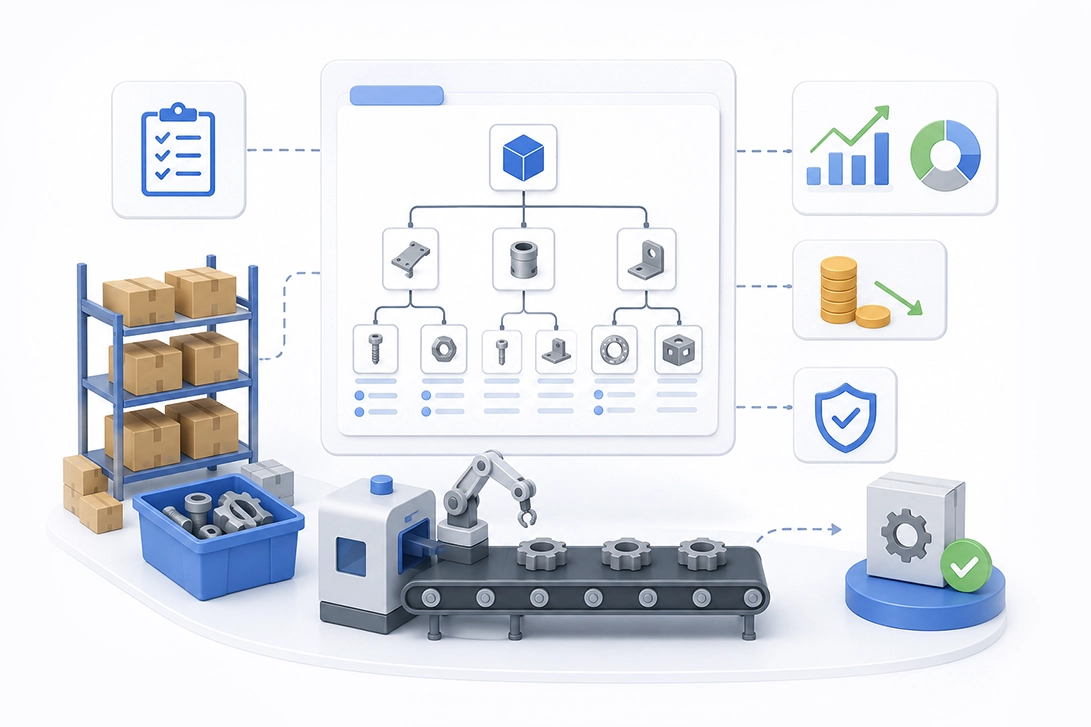
A bill of materials (BOM) is a structured, comprehensive list of materials, components, and parts required to manufacture or repair a product, including their quantities, names, descriptions, and costs. This foundational document serves as a centralized source of information, detailing the raw materials and components needed for efficient production and managing manufacturing operations across every stage of the product lifecycle.
Bill of Materials Definition: A BOM is a detailed blueprint that lists every material, part, and subassembly needed to build a product, serving as the foundation for production planning and inventory management. The primary purpose of a BOM is to provide a comprehensive and structured list of all the raw materials required to manufacture a finished product, facilitating efficient and accurate manufacturing processes.
This guide covers everything manufacturing professionals need to know about BOMs: the different types serving various business functions, structural formats for simple and complex products, essential components that make up an effective BOM, the step-by-step creation process, and integration strategies with enterprise resource planning (ERP) and manufacturing resource planning (MRP) systems. It is especially relevant for any manufacturing company involved in producing complex products, particularly those managing multi-level BOMs and integrating with ERP/MRP systems. In contrast, a multi-level BOM displays the hierarchical relationships between components, subassemblies, and assemblies, often referred to as an indented BOM. Whether you're an engineer designing products, a procurement specialist managing supplier relationships, or a business owner seeking production efficiency, this resource addresses your specific needs.
By the end of this guide, you will:
A bill of materials functions as a hierarchical list that serves as a manufacturing recipe or blueprint for production. It coordinates multiple business functions engineering, procurement , inventory management , and production planning by providing a single source of truth about what components required go into creating a finished product.
Production Planning ensures that every part is available for manufacturing, reducing waste and preventing production downtime. A well-structured bill of materials helps ensure that all necessary materials are available when needed, reducing the risk of production delays and excess inventory.
Cost Management helps companies calculate the total cost of materials to set accurate product pricing and identify cost savings. Through precise material tracking and accurate cost estimation, manufacturers gain visibility into unit costs and can make informed decisions about procurement type and supplier selection. (Procurement Type: Notes whether a part is purchased from a vendor or made in-house.)
Quality Control & Consistency maintains consistency across products, ensuring all parts fit correctly and meet design standards. When every production run follows the same BOM, manufacturers achieve predictable product quality and reduce variability in the assembly process.
Implementing a BOM can lead to reduced waste by ensuring that only the necessary materials are procured, thus optimizing inventory levels and minimizing carrying costs. Using a BOM allows manufacturers to streamline their production processes, as it provides clear instructions and a comprehensive list of components needed for assembly, which enhances efficiency and accuracy.
In a live production environment, the BOM is the central hub for several critical functions including inventory planning, cost control, and ensuring consistency and quality. The manufacturing BOM integrates with enterprise resource planning and MRP software systems to automate production scheduling and materials management.
The BOM evolves alongside the product with different types of BOMs used at different stages, such as Engineering BOM (EBOM), Manufacturing BOM (MBOM), and Service BOM (SBOM). This evolution connects the design phase where engineers define product specifications to the manufacturing process where production teams build the final product.
Creating a bill of materials (BOM) is a collaborative effort that typically involves input from multiple departments within a company, including design, engineering, purchasing, materials management, and manufacturing teams. This cross-functional collaboration ensures the BOM accurately reflects both design intent and production realities.
Understanding BOM structure directly impacts how effectively your organization manages product complexity. Two primary structural approaches, single-level and multi-level serve different manufacturing scenarios, while display methods help teams visualize component relationships for various purposes. Multi-level BOMs are especially useful for managing assemblies with multiple components and sub-assemblies arranged hierarchically, clarifying the relationships between parent and child elements within complex product assemblies.
A single-level bill of materials lists each part required to produce a product only once, similar to a shopping list, but does not show the relationships between assemblies and components. This flat structure displays only direct components under the parent assembly without revealing hierarchical depth.
In contrast, a multi-level BOM displays the hierarchical relationships between components, subassemblies, and assemblies, often referred to as an indented BOM. The multi level bill structure uses BOM level indicators to show parent-child relationships between component parts and sub assemblies. (BOM Level: A hierarchy number showing where a part fits within the overall product structure.)
Single-level BOMs are typically used for simpler products, while multi-level BOMs are preferred for complex products that require detailed relationships between parts and subassemblies. For example, a simple bracket might use a single level BOM, while printed circuit board assemblies or telecom systems require the detailed bom hierarchy of a multi level bom to track all the components through multiple intermediate assemblies.
| Feature | Single-Level BOM | Multi-Level BOM |
|---|---|---|
| Complexity | Simple products | Complex assemblies |
| Hierarchy Display | Flat list only | Parent-child relationships |
| Visibility | Direct components | All child components at every level |
| Best For | Basic manufacturing | Products with sub assemblies |
| Maintenance | Lower effort | Requires more management |
BOM explosion display breaks down the finished product into individual components, starting from the final product and progressively revealing all materials required at each level. This view answers the question “what goes into this product?” and supports production planning and procurement activities.
BOM implosion display works in reverse, linking components back up to parent assemblies. This “where-used” analysis helps manufacturing teams understand the impact when a specific part changes or becomes obsolete, essential for change management and supply chain management decisions.
Manufacturing operations use explosion views for forward planning and costing, while implosion views prove invaluable when assessing how component shortages or engineering changes affect multiple products sharing the same product structure.
Different BOM types serve distinct phases of the product lifecycle management process. Selecting the appropriate BOM type depends on your product complexity, production methodology, and which business functions need the information.
An Engineering Bill of Materials (EBOM) is developed during the product design phase and defines the original design of a finished product, including all parts and components as designated by engineering. The engineering bill reflects design intent rather than manufacturing sequence, organizing components by functional subsystems as they appear in computer aided design tools.
The engineering BOM lives within product lifecycle management systems and serves as the authoritative record of what the product should contain based on engineering specifications. Design engineers own this materials engineering bom, updating it through formal revision control as the product evolves.
A Manufacturing Bill of Materials (MBOM) identifies all materials, assemblies, and subassemblies required to produce a shippable product, including packaging and accounting for waste. Unlike the engineering bom’s functional organization, the manufacturing bill restructures components according to the assembly process and production line sequence.
The MBOM includes elements the EBOM might omit: consumables, adhesives, packaging materials, and phantom assemblies built inline but not stocked separately. Production scheduling and shop floor execution systems depend on accurate bom data from the manufacturing bom to coordinate efficient production.
A Configurable Bill of Materials (CBOM) is used for finished products that are designed to meet specific customer requirements, identifying the materials and components needed for customization. The configurable bom uses option logic and variant rules to map customer selections to specific component configurations.
The sales bom presents product configurations in customer-friendly terms while linking to underlying manufacturing requirements. For companies offering modular bom structure products or assemble-to-order manufacturing, the configurable bill enables efficient manufacturing of customized products without maintaining separate BOMs for every possible combination.
An Assembly Bill of Materials lists the parent item as a sales product rather than an inventory item, and includes sub-assemblies, which can be either single-level or multi-level. The assembly bom focuses on how components combine during the production process.
A Production Bill of Materials acts as the foundation for a production order, listing the components and assemblies that make up a product, and is used to convert components into finished products during production. Template BOMs serve frequently manufactured items as standardized starting points.
| BOM Type | Primary Users | Main Focus | Typical Use Cases |
|---|---|---|---|
| Engineering BOM | Design Engineers | Design intent, functional groupings | Product development, CAD integration |
| Manufacturing BOM | Production Teams | Assembly sequence, work centers | Production scheduling, shop floor execution |
| Sales BOM | Sales Teams | Customer configurations | Order entry, quoting |
| Configurable BOM | Multiple Teams | Variant management | Customizable products, options logic |
| Template BOM | Manufacturing | Standardization | Frequently built assemblies |
| Service BOM | Field Service | Replaceable parts | Maintenance, warranty repair |
Select your BOM type based on which stage of product lifecycle management you’re supporting and which teams need the information. Most manufacturing companies require at minimum both EBOM and MBOM, with clear processes for translating between them.
A comprehensive BOM must include specific data points to ensure every department works from the same source of truth. A typical BOM includes specific data points to ensure accurate production and efficient manufacturing operations.
Proper BOM creation requires systematic methodology and cross-functional collaboration. Following established best practices ensures your BOM supports accurate production from initial release through ongoing revisions.
To create BOMs effectively requires attention to both technical accuracy and organizational processes. Follow these steps:
Manufacturing organizations frequently encounter BOM-related obstacles that impact production efficiency and cost control. Understanding these challenges enables proactive mitigation.
Inaccurate BOM entries — missing consumables, wrong quantities, outdated specifications — cascade into procurement errors, production line stoppages, and quality failures. Industry data shows 38% of production delays in low-volume PCB assembly stem from BOM errors, with rework costs averaging 900 – 2,500 per run.
Solution:
As products grow in complexity, multi-level bill structures become difficult to navigate and maintain. Teams struggle to understand relationships between component parts and their parent assemblies.
Solution:
Poor alignment between engineering bill and manufacturing bill causes production errors when shop floors receive incomplete or incorrectly translated specifications. The engineering BOM focuses on design while the manufacturing BOM must address production realities; this gap frequently causes problems.
Solution:
Without robust revision tracking, teams risk building to outdated specifications or implementing changes inconsistently across production orders.
Solution:
Using a Bill of Materials (BOM) offers numerous benefits that enhance manufacturing efficiency and product quality:
BOMs ensure all necessary materials and components are identified and available, reducing the risk of production delays and downtime.
By detailing quantities and costs, BOMs help accurately calculate material expenses, enabling better budgeting and pricing strategies.
BOMs maintain product quality by standardizing the components and assembly process, ensuring consistent output across production runs.
Precise material requirements minimize excess inventory and reduce waste, lowering carrying costs and environmental impact.
Clear instructions and comprehensive component lists enhance assembly efficiency and accuracy, reducing errors.
BOMs serve as a centralized information source, aligning engineering, procurement, and manufacturing teams on product specifications.
BOMs help manage inventory levels effectively, preventing shortages and overstocking by providing accurate material requirements.
Tracking revisions within BOMs allows for controlled updates, ensuring all departments use the latest product specifications.
Accurate BOMs improve supplier communication and material sourcing, supporting timely procurement and reducing disruptions.
BOMs facilitate automated production scheduling, inventory control, and cost tracking when integrated with enterprise software, increasing operational efficiency.
Choosing LOGIC ERP manufacturing software to create and manage your bill of materials (BOM) offers numerous advantages that streamline production processes and enhance operational efficiency. LOGIC ERP provides an integrated platform that centralizes BOM data, ensuring accuracy and consistency across departments from engineering and procurement to manufacturing and inventory management.
With LOGIC ERP, you gain access to advanced features such as multi-level BOM management, real-time revision tracking, and seamless integration with production scheduling and inventory control modules. This comprehensive approach reduces errors, prevents costly production delays, and optimizes material usage by maintaining up-to-date component lists and quantities.
Furthermore, LOGIC ERP supports collaboration among cross-functional teams by providing a single source of truth for BOM information, enabling faster decision-making and improved communication. Its user-friendly interface and customizable templates allow businesses to tailor BOMs according to unique product requirements and manufacturing workflows.
By leveraging LOGIC ERP, manufacturers can enhance quality control, improve cost management, and accelerate time-to-market. The software’s robust reporting and analytics tools also provide valuable insights into material costs and production efficiency, empowering companies to continuously refine their processes.
In summary, LOGIC ERP manufacturing software offers a powerful, scalable solution for creating, managing, and optimizing bills of materials, helping manufacturers achieve greater productivity, reduce waste, and maintain competitive advantage in today’s dynamic market.
A well-managed bill of materials serves as the foundation for efficient manufacturing operations, connecting design intent through procurement and production to final product delivery. From accurate cost estimation to inventory control , from production planning to quality assurance, the BOM touches every aspect of manufacturing success.
Take these immediate actions to improve your BOM processes:
For continued improvement, explore related topics including ERP integration strategies for seamless BOM data flow, inventory management optimization using accurate BOM-driven forecasting, and production planning methodologies that leverage your BOM investment for maximum production efficiency.
Call at +91-73411-41176 / +91-73411-41175 or send us an email at sales@logicerp.com to book a free demo today!
An Engineering BOM (EBOM) is developed during the design phase and organizes components by functional groupings as designated by engineering. A Manufacturing BOM (MBOM) restructures this information for the production process, including assembly sequences, work center assignments, consumables, and packaging elements the EBOM typically omits. Both serve essential but different purposes in the product lifecycle.
BOMs require updates whenever design changes occur, suppliers change, or production processes evolve. Tracking revisions continuously is crucial; all changes need documentation to maintain accuracy and provide an audit trail. Establish formal review cycles quarterly for stable products, more frequently during active development.
Yes, particularly the manufacturing BOM can incorporate labor estimates, work center assignments, and processing times alongside material specifications. This extended BOM data supports more accurate cost estimation and production scheduling by including both material and conversion costs.
Inaccurate BOM data causes production delays, excess inventory or stockouts, quality failures, and cost overruns. Industry research shows 73% of BOM-related mistakes cause rework, delays, or quoting inefficiencies.
Procurement teams use the BOM to order the correct quantity of raw materials and components from suppliers, preventing shortages or overstocking. When integrated with ERP systems, BOMs drive automatic inventory control calculations, reorder point triggers, and materials requirements planning based on production schedules.
A Bill of Material (BOM) is a comprehensive list of raw materials, components, and assemblies required to manufacture a finished product. It serves as a blueprint for production, detailing quantities, descriptions, and relationships among parts.
BOM stands for Bill of Materials, which is a structured list of all materials and components needed to build a product, used for production planning and inventory management.
Common types of BOMs include Engineering BOM (EBOM), Manufacturing BOM (MBOM), Sales BOM (SBOM), Configurable BOM (CBOM), Service BOM, Assembly BOM, Production BOM, Template BOM, and Modular BOM, each serving different functions in the product lifecycle.
You can create a BOM in Excel by listing all components with columns for part numbers, descriptions, quantities, units of measure, and costs. Use formulas to calculate totals and organize parts hierarchically if needed.
A BOM format usually consists of columns for part number, part name, description, quantity, unit of measure, procurement type, revision level, and notes, arranged either as a single-level or multi-level list.
BOM software ranges from simple spreadsheet templates to advanced dedicated systems integrated with ERP and MRP platforms, offering features like version control, multi-level BOM management, CAD integration, and change tracking. Try LOGIC ERP | the best bill of materials software today!
Bill of Material PDF templates are available online from various manufacturing resource sites and software providers, often customizable to fit specific production requirements.
BOM management software automates BOM creation, revision tracking, and integration with inventory and production systems, reducing errors, improving collaboration, and streamlining manufacturing workflows.
BOM represents the detailed list of all materials and components required for product assembly, serving as the foundational document for procurement, production, and quality control.
To create a BOM, identify all raw materials, parts, and subassemblies needed, assign unique part numbers, specify quantities and units of measure, organize components hierarchically, and maintain revision control.
Effective BOM creation involves collaboration across engineering, procurement, and manufacturing teams, centralized control, clear documentation, structured hierarchy, and integration with production planning systems.
The purpose of a BOM is to provide a complete and accurate list of materials needed for production, enabling efficient procurement, inventory management, cost control, and quality assurance.
Calculating a BOM involves summing the quantities of each component required per finished unit and multiplying by the production volume, including considerations for scrap, waste, and packaging.
BOM and Bill of Material are synonymous terms referring to the detailed list of components required to manufacture a product.
In Excel, calculate a BOM by listing components with quantities and unit costs, using formulas to multiply quantities by costs and sum totals, and organizing data to reflect product hierarchy if applicable.
To make a BOM in Excel, set up columns for part numbers, descriptions, quantities, units, and costs, input all components, and use formulas to manage totals and update calculations automatically.
Preparing a BOM involves gathering detailed information on all parts and materials, defining quantities, assigning part numbers, and validating the list with engineering and production teams.
Prepare a BOM in Excel by creating a structured spreadsheet with columns for all essential BOM data, entering component details, and applying formulas for cost and quantity calculations.
In cost accounting, the BOM helps determine the total material costs by detailing quantities and unit costs, aiding in pricing, budgeting, and cost control.
In manufacturing, the BOM is crucial for coordinating procurement, production planning, inventory management, and ensuring product quality and consistency throughout the production process.
Options range from spreadsheet-based approaches for simple products to dedicated BOM software, PLM platforms, and integrated ERP modules. Key capabilities to evaluate include version control, multi-level structure support, CAD integration, change management workflows, and connections to procurement and manufacturing execution systems. Cloud-based solutions increasingly offer real-time collaboration with suppliers and contract manufacturers. Try LOGIC ERP manufacturing software for BOM management today!
A bill of materials (BOM) is a structured list of all raw materials, components, and parts required to manufacture or repair a product. It includes quantities, descriptions, and costs, serving as a blueprint for production. BOMs are vital in manufacturing because they ensure all necessary materials are available, help manage inventory, control costs, and maintain product quality and consistency.
Creating a BOM effectively involves:
The key steps to make a BOM include:
To calculate a BOM accurately:
Typically, a standard BOM lists only physical parts and materials, excluding labor costs. However, extended BOMs or routing documents may include labor hours and processing times to support production scheduling and cost estimation.
To calculate a BOM in Excel:
The best way to make a BOM in Excel is to use a clear, consistent template including part numbers, names, quantities, units of measure, and costs. Employ formulas for cost calculations and totals. Organize components hierarchically if needed and maintain version control by tracking revisions or dates.
Preparing a BOM for manufacturing involves:
Writing a BOM that meets industry standards requires:
A typical BOM appears as a table listing the finished product at the top, followed by components, subassemblies, and raw materials. Columns include part numbers, part names, descriptions, quantities needed, units of measure, procurement types, and sometimes cost and revision information. It may be structured as a single-level or multi-level (indented) list.
In cost accounting , the BOM helps calculate the total material costs required to manufacture a product. By detailing quantities and unit costs, it enables accurate product costing, pricing decisions, and identification of cost-saving opportunities. BOM data supports budgeting, variance analysis, and financial reporting related to production.
In construction, a BOM lists all materials, parts, and assemblies required for building projects. It helps project managers plan procurement, estimate costs, and schedule deliveries. Although similar to a bill of quantities (BOQ), a BOM focuses on the product structure and components rather than labor or work sections.
In manufacturing, a BOM is a comprehensive list of all components, assemblies, subassemblies, raw materials, and quantities needed to produce a finished product. It acts as a recipe or blueprint guiding procurement, production planning, and assembly processes to ensure consistent and efficient manufacturing.
The term "bill of material" refers to a detailed inventory or list of all materials, parts, and components required to build a product or assembly. It specifies quantities and relationships between components, serving as a fundamental document in manufacturing and production management.
Preparing the BOM is typically a collaborative effort involving design engineers, product designers, manufacturing planners, procurement specialists, and materials managers. Engineering teams often create the initial BOM during design, while manufacturing and procurement refine it for production and sourcing.
To create a BOM using ERP software:
In production, the BOM is the authoritative list of all materials and components required to manufacture a product. It guides procurement , inventory management , assembly instructions, and quality control, ensuring that production teams build products accurately and efficiently.
An example BOM in an ERP system might list a bicycle as the finished product, with subassemblies like frame, wheels, and brakes. Each subassembly includes components such as tires, spokes, and brake pads, with quantities, part numbers, and procurement details. The ERP tracks revisions and integrates this BOM with purchasing and production modules.
An accurate BOM (Bill of Materials) ensures that all materials, components, and quantities are correctly listed, which is essential for efficient manufacturing. It prevents production delays, reduces waste, and maintains product quality.
A configurable bill, or configurable bill of materials, allows manufacturers to customize products based on specific customer requirements. Unlike a standard BOM, it supports multiple product variants and options without creating separate BOMs for each configuration.
A bill of materials (BOM) is a comprehensive list of raw materials, components, and assemblies needed to manufacture a finished product. It includes quantities, descriptions, and hierarchical relationships to guide production planning.
An engineering bill of materials (EBOM) is developed during the product design phase and reflects the original design intent. It lists parts and components as specified by engineering, often organized by functional groupings rather than production sequence.
BOM notes provide additional information such as special instructions, alternative suppliers, or quality requirements. They help clarify details that are not captured in standard BOM fields, supporting better communication across departments.
Creating BOMs involves defining data scope, selecting the appropriate BOM structure (single-level or multi-level), listing all components with accurate details, tracking revisions, and validating the BOM across departments to ensure accuracy and usability.
BOM software automates the creation, management, and revision tracking of bills of materials. It enhances efficient manufacturing by reducing errors, improving collaboration, and integrating BOM data with ERP and MRP systems for seamless production planning .
BOM explosion is the process of breaking down a finished product into its individual components and subassemblies across multiple levels. This hierarchical view is crucial for precise material planning, cost estimation, and procurement.
BOM level indicates the hierarchical position of a component within the overall product assembly. Higher levels represent parent assemblies, while lower levels indicate subassemblies or individual parts, helping organize complex products for efficient manufacturing.
The major components of a Bill of Materials (BOM) typically include the following elements:
These components ensure that the BOM provides a comprehensive and clear blueprint for manufacturing, procurement, and inventory management.
Popular Products