LOGIC ERP MIS software tools for Reporting MIS provides configurable reports and dashboards in both summarized and detailed form for analysis. Our In-built tools for MIS Reporting are best and most flexible in the industry. Our MIS Reports can be scheduled to be auto mailed or sent to our LOGIC ERP Mobile app in different formats like Excel, PDF and HTML.

Click any question below to jump directly to that section.
An MIS Report i.e. Management Information System report provides a comprehensive snapshot of a company's performance by consolidating data from multiple departments, and helps businesses visualize key metrics, track progress, and make data-driven decisions. These reports are quickly generated and can be accessed anytime, anywhere, ensuring timely insights for managers and decision-makers to meet their unique requirements.
Businesses can use the right type of MIS report to analyze critical data, monitor operations, and improve efficiency. Typically, these reports are generated daily, weekly, monthly, or quarterly based on business requirements. By implementing an automated MIS reporting system, organizations can streamline the collection, processing, and presentation of data, making it easier to access actionable insights in a structured, user-friendly format.
Instant insights on demand
Daily, weekly, monthly
All departments unified
Zero manual effort
The full form of MIS Report is "Management Information System Report." and this report combines management, information, and the systems that organize it, providing businesses with a structured way to monitor and analyze their operations.
Understanding the MIS report full form is important for managers and decision-makers who want to analyse Management Information System reports to improve efficiency, optimize processes, and make informed business decisions.
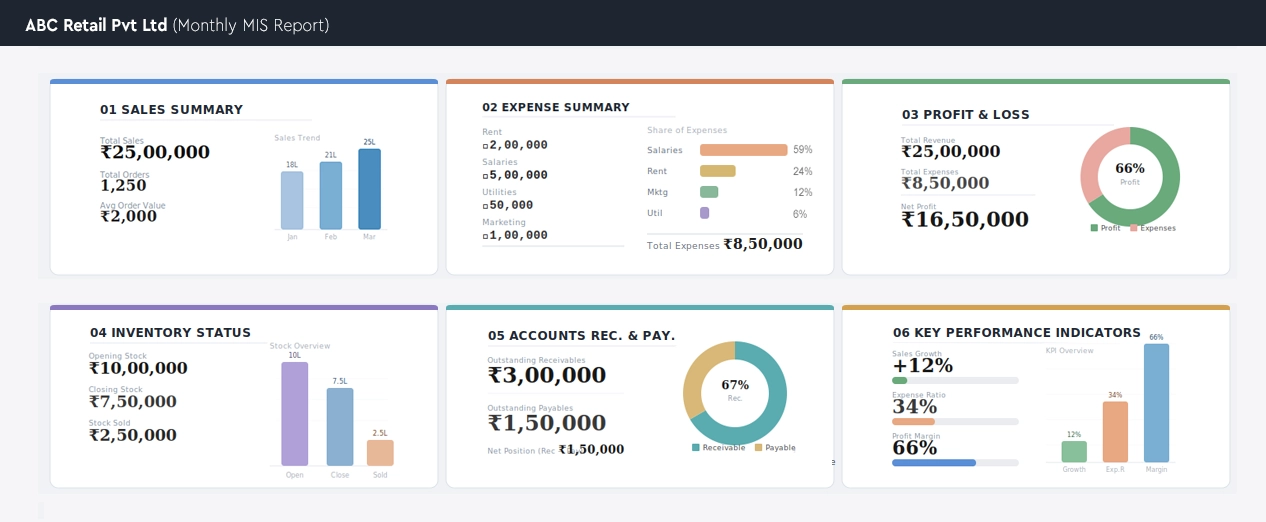
Creating a Management Information System (MIS) report involves following six simple steps that ensures accurate, actionable insights for data-driven decision-making. Whether you're using an automated MIS reporting system or preparing reports manually, these steps can be customized to meet your business needs.
Start by clearly identifying the purpose of the MIS report. Narrowing the focus ensures the report provides relevant insights for effective business decisions.
Gather accurate and complete data from relevant sources across your organization. Quality data is the foundation of a reliable MIS report.
Clean and standardize the collected data. Transform raw figures into meaningful information to prepare it for analysis and reporting.
Interpret the processed data to extract key insights and trends. This step turns raw information into actionable intelligence for decision-makers.
Present the data and insights in a clear, visually appealing format using charts, graphs, and structured layouts to enhance readability.
Use the completed MIS report to review performance, assess organizational status, and make informed, strategic decisions that drive business growth.
The primary purpose of an MIS report is to convert raw data into actionable insights for better decision-making. For example, if 60% of revenue comes from electronics, businesses can focus marketing & inventory on those high-demand products. MIS reports help improve performance, & planning across all departments.
Predictive MIS reports help businesses anticipate trends and act proactively. For example, a rise in sunscreen sales signals seasonal demand, enabling better inventory planning and cost control. They also support cash flow forecasting, smarter resource allocation, and improved profitability.
MIS reports ensure timely and accurate communication across all management levels. They provide insights into sales, employee performance, and credit status, helping each department stay informed. This enables faster, data-driven decisions that improve efficiency and support business growth.
What Our Customers Say About Auto MIS Report Generation
MIS Reports addresses diverse needs of businesses and stakeholders, providing actionable insights across various operations. Here are some common types of MIS reports that organizations rely on for informed decision-making:
Track sales performance with or without gross margins
Analyze items based on profitability and popularity combinations
Balance Sheet, Profit & Loss, Cash Flow, & Fund Flow Statements
Identify expired, non-moving, or slow-moving inventory
Monitor order intake, sales, and collection performance
Highlight issues such as negative balances or outstanding payments
Assess financial and operational timelines
Evaluate financial health and efficiency
Maintain compliance and track transactional history
Predict future demand, sales trends, & requirements
By using these MIS report examples, businesses can streamline operations, monitor performance, and make data-driven decisions. From sales and inventory to finance and audits, Management Information System reports provide comprehensive insights that drive efficiency and growth.
An MIS Report, or Management Information System report, is an important tool that gives businesses a complete overview of organizational performance. MIS reports provide detailed insights into key areas such as sales, revenue, market trends, and operational challenges. By using MIS reports, companies can make data-driven decisions, optimize strategies, and improve overall efficiency.
Creating MIS reports with advanced MIS reporting software, businesses can automate report generation, gain real-time insights, and speed up the decision-making process. Implementing an effective Management Information System report empowers your organization to analyze performance, identify opportunities, and drive growth.
These reports offer clear insights into a company's operations, performance metrics, and management activities.
By using MIS reports for decision-making, businesses can track performance, implement effective processes, enhance operational efficiency, and achieve organizational excellence.
With actionable insights, MIS reports help companies analyze past performance, forecast future needs, and drive strategic growth.
MIS reports offer a comprehensive view of your company's operations from orders and revenue to customer inquiries and employee performance. By comparing actual results against planned targets over a specific period, these reports help identify what's working and highlight areas for improvement. With actionable MIS reports & insights, businesses can adopt best practices, enhance performance, evaluate past product success, and forecast future needs for growth and demand.
Data is gathered from all departments — sales, finance, inventory, HR — into a single unified system.
Raw data is processed, cleaned, and analyzed against planned targets to identify trends and gaps.
Results are presented in structured charts, dashboards, and tables for easy comprehension.
Reports are auto-delivered to decision-makers enabling faster, informed strategic actions.
There are six important components of an effective Management Information System (MIS). Let us understand what is the role of components in the MIS reporting system.
From managers making strategic decisions to IT professionals managing systems, people play a crucial role in analyzing data and converting it into meaningful, actionable insights that drive business growth.
All physical components, including servers, computers, printers, and networking devices, that support the smooth collection, processing, storage, and distribution of data into useful information.
An all-in-one software including database management systems (DBMS), billing/POS software, accounting tools, ERP, & CRM solutions, that operate to efficiently process & convert data into actionable information.
Data is the most valuable asset in an MIS. It is collected from various sources and transformed into clear, meaningful insights that support decision-making, drive growth, and enable innovation.
Standardized rules, policies, and workflows that ensure all MIS processes are accurate, consistent, and compliant, helping reduce errors, save time, and improve overall efficiency.
Modern MIS relies on seamless communication. Cloud or LAN/WAN networks connect teams and departments, enabling centralized access to critical insights anytime, anywhere.
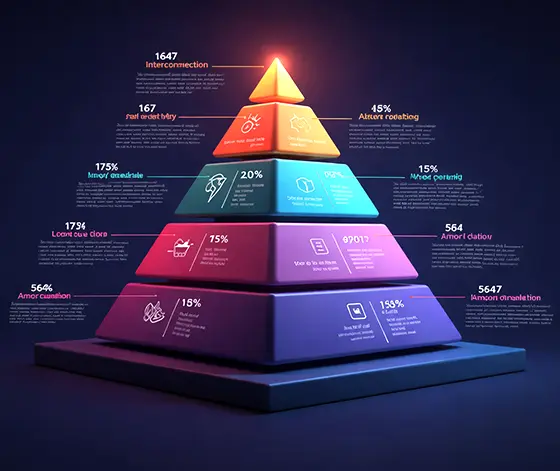
The pyramid above illustrates the three levels of management, their structure, the corresponding information systems, and the types of decisions made at each level. The nature of MIS at each level is influenced by factors such as the stakeholders involved, the frequency of communication within and across levels, the turnaround time required for responses, and the degree of technological dependency.
Every MIS report has its own purpose. According to factors like source data, expected outcome, target audience MIS reports can be categorized into the following types:
High-level business performance dashboard in ERP providing real-time insights across departments, divisions, and operations for strategic decision-making
Detailed cash flow report in ERP tracking cash inflow, outflow, receivables, payables, and liquidity management
Advanced profitability analysis report comparing actual vs target profit, revenue growth, and financial performance metrics
Comprehensive ERP accounting report covering assets, liabilities, income, and expenditure for financial reporting and compliance
Detailed balance sheet reports in ERP showing financial position, assets, and liabilities
Advanced financial analysis reports and business analytics dashboards for tracking profitability and performance insights
Powerful trend analysis and business analytics report using historical and real-time data for forecasting and decision-making
Complete sales register reports in ERP for transaction tracking, revenue management, and audit reporting
In-depth sales performance analysis reports, product trends, and revenue insights
Real-time order management reports and order tracking analytics for efficient fulfillment
Detailed scheme and promotion reports analyzing discounts, offers, and marketing campaign performance
Comprehensive sales performance report in ERP tracking revenue, region-wise sales, and customer insights
Comprehensive purchase and procurement reports in ERP for vendor analysis, cost control, and supply chain management
Real-time inventory management reports, stock tracking, and warehouse analytics
Advanced inventory analytics report tracking fast/slow-moving items, stock levels, and supply chain performance
Detailed production and manufacturing reports tracking output, efficiency, and resource utilization
Complete payroll management reports, salary processing, and HR analytics dashboards
Advanced customer relationship management reports providing customer insights, engagement tracking, and sales conversion analytics
Exception and variance analysis report highlighting deviations, risks, anomalies, and performance gaps
Secure user access control reports, system logs, and user activity tracking for ERP security and compliance management
Tracks planned vs actual expenses and revenues, helping control costs and improve financial planning.
MIS reports for various management levels provide role-based business insights, real-time reporting, and data-driven analytics tailored to different decision-makers within an organization. From top management dashboards to operational-level reports, MIS reporting ensures every level of management has access to the right data at the right time for faster and smarter decisions.
PurposeTrack revenue growth, measure marketing ROI, and optimize sales strategies
KeySales performance reports, lead conversion reports, campaign analysis, customer insights
Purpose Improve production efficiency, reduce wastage, and ensure timely manufacturing
KeyProduction planning reports, output efficiency reports, raw material consumption, quality control reports
Purpose Monitor financial health, control costs, and ensure compliance
KeyProfit & Loss statements, cash flow reports, balance sheets, expense tracking
Purpose Optimize inventory levels, avoid stockouts, and streamline supply chain operations
KeyStock reports, reorder levels, warehouse management, vendor analysis
Purpose Improve workforce efficiency, manage resources, and enhance operational performance
KeyEmployee performance reports, attendance, payroll, productivity analysis
MIS reports for various management levels provide role-based business insights, real-time reporting, and data-driven analytics tailored to different decision-makers within an organization. From top management dashboards to operational-level reports, MIS reporting ensures every level of management has access to the right data at the right time for faster and smarter decisions.
Preparing an MIS report in Excel is one of the most effective ways to track business performance, sales data, inventory, and financial reports. Using Microsoft Excel for MIS reporting allows businesses to create custom dashboards, automate calculations, and generate real-time business insights for better decision-making.
Step-by-Step Process to Prepare MIS Report in Excel
LOGIC ERP makes generating MIS reports simple, accurate, and efficient. Businesses rely on LOGIC ERP for Management Information System reporting because it combines automation, flexibility, and actionable insights:
Generate real-time MIS reports instantly, eliminating manual work and minimizing errors.
Get detailed sales, inventory, & financial reports in an organized, easy-to-read format to support faster decision-making.
Almost all types of MIS reports can be exported in multiple formats and easily shared with teams or stakeholders.
LOGIC ERP reports are accessible from browsers, desktops, and mobile devices, perfect for remote teams.
Set up daily, weekly, or monthly reports to be automatically emailed to management at specific times.
Ensure data accuracy and consistency while scaling effortlessly as your business grows.
Create complex Management Information System reports with just a few clicks, no technical expertise required.
Integrate with e-commerce platforms, POS systems, & third-party tools to provide unified, real-time MIS insights.
Generating MIS reports in LOGIC ERP enables businesses to access real-time business insights across sales, inventory, and finance, while leveraging automated reporting and advanced analytics dashboards for complete visibility. These Management Information System (MIS) reports help analyze overall business performance through real-time dashboards and intelligent reporting tools, empowering organizations to make faster, data-driven decisions and maintain better operational control. Let’s explore how to generate all types of MIS reports and export it from LOGIC ERP in an easy way.
Start by logging into your LOGIC ERP software dashboard, the central hub for accessing ERP reporting tools, MIS analytics, and business data management.
Choose from multiple ERP MIS report types based on your business needs:
Click on Generate Report to instantly view real-time MIS dashboards in LOGIC ERP with:
Export your LOGIC ERP MIS reports in multiple formats:
Go to the Reports or MIS Reports section in LOGIC ERP to access pre-configured MIS reports, real-time dashboards, and business analytics tools.
Use advanced filters to generate custom MIS reports in LOGIC ERP:
Review your MIS analytics dashboard to understand:
Schedule Reports
Stay Updated with Retail Management Software and Retail POS System
MIS report (Management Information System report) is a powerful business reporting tool that helps organizations analyze data, improve decision-making, track performance, and enhance operational efficiency with real-time insights and actionable reports.
MIS (Management Information System) in accounting, marketing, and business is a data-driven system that helps organizations streamline financial reporting, analyze marketing performance, improve decision-making, and enhance overall business efficiency in 2026.
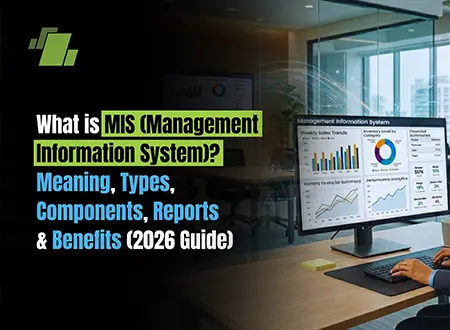
MIS (Management Information System) is a business intelligence system that collects, processes, & analyzes data to generate reports, support decision-making, & drive strategic growth with key components, types, and benefits in 2026.
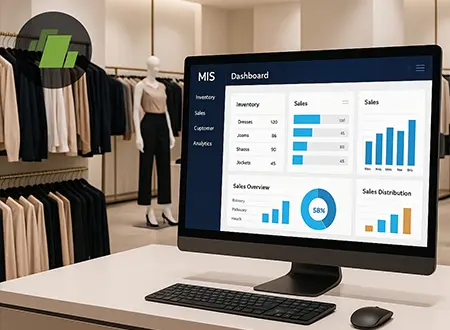
LOGIC ERP MIS software plays an important role in apparel retail management by providing real-time sales reports, inventory insights, & business analytics to improve decision-making, streamline operations, & boost profitability.
Explore real-time reporting, automated MIS dashboards, and complete ERP software capabilities with LOGIC ERP.
Everything you need to know about LOGIC ERP retail management software
Yes, AI-powered ERP for retail industry enables predictive analytics, personalized customer experiences, and automated demand forecasting. AI retail software helps retailers make smarter decisions, improve sales forecasting, and streamline supply chain management for long-term growth. Get more details on LOGIC ERP 2.0 | The Next-Generation AI-Powered ERP Solution to explore the latest updates.
MIS (Management Information System) is a structured system that transforms raw MIS data into meaningful insights for better business decisions.
The full form of MIS is Management Information System, used across industries for reporting and analysis.
MIS in banking refers to a system used to track transactions, loans, deposits, and branch performance. It helps banks analyze financial data, manage risk, and ensure regulatory compliance
To make MIS report, collect business data (sales, finance, inventory), organize it into structured format, analyze using Excel or MIS software, and present insights through charts or MIS dashboard. Focus on KPIs, trends, and comparisons for decision-making.
Prepare MIS report by defining objectives, gathering accurate data, structuring format, analyzing key metrics, and adding actionable insights. A well-prepared MIS report helps track performance and supports strategic decisions.
MIS full form in banking is Management Information System. A Management Information System (MIS) in banking is a system used by banks to collect, process, and analyze data related to transactions, customers, loans, and operations. It helps bank management make informed decisions based on accurate and timely information.
MIS (Management Information System) is a system that collects, processes, and analyzes data to generate meaningful information. It helps businesses monitor performance, improve efficiency, and make data-driven decisions using MIS reports and MIS dashboards
MIS stands for Management Information System, a core business system used for reporting, analytics, and decision-making across departments.
Information in MIS refers to processed data that is meaningful, structured, and useful for decision-making.
Stepwise Explanation:
An Information System in MIS is a framework that collects, processes, stores, and distributes data.
Steps Involved:
A Decision Support System (DSS) is an important component of a Management Information System (MIS) that helps managers and business leaders make informed, data-driven decisions. By analyzing large volumes of organizational data, a DSS provides actionable insights, simulations, and predictive models to support strategic, tactical, and operational decisions.
MIS Scheme in Post Office is a government savings plan that provides fixed monthly income.
How It Works:
DSS is a subsystem of MIS that uses data analytics and models to assist managers in decision-making.
MIS full form in accounting is Management Information System.
A Management Information System (MIS) in accounting refers to a structured system that collects, processes, and analyzes financial data to help businesses make informed decisions. It transforms raw accounting data into meaningful reports for management.
MIS report in accounting provides financial insights like profit, loss, and expenses.
Steps to Create:
MIS in marketing refers to a Marketing Information System, which collects, analyzes, and distributes market data to help businesses make better marketing decisions. It includes customer data, competitor analysis, and sales trends.
Yes, MIS (Monthly Income Scheme) interest is taxable under “Income from Other Sources.” It is added to your total income and taxed as per your applicable income tax slab.
There is no single formula to create an MIS report, but it is built using a combination of key Excel formulas and functions. The most commonly used formulas include:
These formulas help convert raw data into meaningful insights, which form the core of any MIS report. Advanced MIS reports also use Pivot Tables, dashboards, and charts for better visualization and analysis.
MIS in Microsoft Excel (Management Information System) refers to the process of using Excel to collect, organize, analyze, and present business data in the form of reports.
It allows businesses to:
Excel acts as a powerful tool to create MIS reports because of its flexibility, formulas, and data visualization features.
You can generate MIS reports quickly by following these simple steps:
Key characteristics of MIS include:
The main components of MIS are:
ERP (Enterprise Resource Planning) is a system that integrates all business processes like finance, HR, inventory, and sales into one platform, making MIS more efficient and centralized.
MIS is a system that collects, processes, and provides data to managers for decision-making, planning, and controlling business operations.
MIS stands for Management Information System, meaning a structured system used to manage business information and support decision-making.
MIS in accounting refers to financial reports such as profit & loss, cash flow, and budgets used for monitoring financial performance and decision-making.
An MIS portal is a centralized online platform where users can access reports, dashboards, and business data in real time.
MIS order refers to intraday trading in stock markets where positions are squared off on the same day.
MIS planning involves designing systems and processes to collect and use information effectively for business decisions.
MIS Report stands for Management Information System Report.
MIS in management is a tool used by managers to monitor performance, track KPIs, and make strategic decisions.
LOGIC ERP helps you generate accurate, real-time MIS reports without manual effort, improving decision-making and efficiency.
With LOGIC ERP, creating MIS reports is quick and automated:
Businesses prepare MIS reports to gain insights and make informed decisions based on accurate data.
Key reasons include:
MIS reports act as a powerful tool to ensure transparency, accountability, and business growth.
Businesses prepare MIS reports to gain insights and make informed decisions based on accurate data.
Key reasons include:
MIS reports act as a powerful tool to ensure transparency, accountability, and business growth.
MIS in the stock market means Margin Intraday Square-off, allowing traders to trade with leverage for intraday positions.
The system approach views MIS as an integrated system where all components work together:
Input → Process → Output → Feedback
MIS is used by:
MIS means a system that transforms data into useful information for decision-making.
An MIS dashboard is a visual representation of business data using charts, KPIs, and graphs.
An MIS report is a structured report that provides insights into business performance using data analysis.
MIS works through:
MIS involves collecting, analyzing, and reporting business data regularly to support decisions.
An MIS report in Excel (Management Information System report) is a structured report created using Microsoft Excel to analyze, track, and present business data such as sales, expenses, inventory, and performance metrics.
It helps businesses convert raw data into meaningful insights for better decision-making.
Key Features of MIS Reports in Excel
MIS data entry refers to the process of entering, updating, and maintaining data in a system or spreadsheet (like Excel) to generate accurate MIS reports.
An MIS report in Excel is a powerful tool for analyzing business performance, while MIS data entry ensures the data used in these reports is accurate and up to date.
Role of MIS Data Entry
CRM (Customer Relationship Management) helps manage customer data and interactions within MIS.
A data warehouse stores large volumes of historical data used for analysis and reporting.
Financial MIS focuses on financial data like revenue, expenses, and profitability for decision-making.
Intraday MIS refers to trading positions that must be closed within the same trading day.
MIS is a system that collects data, processes it into information, and helps managers make decisions efficiently.
MIS is a decision-support system with types like operational, tactical, and strategic MIS.
MIS is a combination of people, technology, and processes that convert data into meaningful information for business decisions.
MIS in banking tracks transactions, customer data, loans, and financial performance.
MIS helps businesses manage operations, analyze performance, and improve decision-making.
In companies, MIS is used to monitor departments, generate reports, and improve efficiency.
MIS in education manages student data, attendance, performance, and administration.
MIS planning involves designing systems to ensure accurate and timely information flow.
MIS software includes tools like Excel, ERP systems, and BI tools used for reporting and analysis.
MIS work involves data analysis, report creation, dashboard development, and decision support.
A monthly MIS report summarizes business performance for a month, including sales, expenses, and KPIs.
Sales MIS tracks sales performance, targets, revenue, and customer trends.
The main purpose of MIS is to provide accurate information for better decision-making and business efficiency.
There are mainly 5 types:
MIS provides real-time insights, trends, and forecasts that help managers make informed decisions.
MIS interest = Investment Amount × Interest Rate ÷ 12 (for monthly income)
Yes, MIS interest (such as from post office schemes) is taxable under “Income from Other Sources” as per income tax laws.
An MIS report is a structured document that presents analyzed business data such as sales, finance, and operations to help management track performance and make informed decisions.
In business, MIS refers to a system that helps organizations manage data, generate reports, and improve strategic and operational decisions.
MIS stands for Management Information System, a framework used to organize and analyze business data.
AI in MIS uses artificial intelligence to automate data analysis, forecasting, and reporting.
Artificial Intelligence in MIS refers to using machine learning and automation tools to improve decision-making and data processing.
A database in MIS is a structured storage system that holds business data for analysis and reporting.
Decision-making in MIS involves using data and reports to choose the best course of action.
An enterprise system integrates all business functions into a single platform.
MIS report stands for Management Information System report. It is a structured report that analyzes business data like sales, finance, and operations to support decision-making.
The MIS full form in sales is Management Information System. It tracks sales performance, targets, revenue, and customer data for better planning.
MIS preparation is the process of collecting, organizing, analyzing, and presenting business data in report format for management insights.
MIS Excel full form is Management Information System in Microsoft Excel, used to create reports using formulas, pivot tables, and dashboards.
MIS preparation means compiling and analyzing data to generate reports that help in business monitoring and strategic decisions.
In accounting, MIS refers to a system that generates financial reports like profit and loss, balance sheets, and expense analysis.
Excel MIS full form is Management Information System created using Excel for tracking and analyzing business data.
A monthly MIS report format in Excel includes sales summary, expense details, profit and loss, KPIs, and charts for performance analysis.
MIS in finance is used to monitor financial performance, cash flow, budgeting, and forecasting for better financial control.
MIS expansion stands for Management Information System, used across industries for data management and reporting.
An HR MIS report tracks employee data such as attendance, payroll, recruitment, and performance.
The MIS full form in finance is Management Information System, used for financial reporting and analysis.
In marketing, MIS stands for Management Information System, used to track campaigns, leads, and customer insights.
MIS portal full form is Management Information System portal, a platform used to access reports and business data online.
In banking, MIS refers to systems that generate reports on transactions, loans, risk, and compliance.
MIS data analytics involves analyzing business data through MIS reports to identify trends and improve decision-making.
In corporate terms, MIS is a system used to manage and analyze organizational data for strategic decisions.
The MIS full form in business is Management Information System, used to track operations, finance, and performance.
In medical terms, MIS can mean Management Information System for hospital data, or Minimally Invasive Surgery depending on context.
MIS and data analytics work together to collect, process, and analyze data for insights and business intelligence.
An MIS profile refers to a job role responsible for managing data, preparing reports, and analyzing business performance using tools like Excel or ERP systems.
An ERP system in MIS collects data from all departments and provides it for reporting.
An expert system uses AI to simulate human expertise and provide recommendations.
A knowledge management system stores and shares knowledge within an organization.
An MIS report (Management Information System report) is a structured document that converts raw business data into meaningful insights to help management monitor performance, control operations, and make informed decisions. It typically includes data from areas like:
MIS is a data-driven system with characteristics like accuracy, timeliness, relevance, and integration.
MIS is important for improving efficiency, decision-making, and business growth.
MIS applications include reporting, forecasting, inventory management, and analytics.
MIS in ERP refers to reporting and analytics generated from ERP systems.
The MIS interest rate is the rate of return offered in MIS schemes like post office monthly income plans.
An MIS format (Management Information System format) refers to the structured layout used to present business data in a clear, organized, and easy-to-analyze manner. It defines how information is arranged in reports, including headings, columns, metrics, and summaries.
A standard MIS format typically includes:
The main purpose of an MIS format is to ensure consistency, accuracy, and easy interpretation of data for better decision-making.
An MIS report in HR (Human Resources) is a report that tracks and analyzes employee-related data to help organizations manage their workforce effectively.
It includes important HR metrics such as:
HR MIS reports help management to:
MIS report in finance is a structured financial report that tracks income, expenses, and profitability to help businesses make informed financial decisions.
Key components:
Purpose:
MIS report in banking is used to analyze financial transactions, customer data, and operational performance for better risk management and decision-making.
MIS report in construction helps track project costs, timelines, and resources to ensure efficient project management and cost control. It helps to track project performance, costs, timelines, and resource utilization.
Key metrics:
Benefits:
Popular Products