Create eway bill with LOGIC ERP software developed for GST-registered businesses. Real-time integration with the GSTN eway bill portal simplifies the transportation compliance, allowing you to generate GST eway bill just as easily as regular invoices.
An e-Way Bill (Electronic Way Bill) is a digital document required under India’s Goods and Services Tax (GST) system for the transportation of goods valued above ₹50,000. It is generated on the GST e-Way bill portal before goods are moved from one location to another, whether within a state or across states. The e-Way bill contains essential details such as the GSTIN of the supplier and recipient, invoice information, description and value of goods, and transporter or vehicle details. Once generated, the system issues a unique e-Way Bill Number (EBN) that allows suppliers, transporters, recipients, and authorities to track the movement of goods and ensure compliance with GST regulations.
The primary purpose of the e-Way bill system is to create transparency in goods transportation, reduce tax evasion, and streamline logistics documentation for businesses operating under GST. Many businesses now use ERP solutions like LOGIC ERP to automatically generate e-Way bills during invoice creation, making the process faster, more accurate, and fully compliant with GST rules.
The e-Way Bill format under GST is structured into two main sections: Part A and Part B, which together capture all the essential details required for the transportation of goods.
Formats of e-way Bill
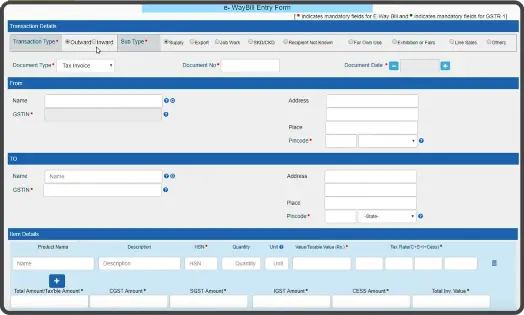
Part A – Transaction Details
Part A of the eway bill contains important business and invoice details related to the movement of goods. This section of part A in the format of an eway bill is usually filled by the supplier, recipient, or the registered transporter responsible for initiating the shipment. These details help authorities verify the legitimacy of the transaction and the goods being transported.
It includes information such as:
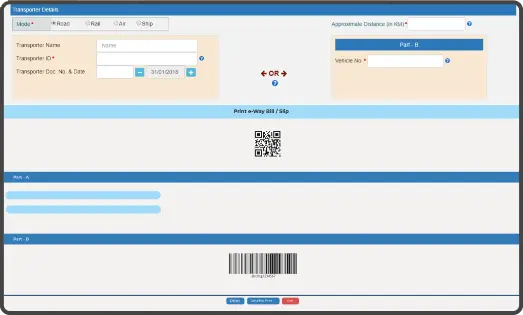
Part B – Transportation Details
Part B of the eway bill focuses on the transportation information required to move the goods from the supplier to the recipient. This section of part B in the format of an eway bill is typically filled once the vehicle or transporter details are finalized. Updating Part B is mandatory before the physical movement of goods begins, as it allows authorities to track the shipment during transit and ensure compliance with GST transportation rules.
It includes details such as:
A GST e-Way Bill Number (EBN) can be generated through multiple methods, including the GST e-Way bill portal or via SMS. While the format may vary depending on the method of generation, certain mandatory details are always included, such as the e-Way Bill Number, date, and time of generation.
Some formats may also include additional information like:
Supplier details
Buyer/recipient details
Transporter information
Goods description & value
Before generating a GST e-Way bill, businesses must keep a few important documents ready. These documents provide the necessary information about the goods, transaction, and transportation details, ensuring that the shipment complies with GST regulations and can be verified during transit.
Having these documents ready helps businesses generate e-Way bills quickly, avoid errors, and ensure smooth transportation of goods without GST compliance issues.
Here are the key documents required:
Invoice, Bill of Supply, or Delivery Challan
A valid document related to the goods being transported, containing details such as invoice number,value of goods, and description of items.
Vehicle Number or Transporter ID (for Road Transport)
If the goods are transported by road, the vehicle number or transporter ID must be provided in the e-Way bill.
Transport Document Number and Date (for Rail, Air, or Ship)
When goods are transported through railways, air cargo, or ship, the transport document number and date issued by the transporter are required.
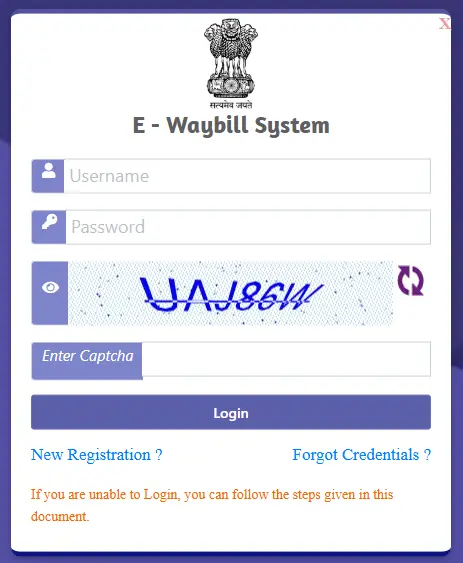
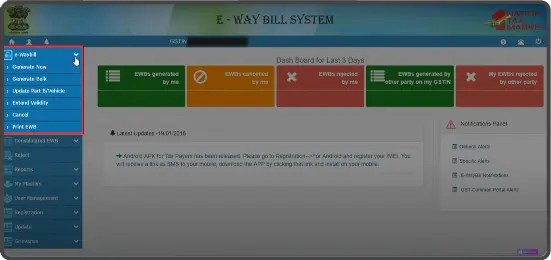
Generating an e-Way Bill on the GST e-Way bill portal is simple and ensures GST compliance for transporting goods valued above ₹50,000. Follow these steps:
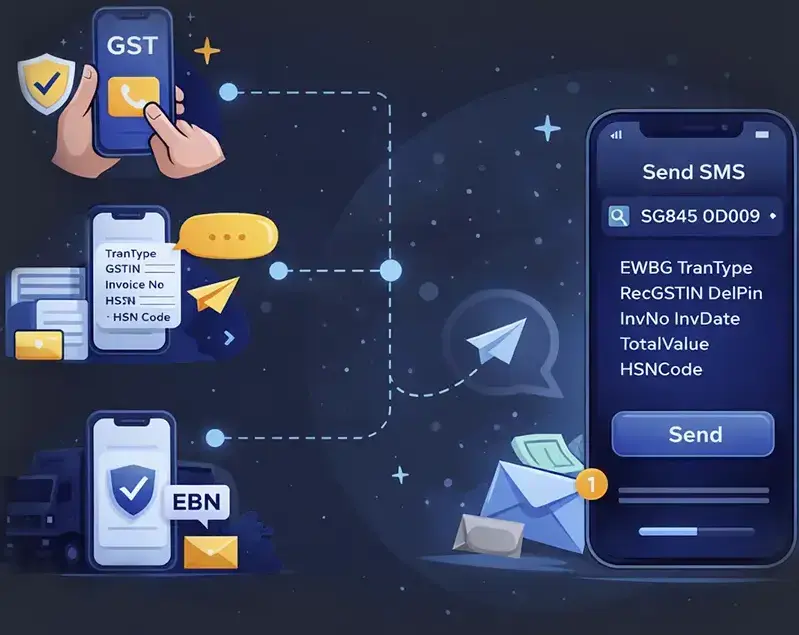
Generating an e-Way Bill via SMS is a convenient option when you don’t have internet access or a computer. The generation of an GST eWay bill includes these steps:
Register Your Mobile Number
Register your mobile number with the GST e-Way bill portal. Only the registered number linked to your GSTIN can be used to generate e-Way bills via SMS.
Send the SMS with Required Details
Compose an SMS in the format specified by the GST e-Way bill portal, including transaction type, invoice number, goods value, GSTIN, and transporter ID, and send it to the designated e-Way bill number77382 99899.
Receive the e-Way Bill Number (EBN)
Once the SMS is processed, the e-Way Bill Number (EBN) will be sent back to your registered mobile number along with transporter and shipment details.
LOGIC ERP makes e-Way Bill generation effortless, accurate, and fully compliant, helping businesses streamline dispatch and transportation operations. With LOGIC ERP, generating an GST eWay bill number is simple, fast, and fully GST-compliant. Here’s how it works:
Connect LOGIC ERP with GST Portal
Register your GST number on the GST eWay bill portal and map it with LOGIC ERP using the provided username and password.
Automated e-Way Bill Generation
Every time you create a sales invoice or sales return in LOGIC ERP with dispatch details, the system automatically generates the e-Way Bill in the official GST format.
Instant Access for All Parties
The consignor, consignee, and transporter can instantly view and print the e-Way Bill, including the unique e-Way Bill Number (EBN) and QR code.
No Manual Entry Required
LOGIC ERP eliminates manual portal login and repetitive data entry, reducing errors and saving time for your logistics and accounting teams.
Struggling to Generate e-Way Bills on the GST Portal?
LOGIC ERP ensures seamless GST compliance with auto e-Way Bills.
Automated e-Way Bill Generation with LOGIC ERP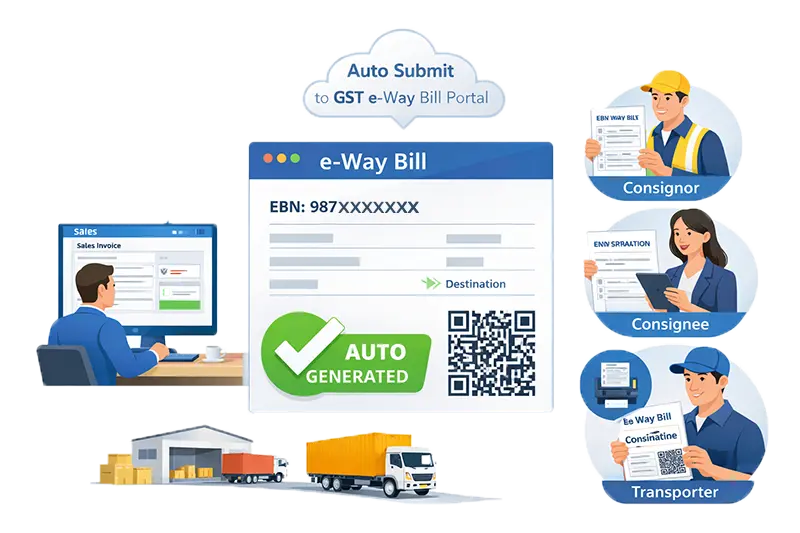
With LOGIC ERP, generating an e-Way Bill is completely automated. Every sale or sales return invoice created with dispatch details is instantly posted to the GST e-Way bill portal without manual intervention. This means the consignor, consignee, and transporter can access and print the e-Way Bill immediately, complete with the unique e-Way Bill Number (EBN) and QR code.
By automating this process, LOGIC ERP saves time, reduces errors, and ensures full GST compliance, making goods movement faster, smoother, and hassle-free for businesses of all sizes.
LOGIC ERP simplifies e-Way Bill generation and ensures full GST compliance with powerful features designed for businesses of all sizes.
Generate e-Way Bills instantly while creating invoices, no manual entry required.
Seamlessly post all invoice and dispatch data directly to the GST e-Way bill portal for instant validation.
Handle high-volume shipments effortlessly by generating multiple e-Way Bills in one go
Monitor your consignments with real-time transporter details to ensure smooth deliveries.
Stay GST-compliant with automated reports and logs for audits, inspections, and internal tracking.
Generate e-Way Bills across multiple branches & warehouses from a single platform with LOGIC ERP.
A simple 4-step process ensures your goods are shipped smoothly and legally:
Generate a sales invoice or sales return with dispatch details in LOGIC ERP.
Invoice details are automatically sent to the GST e-Way bill portal using real-time integration.
The system generates a unique e-Way Bill Number (EBN) and QR code, ready for use.
The consignor, consignee, and transporter can instantly print the e-Way Bill and dispatch the goods, ensuring compliance and smooth logistics.
With powerful ERP automation and seamless integration with the GST portal, LOGIC ERP helps businesses streamline operations, manage logistics, and simplify goods transportation.
Retail
Industry
Distribution
Businesses
Manufacturing
Industry

Retail businesses use LOGIC ERP to manage billing, inventory, and GST compliance while generating e-Way bills quickly for product transfers between stores, warehouses, and suppliers. It is widely used by retail businesses such as:
Distributors rely on LOGIC ERP to manage high-volume shipments, supplier networks, and logistics operations while generating e-Way bills efficiently. It is commonly used by distribution businesses including:

Manufacturers use LOGIC ERP to manage production, inventory, dispatch, and transportation while ensuring automated e-Way bill generation for goods movement. It supports manufacturing sectors such as:
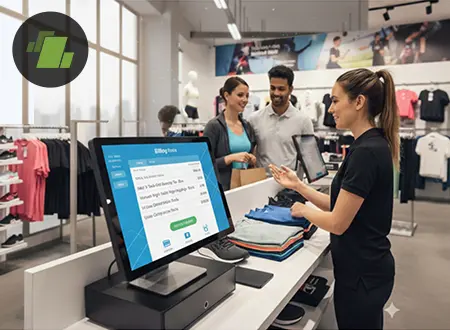
Retail businesses use LOGIC ERP to manage billing, inventory, and GST compliance while generating e-Way bills quickly for product transfers between stores, warehouses, and suppliers. It is widely used by retail businesses such as:
Distributors rely on LOGIC ERP to manage high-volume shipments, supplier networks, and logistics operations while generating e-Way bills efficiently. It is commonly used by distribution businesses including:
Manufacturers use LOGIC ERP to manage production, inventory, dispatch, and transportation while ensuring automated e-Way bill generation for goods movement. It supports manufacturing sectors such as:
Explore what an e-way bill is, its full form, generation, modification and process to generate e-way bills. Discover how LOGIC ERP e-way bill generation software simplifies GST-compliant e-way bill generation using APIs without accessing the portal.
Explore how to create an e-way bill for job work return in India with step-by-step process, GST rules, documentation, and portal guidelines. Understand job work e-way bill requirements, validity, and compliance for smooth goods movement with LOGIC ERP today!
Explore how multi-location businesses can simplify e-way bill management with automation, centralized systems, and GST-compliant processes. Streamline generation, tracking, and compliance across warehouses and branches efficiently with LOGIC ERP today!
As per Rule 138 of the CGST Rules, 2017, an e-Way Bill must be generated for the transportation of goods valued above ₹50,000.
The e-Way Bill must be generated before the movement of goods begins.
If the supplier is GST registered, they are responsible for generating the e-Way Bill.
If the supplier is not registered under GST, the registered recipient must generate the e-Way Bill.
If neither the supplier nor the recipient generates the bill, the transporter must generate the e-Way Bill using their Transporter ID.
The validity of an e-Way Bill depends on the distance the goods need to travel.
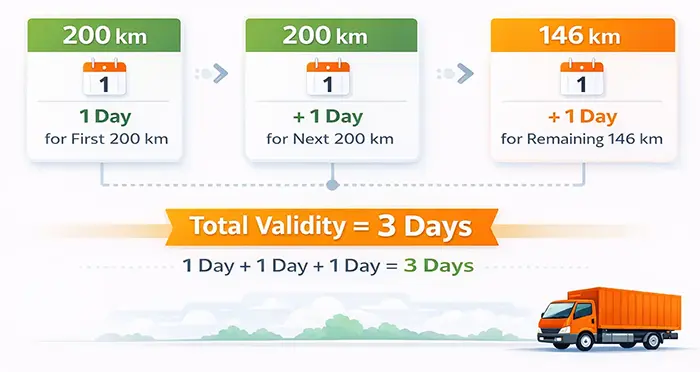
Generally, one day of validity is allowed for every 200 kilometers of transportation.
The e-Way Bill must be extended before its validity expires if the goods cannot reach the destination on time.
The person in charge of the goods must carry the invoice, delivery challan, and e-Way Bill number (EBN) during transportation.
Transporting goods without a valid e-Way Bill can lead to a penalty of ₹10,000 or the tax amount involved, whichever is higher.
The validity of a GST e-Way bill depends on the distance the goods need to be transported. It is calculated as follows:
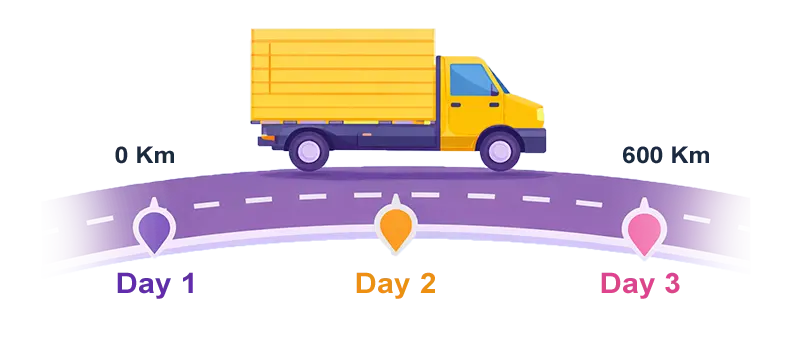
Up to 200 km
200 – 400 km
400 – 600 km
e-Way Bill Validity Calculation Example
If goods are transported 546 km
As per GST rules, the responsibility to generate an e-Way Bill depends on the parties involved in the transportation of goods. The e-Way bill must be generated before the movement of goods valued above ₹50,000 to ensure proper documentation and compliance with GST regulations.
If the supplier or recipient is registered under GST, the registered party must generate the e-Way Bill before the transportation of goods. The supplier generates it with the recipient’s details, while the recipient can generate it with the supplier’s details if they arrange the transport.
When the transaction involves a GST unregistered person and a GST registered person, the registered party is responsible for generating the e-Way Bill to ensure the movement of goods complies with GST regulations.
A transporter moving goods by road, rail, air, or ship must ensure that an e-Way Bill is generated before transportation. If neither the supplier nor the recipient generates it, the transporter can generate the e-Way bill using their Transporter ID on the GST portal.
This comparison highlights how LOGIC ERP simplifies e-Way bill generation by automating the process, reducing manual work, and improving GST compliance efficiency for businesses.
| Feature | LOGIC ERP e-Way Bill Solution Recommended | Manual e-Way Bill Generation |
|---|---|---|
| e-Way Bill Creation | Automatically generated during invoice creation | Requires manual entry on the GST portal |
| GST Portal Integration | Direct real-time integration with the GST portal | Users must log in and enter details manually |
| Data Entry | Invoice and shipment details are auto-filled | All details must be entered manually |
| Bulk e-Way Bill Generation | Easily generate multiple e-Way bills for many invoices | Requires separate entry or JSON upload |
| Accuracy | Reduces errors through automated data capture | Higher chances of human errors |
| Time Required | Instant generation during billing | Time-consuming for each shipment |
| Tracking & Management | Centralized dashboard to manage and track all e-Way bills | Limited tracking through the portal |
| Operational Efficiency | Fully integrated with billing, inventory, and logistics | No integration with business systems |
| Best For | Businesses handling frequent shipments | Businesses with occasional shipments |
LOGIC ERP makes GST compliance easier by allowing businesses to automatically generate e-Way bills directly from invoices through seamless integration with the GST e-Way bill portal. Instead of manually entering shipment details on the portal, LOGIC ERP captures key information such as supplier and recipient GSTIN, invoice details, goods value, and transporter information, and instantly generates the e-Way bill with a unique e-Way Bill Number (EBN).
Automatically generate e-Way bills directly while creating invoices, eliminating manual entry.
Minimize mistakes by capturing invoice and shipment details automatically.
Speed up the e-Way bill generation process and focus more on business operations.
Generate e-Way bills instantly to avoid delays in shipment and logistics.
Stay compliant with GST regulations through accurate and automated documentation.
Seamlessly connect with the GST e-Way bill portal for quick and reliable bill creation.
Generate multiple e-Way bills at once for high-volume transactions.
Monitor, manage, and track all e-Way bills conveniently from one platform.
Perfect for retailers, distributors, manufacturers, and wholesalers managing goods transportation.
Ready to Integrate Shopify with LOGIC ERP?
Automate your eCommerce operations and scale faster with a powerful ERP-backed Shopify integration.
Contact UsMost Common Questions Asked by Our Clients
An e-Way Bill (Electronic Way Bill) is a digital document required under the GST system in India for transporting goods valued above ₹50,000. It is generated on the GST e-Way bill portal and contains important details such as the supplier and recipient GSTIN, invoice information, description and value of goods, and transporter details. Once generated, the system provides a unique e-Way Bill Number (EBN) that allows authorities and businesses to track the movement of goods and ensure compliance with GST regulations.
To generate an e-Way Bill, a registered user must log in to the GST e-Way bill portal and enter the required shipment details. The process involves selecting “Generate New”, filling in Part A details such as supplier, recipient, invoice information, and goods value, followed by Part B details including transporter information and vehicle number. After submitting the form, the system generates a unique e-Way Bill Number (EBN) along with a QR code that can be used during transportation.
Yes, an e-Way Bill can be generated without entering the vehicle number initially. This is possible because the e-Way bill consists of two sections: Part A and Part B. Part A contains transaction details and is mandatory, while Part B contains vehicle or transporter information. Businesses can generate the e-Way bill with Part A details and update the vehicle number later before the goods begin transportation.
The validity of an e-Way Bill depends on the distance the goods are transported. Typically, an e-Way bill is valid for one day for every 200 kilometers of travel. For example, if goods are transported for up to 200 km, the e-Way bill is valid for 1 day, and for 400 km, the validity extends to 2 days. The validity can be extended by the transporter or the party who generated the bill if the goods cannot reach the destination within the original timeframe.
An e-Way Bill is a mandatory GST document for transporting goods valued above ₹50,000. It has two parts: Part A (transaction details like supplier, recipient, invoice, and goods value) and Part B (transport details like vehicle number and transporter info). e-Way bills must be generated before transportation by the supplier, recipient, or transporter, and their validity depends on distance.
They can be generated via the GST portal, SMS, or ERP software like LOGIC ERP. Certain details, such as vehicle or transporter information, can be modified within the validity period to ensure compliance.
The e-Way Bill system tracks the movement of goods valued above ₹50,000 and ensures that all transported goods comply with GST regulations. It was introduced to reduce tax evasion, improve transparency in goods movement, and streamline logistics documentation for businesses.
An e-Way Bill is divided into two parts – Part A and Part B. Part A contains transaction details such as supplier and recipient GSTIN, invoice number, date, goods description, value, and reason for transportation. Part B contains transport details, including the vehicle number, transporter ID, and mode of transport. This standardized format ensures compliance and easy tracking of goods.
Transporting goods valued above ₹50,000 without generating an e-Way Bill is considered a violation of GST rules. The penalty for non-compliance can be ₹10,000 or the amount of tax evaded, whichever is higher. In some cases, authorities may also detain or seize the goods and the vehicle until the penalty is paid and the required documents are provided.
Businesses can generate an e-Way Bill directly through the GST portal, via SMS, or through ERP software integrated with the GST system. Many businesses prefer ERP solutions because they automatically generate e-Way bills when an invoice is created. This automation reduces manual work, minimizes errors, and ensures faster compliance with GST transportation rules.
An e-Way Bill is required when goods valued above ₹50,000 are transported from one location to another. This applies to both interstate and intrastate movement of goods. The e-Way bill must be generated before the transportation begins and should include details about the supplier, recipient, goods, and transporter.
Yes, transporters can generate e-Way Bills if the supplier or recipient has not already created one. When a transporter is responsible for moving goods valued above ₹50,000, they must ensure that an e-Way bill is generated before starting the journey. Transporters can generate the bill using the GST e-Way bill portal or transporter ID to ensure the shipment complies with GST regulations.
The validity of an e-Way bill can be extended within eight hours before or after its expiry.
Yes. If neither the supplier nor the recipient generates the e-Way bill, the transporter must generate it before moving goods.
LOGIC ERP integrates directly with the GST portal, allowing businesses to generate e-Way bills automatically during invoice creation.
GST e-Way Bill software is a system that allows businesses to generate electronic way bills automatically when transporting goods worth more than ₹50,000. It integrates with the GST portal to generate e-Way Bill Numbers (EBN) and ensures compliance with transportation regulations.
Automated e-Way Bill generation works by integrating ERP software with the GST portal. When an invoice is created in the ERP system, the software automatically submits the required data to the government portal and generates an e-Way Bill Number along with a QR code.
An e-Way Bill must be generated by:
You can edit an e-Way Bill by logging into the GST eway bill portal. Update the vehicle number or transporter details using the “Update Vehicle Number” option. For multiple invoices, use the Consolidated EWB option to regenerate transport details quickly.
If goods are not delivered, the party who generated the bill can cancel it through the portal. Any other party can reject the e-Way Bill using the “Reject” option.
The e-Way Bill validity can be extended either eight hours before expiry or within eight hours of expiry by the party who originally generated it. This ensures compliance during long-distance transportation.
The status of all e-Way Bills can be viewed by all parties on the GST eway bill portal under the Reports section.
Transporting goods above ₹50,000 without an e-Way Bill can attract a penalty of ₹10,000 or the amount of tax evaded, whichever is higher.
The person transporting goods must carry:
From October 1, 2020, if the transporter ID and transport mode are updated in the e-invoice, the e-Way Bill can be auto-generated, simplifying the process for suppliers and transporters
If the transporter is unregistered, they can either request the supplier to generate the e-Way Bill or log in to the e-Way Bill portal for citizens to generate it themselves.
The transporter must update conveyance details in Form GST EWB-01 on the portal before transferring goods to a new vehicle to maintain compliance.
Yes. Part A of the e-Way Bill (goods, supplier, recipient details) is mandatory, while Part B (vehicle details) can be updated later. Vehicle information must be added before the physical movement of goods.
Start Automating e-Way Bills Today!
Experience faster GST compliance and seamless logistics management with LOGIC ERP.
Schedule Free DemoPopular Products