Workforce management software is an integrated platform that helps organizations plan, schedule, track, and optimize employee work — supporting productivity, time and attendance, absence management, labor law compliance, and workforce analytics from one connected system.
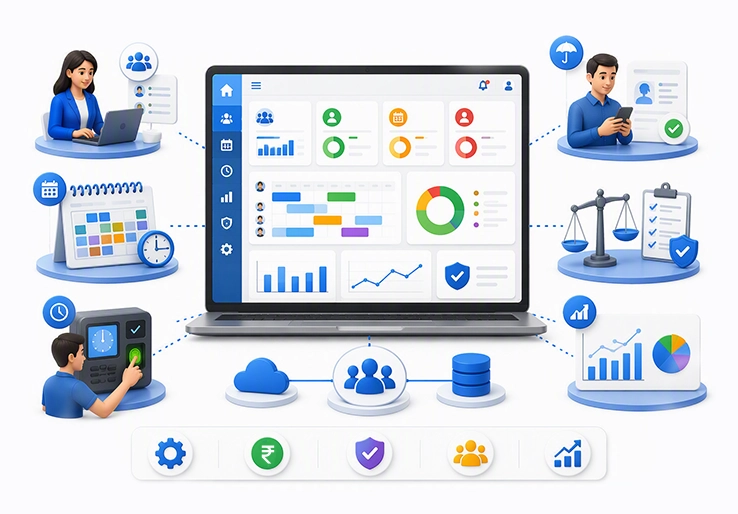
Workforce management software is an integrated platform that helps organizations plan, schedule, track, and optimize employee work. It supports workforce productivity, employee schedules, time and attendance, absence management, labor law compliance, workforce analytics, and operational efficiency from one connected system.
This guide explains what workforce management software does, which features matter most, how workforce management solutions reduce costs, and what businesses should consider before implementation. It is written for HR managers, business owners, operations directors, IT decision-makers, and finance leaders who want to modernize workforce management processes, reduce administrative workload, and align workforce strategies with business goals.
In simple terms: workforce management software automates employee scheduling, attendance tracking, leave management, and labor management. A typical WFM solution includes features for tracking time and labor, scheduling workers, and managing absences, with the potential to extend to workforce health and safety.
By the end, you will understand:
Workforce management software, often called WFM software, is management software that automates and optimizes employee-related processes such as scheduling, attendance, labor forecasting, leave management, and compliance. It gives organizations real-time workforce management data so managers can make better decisions about staffing needs, labor costs, employee availability, and resource allocation.
Workforce management important outcomes include labor cost control, compliance management, employee engagement, and stronger operational efficiency. Effective workforce management is essential for businesses of all sizes as it optimizes productivity, reduces operational costs, and enhances employee satisfaction.
Workforce management (WFM) refers to the systems, processes, and tools used to manage employees' time, schedules, absences, performance, and labor requirements. A comprehensive WFM solution connects time and attendance, employee schedules, labor forecasting, scheduling efficiency, workforce analytics, and compliance reporting.
The key components of workforce management solutions include time and attendance tracking, absence management, and compliance with labor laws, which are essential for optimizing workforce efficiency. Leave and absence management in WFM software centralizes paid time off requests and tracks sick days to maintain visibility into team availability.
WFM software differs from basic timekeeping systems because it does more than track attendance or record employee hours. It analyzes workforce management data, supports workforce planning, improves scheduling efficiency, reduces payroll errors, and provides insights into employee performance, labor costs, and budget performance.
The purpose is practical: reduce costs, maximize productivity, support accurate payroll, improve employee engagement, and ensure compliance with labor regulations. WFM software eliminates manual errors, optimizes labor costs, and improves employee satisfaction by centralizing HR processes into a single, accessible platform.
Traditional workforce management relied on paper timesheets, manual employee schedules, spreadsheets, supervisor approvals, and disconnected payroll systems. Traditional workforce management solutions often struggle with time tracking, leading to confusion, errors, and increased payroll costs due to inaccurate data from master HR systems.
As labor laws became more complex and more organizations started managing hourly workers, remote workers, represented workers, and flexible work arrangements, manual processes became harder to control. A lack of reliable absence management systems in traditional WFM can lead to increased costs and lower productivity, as organizations struggle to manage diverse and complex absence policies across different regions.
Modern workforce management systems now integrate with human capital management, payroll systems, core HR functions, ERP, talent management, and financial platforms. When choosing a workforce management (WFM) solution, organizations should ensure that the software integrates seamlessly with existing systems such as HR, payroll, and ERP to enhance operational efficiency.
This evolution matters because integrated workforce management technology turns workforce operations from a reactive administrative task into a strategic planning function. The next step is understanding the features that make modern workforce management tools valuable.
The main features of WFM software are designed to help organizations track attendance, automate scheduling, manage employees, forecast staffing needs, reduce compliance risk, and improve workforce productivity. These workforce management functions work best when they are connected instead of managed through separate spreadsheets or niche systems.
Modern workforce management solutions leverage AI to automate scheduling, optimize staffing, and deliver predictive insights that help organizations stay agile and competitive.
Time and attendance management tracks employee hours, breaks, overtime, lateness, and absences through web clocks, mobile devices, kiosks, or biometric devices. Time and attendance tracking in WFM software monitors work hours via web, mobile, or biometric devices to prevent unauthorized buddy punching.
Automated tracking of actual hours worked and leave in WFM software reduces payroll errors caused by manual data entry. This is especially valuable for hourly workers, shift-based teams, distributed teams, and businesses that need accurate payroll across multiple locations.
Strong attendance tracking also supports compliance management. Workforce management systems can flag missed breaks, excessive overtime, late clock-ins, or deviations from scheduled shifts before those issues affect payroll or labor law compliance.
Employee scheduling and shift management help managers build employee schedules based on employee availability, skills, labor demand, business rules, and budget limits. AI algorithms can analyze data to predict staffing needs, optimize scheduling, and match employees with tasks suited to their skills, allowing managers to make data-driven decisions.
Self-service portals and mobile workforce management tools allow employees to view schedules, swap shifts, request time off, and receive employee communications without HR involvement. Employee self-service (ESS) tools in WFM software empower staff to view schedules, swap shifts, and request time off without HR involvement, boosting morale and engagement.
Flexible scheduling is one of the most visible benefits for employees. Workforce management tools can improve employee engagement by helping employees feel more productive in their work and achieve better work-life balance through increased scheduling flexibility.
Labor forecasting and analytics use historical data, real-time data, demand patterns, budgets, seasonality, and operational signals to predict staffing needs. Labor forecasting and analytics utilize AI and real-time data to predict busy periods and forecast staffing needs in WFM systems.
Data-driven decision making is facilitated by real-time workforce analytics and customizable reports that provide visibility into labor trends and budget performance. A good WFM solution should provide insights and analytics on employee performance, labor costs, and scheduling efficiency, enabling management to make informed decisions.
These analytics support performance tracking, workforce allocation, and resource allocation. They also create audit trails for compliance reporting and help leaders understand where workforce operations are efficient, overstaffed, understaffed, or exposed to risk.
A workforce management system reduces manual processes and gives managers better control over policies for time and attendance, leave management, absence management, and labor law compliance. Automation in workforce management significantly enhances organizational efficiency by streamlining administrative tasks, reducing errors, and improving overall productivity.
With better visibility into hours worked, worker availability, scheduling conflicts, and safety incidents, managers can respond quickly when staffing needs change. A successful workforce management strategy can lead to immediate productivity increases through actions like schedule adherence and AI-powered workload forecasting, while also contributing to long-term goal setting.
The result is a more productive workforce, stronger workforce planning, and better alignment between employee schedules and business goals.
As workforce productivity increases, HR management costs and operational costs decrease because teams spend less time on administrative tasks. Automating administrative tasks in WFM software increases productivity by allowing managers and HR teams to focus on strategic growth.
More visibility into employee availability, budgeted hours, absences, overtime, and actual hours worked helps organizations reduce labor costs. Workforce management helps organizations ensure compliance with labor laws, which is crucial for avoiding legal issues and maintaining operational integrity.
Compliance management in WFM software ensures adherence to local, state, and national labor laws, tracking overtime rules and mandatory breaks to avoid penalties.
A comprehensive workforce management solution gives all types of workers an intuitive way to report employee hours and absences accurately. Mobile access, web clocks, biometric devices, and employee self-service tools make attendance data easier to capture and verify.
Accurate and timely workforce management data improves payroll, compliance, scheduling, and employee communications. It also allows alerts when there are compliance violations, missing punches, policy exceptions, or payroll-impacting changes.
For organizations that operate across multiple regions, accurate data is essential for managing labor regulations, represented workers, flexible work arrangements, and consistent HR processes.
A workforce management system can support workforce health and safety by making it easier to report incidents, capture critical information, and respond quickly. Effective workforce management may extend beyond scheduling and time tracking to include safety incidents, environmental health and safety workflows, and risk visibility.
By streamlining health and safety reporting, organizations encourage employees to report near misses, unsafe conditions, and incidents. That improves employee experience and helps leaders build a culture of safety, compliance, and accountability.
A safer workplace also supports employee satisfaction, reduces disruption, and strengthens overall workforce efficiency.
Workforce management solutions deliver value by improving scheduling, reducing errors, lowering labor costs, supporting compliance, and empowering employees. An engaged, happy, and motivated workforce is a core benefit that arises from effective workforce management solutions, leading to improved overall productivity and satisfaction.
Workforce management software automates attendance tracking and improves the accuracy of attendance data. Employees can clock in and out through mobile devices, web clocks, kiosks, or biometric devices, while managers get real-time visibility into employee hours.
This helps prevent unauthorized buddy punching, reduces payroll mistakes, and supports accurate payroll. It also gives HR teams better data for absence management, leave management, and compliance reporting.
A workforce management system reduces manual processes and enables managers to better manage policies for time and attendance, flexible scheduling, and absence rules. With improved visibility into hours worked, employee availability, and safety incidents, managers can ensure staffing needs are covered and respond quickly when demand changes.
Workforce management promotes balanced workloads and consistent schedules, which can enhance employee satisfaction by providing predictability and reducing burnout. Better planning also helps maximize productivity across departments and locations.
Workforce management systems can help organizations promote safety and compliance while managing health and safety incidents more effectively. By automating the process from incident reporting to information capture, businesses can maintain accurate records and encourage employees to report problems early.
This is useful for manufacturing, logistics, healthcare, retail, and other environments where workforce operations are closely tied to employee safety and regulatory obligations.
As workforce productivity improves, workforce management costs can decrease because managers and HR teams spend less time on repetitive administrative tasks. Better visibility into employee availability, budgeted hours, overtime, and absences helps reduce staffing expenses from incremental overtime or labor overages.
WFM software also helps organizations avoid hidden costs caused by inaccurate time tracking, delayed approvals, payroll corrections, and labor law violations.
Workforce management tools can improve employee engagement by helping employees feel more productive and supporting better work-life balance through increased scheduling flexibility. By capturing employee sentiment, schedule preferences, and availability, workforce management functions can give employees more control.
This improves employee empowerment and employee experience. When employees can view schedules, request leave, swap shifts, and receive updates through mobile workforce management tools, engagement and trust often improve.
Many organizations struggle to match work skills with business demand while minimizing costs. Workforce management solutions help managers create employee schedules that align the workforce with anticipated demand.
Flexible scheduling also gives employees more freedom to manage availability, shift swaps, and time-off requests through self-service tools. This reduces scheduling conflicts and improves scheduling efficiency.
Some workforce management solutions use biometric data collection devices, such as fingerprint scanners, to clock employees in and out. This helps eliminate buddy punching, where one worker clocks in for another.
Location-based access to a web clock can also ensure workers only clock in from approved work locations. Secure workforce management systems may use machine learning to monitor suspicious activity and anomalies in workforce management data before errors or fraudulent transactions reach payroll.
Workforce analytics centralizes organizational and departmental data so leaders can make better business decisions. Real-time reporting helps managers monitor labor trends, employee performance, overtime, absenteeism, labor costs, and budget performance.
Data analytics also supports workforce planning and long-term workforce strategies. Instead of reacting after payroll closes, managers can adjust schedules, staffing levels, and resource allocation while work is still in progress.
Mobile workforce management refers to the ability to manage workforce processes through mobile devices, including clocking in, viewing employee schedules, swapping shifts, requesting time off, and accessing pay-related information. Mobile access is especially important for remote workers, field teams, distributed locations, and hourly workers.
Anywhere access helps organizations meet employees where they are. It also improves employee communications, reduces delays, and supports faster approvals.
Workforce management systems minimize human errors by automating time and attendance, absence approvals, schedule validations, and payroll-related calculations. Automation ensures accuracy and reduces mistakes that often occur when employees or managers rely on manual data entry.
For example, intelligent rules can detect retroactive changes that affect how employee time should have been calculated and automatically send adjustments to payroll systems. Compliance alerts can also help ensure employee time is recorded correctly and schedules follow labor laws.
Implementing WFM software is both a technology project and an operational change project. The goal is not only to install software, but to improve workforce management processes, streamline operations, and connect human resources, payroll, finance, operations, and IT around shared workforce management data.
Organizations should consider implementation when manual processes are causing payroll errors, scheduling conflicts, compliance risks, high overtime, poor visibility, or excessive administrative workload. The best implementation approach depends on workforce size, locations, labor regulations, integration needs, and the complexity of employee schedules.
A structured implementation process reduces risk and improves adoption. Most organizations move through these phases:
Compare workforce management solutions based on features, integrations, mobile access, compliance capabilities, support, scalability, security, pricing, and roadmap. Some organizations may compare tools such as ADP Workforce Manager, ERP-integrated WFM modules, or industry-specific WFM solutions.
Configure employee profiles, pay rules, labor regulations, leave policies, scheduling rules, approval workflows, user roles, and integrations with payroll systems, human capital management platforms, ERP, and core HR functions.
Train HR teams, managers, employees, and administrators. Focus on employee self-service, mobile workforce management, attendance tracking, schedule management, exception handling, and compliance alerts.
Start with a pilot location or department when possible. Monitor usage, payroll accuracy, schedule adherence, employee feedback, labor costs, and productivity metrics, then refine rules and workflows.
Enterprise WFM implementations may take 6–12 months when there are many locations, integrations, jurisdictions, union rules, or custom workflows. Mid-market implementations commonly take 3–6 months, while small business implementations using cloud-based WFM solutions may take 1–3 months.
| Evaluation Criteria | Enterprise Solutions | Mid-Market Solutions | Small Business Solutions |
|---|---|---|---|
| Implementation Time | 6–12 months | 3–6 months | 1–3 months |
| Customization Level | Highly customizable | Moderate customization | Configuration-based |
| Integration Capabilities | Extensive API library | Standard integrations | Basic integrations |
| Total Cost of Ownership | Request pricing | Request pricing | Request pricing |
Enterprise solutions are best for organizations with complex compliance, represented workers, multi-country operations, advanced workforce analytics, and deep ERP or finance integration. Mid-market solutions are often ideal for growing companies that need stronger scheduling, payroll integration, mobile access, and analytics without heavy customization.
Small business WFM solutions should prioritize ease of use, fast deployment, employee self-service, time and attendance, leave management, and simple reporting. Scalability and flexibility are crucial factors when selecting a WFM solution, as the software must be able to grow and adapt alongside the organization's evolving needs.
Workforce management solutions can deliver major benefits, but implementation challenges are common. Every business is unique and has its own set of challenges. Your workforce management solution should address those concerns.
The most common challenges include system integration, employee adoption, compliance alignment, unreliable time tracking, complex represented worker rules, and absence management issues.
The challenge is connecting WFM software with existing HR, payroll, ERP, general ledger, scheduling, project management, and human capital management systems. Poor data quality, duplicate employee records, inconsistent job codes, and disconnected attendance data can weaken trust in the system.
Solution: Comprehensive integration planning before implementation begins. Review API documentation, payroll requirements, ERP data flows, role-based access, security rules, and data ownership. A phased migration approach helps validate attendance data, employee schedules, leave balances, pay rules, and workforce management data before go-live.
The challenge is resistance to new technology, especially when employees perceive mobile workforce management, GPS, biometric devices, or automated attendance tracking as surveillance. Adoption can also suffer if the user interface is difficult, training is limited, or managers do not follow consistent processes.
Solution: Structured training, clear employee communications, and visible support from managers. Use change champions, pilot groups, quick-reference guides, mobile-friendly instructions, and feedback loops. Empowering employees with self-service access to schedules, shift swaps, time-off requests, and pay-related information can improve employee engagement and reduce resistance.
The challenge is ensuring WFM software meets industry-specific labor regulations, union requirements, predictive scheduling rules, overtime laws, mandatory breaks, wage rules, and local, state, and national labor laws. Poorly configured rules can still create compliance exposure even when modern technology is in place.
Solution: Verify vendor compliance capabilities, review labor law templates, confirm update frequency, and test exception workflows. Ongoing audit capabilities, automated alerts, and clear ownership between HR, legal, payroll, and operations help ensure compliance over time.
Time tracking impacts almost every employee in an organization. One of the biggest problems organizations face with current niche time and labor systems is latency or lack of integrity in data coming from the master HR system.
Traditionally, time tracking has been confusing, slow, and error prone. That can create unnecessary payroll costs, additional administrative burden, and employee morale problems when paychecks are inaccurate. No company wants legal exposure or reputational damage because employees were paid incorrectly or labor laws were not followed.
Solution: Automated time and attendance, real-time validations, mobile and web clock options, biometric controls where appropriate, and tight integration with payroll systems.
Represented workers often have significantly different wage structures, benefits, and contract protections compared with non-represented workers. The complexity of managing represented workers can pose significant challenges for organizations, as compliance with regulations regarding seniority, tenure, and benefits can be difficult without a comprehensive workforce management solution.
Managing contract rules for seniority, eligibility, benefits, absence, overtime, and pay entitlements becomes difficult when policies are stored in spreadsheets or handled manually. WFM software helps encode those rules into scheduling, timekeeping, and payroll workflows.
The lack of a reliable absence management system can result in increased costs, greater risk, and lower productivity. Organizations must manage diverse and complex absence policies across countries, regions, business units, and employee types.
Absence management systems are often challenged by unique rules and user interfaces required for different countries and regions. A strong leave management solution should centralize PTO, sick leave, holiday leave, carryover rules, accruals, eligibility, validations, and approvals.
Many organizations also find it difficult to receive timely notifications of health and safety incidents. Workers may be unsure whether they should report near misses or unsafe conditions. Simple tools that encourage reporting help organizations improve safety visibility and maintain better workforce operations.
Choosing the right WFM software starts with clarity about business goals, workforce complexity, labor regulations, and integration needs. The best workforce management solutions are not just time clocks; they are connected platforms that support workforce planning, scheduling efficiency, accurate payroll, compliance, employee experience, and data analytics.
Key considerations include:
For organizations using broader ERP systems, workforce management should connect with finance, payroll, inventory planning, production scheduling, supply chain, and reporting. This is where an ERP-integrated approach, such as evaluating LOGIC ERP's WFM capabilities, can help organizations connect workforce operations with business-wide planning and profitability.
For successful adoption of workforce management solutions, organizations should be able to apply the following best practices:
Successful adoption depends on making workforce management functions easy for employees, managers, HR teams, and IT administrators. Technology works best when employees understand why it exists, how it helps them, and how it improves accuracy, fairness, and work life balance.
The following best practices help organizations improve adoption and results.
Provide self-service time entry and schedule management across the devices employees already use. Mobile-responsive time entry, digital assistants, employee self-service, and mobile workforce management tools make it easier for employees to record time, request absences, view employee schedules, and swap shifts.
A good leave management solution gives organizations full control over rules and policies that govern absenteeism. Teams should be able to configure period terms, eligibility, accruals, entitlement definitions, payment specifications, carryover rules, administrative tasks, absence validations, and display settings.
When employees can manage simple tasks themselves, HR workload falls and employee satisfaction improves. This is one of the clearest ways workforce management tools improve employee engagement.
Modern time and labor solutions should help managers reduce the impact of unplanned absences and manage time by exception. Compliance alerts can stop potential violations before they occur, and text messages or mobile alerts can speed up notification.
A configurable rules engine and templates help managers design time cards and scheduling workflows for different worker types without relying on IT for every change. This reduces administrative workload and allows human resources teams to focus on strategic work instead of repetitive corrections.
Managers also need dashboards for scheduling conflicts, employee availability, labor costs, absence trends, overtime, and performance tracking. Clear visibility helps them streamline operations and make faster decisions.
Although time and labor systems provide value on their own, benefits increase when WFM software integrates with scheduling, payroll, general ledger, project management, ERP, and core HR systems. Tight integration reduces duplicate entry, improves accurate payroll, and connects workforce management data with business planning.
By drawing on payroll, time and labor, and core HCM systems, a robust leave management solution connects changes in leave to pay calculations. Employees can schedule absences through self-service or directly within a time card, while managers gain complete visibility into time and leave management.
Integrated workforce management technology gives leaders a more accurate view of labor costs, workforce allocation, employee performance, and operational efficiency.
Changing markets, a heightened regulatory environment, and an increasingly diverse and dispersed workforce have made workforce management more complex and more essential. Without integrated workforce management technology, organizations can struggle to access the strategic insights needed to align HR activities with business goals.
AI will continue to shape workforce management systems. AI algorithms can analyze data to predict staffing needs, optimize scheduling, and match employees with tasks suited to their skills, allowing managers to make data-driven decisions. Labor forecasting and analytics will become more real time, helping leaders respond faster to demand changes.
Mobile workforce management will also continue to grow as organizations support remote workers, field teams, flexible work arrangements, and distributed operations. Employees will expect mobile access to schedules, attendance, time-off requests, employee communications, and pay information.
Future WFM solutions will likely focus more on employee experience, employee sentiment, fatigue risk, scheduling fairness, wellness, compliance automation, and predictive workforce analytics. Effective workforce management will encompass time and labor management, absence management, health and safety, payroll integration, core HR functions, and financial data to create an engaged, productive, and connected workforce.
Workforce management software is essential technology for organizations that want to optimize workforce productivity, reduce costs, improve employee engagement, and ensure compliance with labor laws. It brings employee schedules, attendance tracking, leave management, workforce analytics, payroll integration, and compliance management into one connected platform.
The measurable value comes from fewer payroll errors, stronger scheduling efficiency, lower labor costs, better workforce planning, improved employee satisfaction, and more reliable operational decisions. Effective workforce management helps businesses build a productive workforce while giving managers and HR teams the visibility needed to act quickly.
Recommended next steps:
Related areas worth exploring include HR technology integration, digital transformation, workforce analytics, human capital management, and ERP-based operational planning.
Call at +91-73411-41176 / +91-73411-41175 or send us an email at sales@logicerp.com to book a free demo today!
ROI depends on workforce size, labor costs, overtime levels, payroll error rates, and current process maturity. Most organizations measure ROI through reduced overtime, fewer payroll corrections, better scheduling efficiency, improved compliance, lower administrative workload, and higher workforce productivity.
A mid-size organization commonly needs 3–6 months to implement WFM software. The timeline depends on integrations, data migration, scheduling complexity, labor law requirements, user training, and the number of locations involved.
Yes. Modern workforce management solutions are designed to integrate with payroll systems, HR platforms, ERP, human capital management systems, finance tools, and core HR functions. Integration is important because it improves accurate payroll, reduces duplicate entry, and enhances operational efficiency.
The key features include time and attendance, employee scheduling, absence management, leave management, labor forecasting, workforce analytics, compliance management, employee self-service, mobile access, payroll integration, and reporting. AI-powered scheduling and predictive staffing insights are increasingly important.
WFM software helps with labor law compliance by tracking overtime, mandatory breaks, working hours, absences, schedule changes, and policy exceptions. It also creates audit trails and reports that support local, state, and national labor regulations.
Training options usually include administrator training, manager workshops, employee self-service guides, mobile app tutorials, help center resources, live support, and implementation consulting. For best results, organizations should provide ongoing training rather than relying only on launch-day instruction.
Workforce management software optimizes employee scheduling and attendance tracking, helping organizations control labor costs by minimizing overtime, reducing payroll errors, and improving overall workforce efficiency.
Mobile workforce management enables employees and managers to access scheduling, attendance, and communication tools via mobile devices, supporting remote, field, and distributed teams for improved flexibility and real-time workforce oversight.
Accurate attendance tracking ensures reliable data on employee hours, reduces unauthorized time entries, supports compliance with labor laws, and streamlines payroll processing, leading to better workforce planning and cost management.
Human capital management (HCM) integrates with workforce management software to centralize employee data, streamline HR processes, and enhance decision-making related to talent, payroll, and compliance.
Flexible scheduling allows employees to manage shifts, swap duties, and request time off through self-service tools, improving work-life balance and boosting employee satisfaction and engagement.
Key components include time and attendance tracking, employee scheduling, absence management, labor forecasting, compliance management, employee self-service, and analytics for informed decision-making.
ADP Workforce Manager offers integrated tools for time tracking, scheduling, compliance, and labor cost control, helping organizations automate workforce processes and improve operational efficiency.
Integration with human resources systems ensures seamless data flow between HR and workforce management, enabling accurate employee records, compliance, and streamlined payroll and benefits administration.
Absence management centralizes leave requests, tracks paid time off and sick days, and enforces absence policies, reducing administrative burden and ensuring adequate staffing.
By providing self-service portals, mobile access, flexible scheduling, and clear communication, workforce management software empowers employees, improves engagement, and fosters a positive employee experience.
Popular Products