In POS systems, "park tickets" refer to holding or temporarily saving a transaction during billing — letting cashiers pause an ongoing sale to attend to other customers without losing the current transaction data.
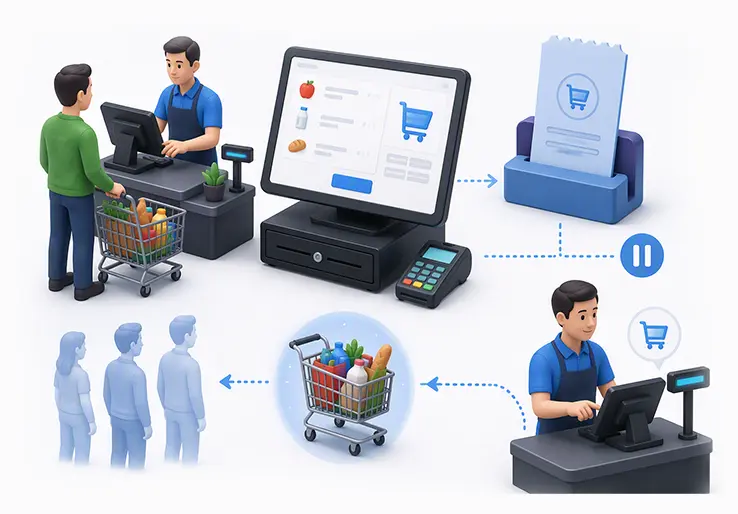
In the context of POS systems, "park tickets" refer to the feature of holding or temporarily saving a transaction during billing rather than actual venue admission tickets. This functionality is critical for venues with high customer volumes such as amusement parks, entertainment centers, and parking facilities. A "hold sale" or "hold bill" allows cashiers to pause an ongoing transaction on the POS screen to attend to other customers without losing the current transaction data.
LOGIC ERP offers an integrated point of sale, billing, and ticketing platform designed for multi-location parks and venues with 2026-ready capabilities including omnichannel sales, real-time inventory management, and mobile POS. This guide explains how the hold ticket (park ticket) feature works in POS systems, how the hold bill button functions, best practices for configuration, and practical use cases.
In POS terminology, a "park ticket" is the action of parking or holding a transaction temporarily during billing. This allows the cashier to save the current sale in progress whether for tickets, food, merchandise, or parking fees without completing payment immediately. The transaction remains accessible on the POS device for quick retrieval and completion later.
Common scenarios for holding tickets in POS include payment delays, guests needing time to decide on add-ons, or customers stepping away briefly. LOGIC ERP offers an integrated point of sale for reliable on-site use across parks and venues, helping staff manage this process smoothly. Held sales are stored locally on the POS device to ensure speed and reliability, but they are not deducted from inventory until finalized, maintaining stock accuracy.
The hold ticket feature is distinct from park bookings, which refer to reserved visit slots or capacity holds for future visits. Parked transactions in POS help manage current sales flow efficiently, especially during peak hours.
A hold sale allows cashiers to temporarily save an in-progress transaction on the POS screen without losing any selected items, discounts, or guest preferences. The Hold Bill feature enables staff to pause and resume sales seamlessly, improving customer service and reducing queue times.
When to use hold bills in a park environment:
Held transactions remain on the local POS device only, ensuring fast access and resilience during connectivity issues. Managing held sales requires balancing customer convenience with inventory accuracy, as items are not reserved until the sale is completed.
Park ticket and hold sale features in POS systems are designed to streamline operations and enhance customer experience in busy venues such as amusement parks and parking facilities. Key features include:
Implementing park ticket hold and hold sale features in POS systems delivers numerous operational and customer service advantages:
LOGIC ERP's comprehensive POS platform combines these features and benefits to empower parks and venues with efficient transaction handling and superior guest satisfaction in 2026 and beyond.
Implementing park ticket hold and hold bill features in POS systems offers significant operational benefits:
| Benefit | Impact |
|---|---|
| Reduced queue times at ticket and food counters | Faster throughput during peak hours |
| Lower abandoned sales rates | Customers can pause and resume purchases without losing progress |
| Improved inventory accuracy | Items not deducted until sale completion, avoiding stock lockup |
| Real-time reporting of hold metrics | Insights into hold durations and conversion rates |
| Support for multiple payment methods | Flexible checkout options for customers |
LOGIC ERP's unified POS integrates park ticket holding with retail, F&B, and parking sales in one system. Mobile POS terminals enable hold functionality anywhere in the venue. Real-time analytics dashboards provide visibility into hold sale performance and customer behavior, empowering smarter management.
"Park tickets" in POS systems refer to the essential hold sale feature that enables temporary saving of ongoing transactions during billing. This capability streamlines operations in busy venues by reducing wait times and preventing abandoned sales. When combined with real-time inventory management and support for diverse payment methods, hold sales enhance guest satisfaction and operational efficiency. LOGIC ERP's 2026-ready POS solutions offer robust hold ticket management, empowering parks and venues to deliver seamless, efficient service and maximize revenue.
Call at +91-73411-41176 / +91-73411-41175 or send us an email at sales@logicerp.com to book your free demo of our advanced POS software today!
A hold sale, or hold bill, is a POS feature that lets cashiers temporarily save an ongoing transaction without losing data. This allows serving other customers while keeping the current sale accessible for later completion.
In POS systems, park tickets refer to held transactions during billing. Cashiers can pause a sale, save it locally, and resume it later to complete payment, improving service flow and customer convenience.
Held sales do not immediately deduct stock, so proper management with expiration policies is necessary to maintain accurate inventory and avoid stock being locked indefinitely.
Hold durations are configurable but typically have time limits with automated alerts to release inventory if the sale is not completed in time.
Hold sales are stored locally on the POS device used to create them, ensuring fast access but limiting retrieval to the same device.
Common uses include guests needing time to decide purchases, payment app delays, drivers temporarily leaving booths, and managing long queues efficiently.
They reduce wait times, prevent abandoned purchases, and allow staff to handle high volumes smoothly, enhancing overall satisfaction.
Yes, once resumed, held transactions can be completed using cash, card, UPI, digital wallets, and contactless payments.
Hold bills manage in-progress sales, while park bookings reserve future visits. Together, they optimize cash flow and capacity management.
Staff need training on creating, retrieving, and clearing holds, understanding expiration policies, and communicating with guests to ensure efficient operations.
By enabling quick pausing and resuming of transactions, hold sales reduce queues and abandoned sales, improving throughput and guest satisfaction during busy periods.
Visitors can buy tickets both online and onsite through POS setups, including self-service kiosks and mobile terminals, ensuring flexibility and convenience in ticket sales.
Cashless transactions streamline payments by enabling contactless card payments, digital wallets, and RFID wearables, reducing queues and enhancing visitor experience.
Real-time inventory control ensures that items are only deducted from stock when sales are finalized, preventing overselling and maintaining accurate stock levels.
The POS screen displays the number of held transactions, and if more than 20 holds exist, a warning prompts the user to proceed or cancel, maintaining system performance.
Yes, intuitive POS setups allow users to double click on held sales displayed in the hold list to quickly resume and proceed with payment.
Yes, tickets can be printed or scanned using barcode or QR code scanners at entry points, facilitating fast and secure visitor access.
Users have the freedom to add remarks, set expiration dates, and control hold cancellation permissions, ensuring efficient management aligned with business rules.
POS setups support multiple users with role-based permissions, enabling secure and centralized management of held transactions across shifts.
Park tickets and hold sales integrate seamlessly with the site's POS system, providing centralized control over ticket sales, inventory, and visitor management.
The POS system is designed to accept multiple payment methods, including cash, cards, UPI, and digital wallets, allowing customers to pay conveniently at the moment of purchase.
Most POS systems have a default expiration time for held sales, often configurable, to prevent indefinite holding and ensure inventory accuracy.
Money is not deducted or processed until the held sale is finalized and payment is completed, ensuring accurate financial tracking and cash flow management.
Yes, POS systems can require a minimum deposit during hold sales to secure the transaction and ensure customer commitment before completing the full payment.
The system provides automated expiration alerts and clear tagging of held sales, helping staff monitor and manage holds effectively without losing track.
Resume Sales POS allows cashiers to quickly retrieve and continue processing held or suspended transactions, reducing wait times and improving checkout speed in busy retail or park environments.
Pending Sales POS transactions are sales that have been started but not completed. They remain saved on the POS system, enabling staff to finalize purchases later, which helps manage customer flow and reduces abandoned sales.
Retail POS Hold Sales let staff temporarily save ongoing transactions, allowing customers to take time for payment or additional selections without losing their cart, thus enhancing customer convenience and reducing queue times.
Suspend Transaction POS is the ability to pause an active sale temporarily to attend to other customers. It is useful during peak hours or when customers need extra time, helping staff manage multiple transactions efficiently.
Popular Products