Best Grocery Store Software for Multi-Store Chains: Centralized Billing, Stock & Reports

Introduction
Multi-store grocery chains increasingly rely on grocery retail software, grocery billing software, and advanced grocery point of sale software to streamline operations. With rising consumer expectations, complex supply chains, and the need for real-time control, businesses require centralized billing, inventory management, and data-driven reporting to ensure profitability and seamless operations across all locations.
In this article, we explore why multi-store grocery chains need such software, what features matter most, which solutions stand out in 2026 (with examples), how to choose the right one, best practices for implementation, and common pitfalls to avoid. Whether you run two neighbourhood supermarkets or a chain of hypermarkets, this guide will help you make an informed, future-proof choice.
Why Multi-Store Grocery Chains Need Centralized Software
The Growing Complexity of Grocery Chain Operations
Running a single grocery store is already demanding but expand that to multiple locations and the complexity multiplies. Each store may have different customer footfall, demand patterns, stocking cycles, and local purchasing behaviors. Some stores might move fast on perishables; others may deal more in packaged goods or slower-moving inventory.
Manual management across outlets often leads to inconsistency: different pricing, promotions, stock levels, and billing practices. Without centralized control, offering customers a uniform brand experience becomes difficult. Inventory imbalances stockouts in one store and overstock in another, are common, leading to missed sales or locked-up capital.
Moreover, perishables require careful batch-wise and expiry-aware handling. Without automated tracking, expiry and spoilage become a major source of loss.
Finally, as regulatory compliance (like GST, tax laws, labelling norms) becomes stricter, maintaining audit-ready billing and accounting across multiple stores with manual systems becomes a significant risk.
All these factors combined, SKU variety, perishables, multi-location operations, compliance and customer expectations, make a strong case for integrated, centralized software tailored for grocery chains.
Challenges Faced by Multi-Stores Without Centralized ERP Software
Before diving into solutions, it helps to understand the pain points that inform the need for good software. Without integrated systems, grocery chains commonly suffer from:
- Inventory mismatches: No real-time visibility, delayed updates, overstock or stockouts across stores.
- Billing inconsistencies: Different pricing or discount practices in different stores, manual overrides, pricing errors, slow checkout during peak hours.
- Loss and wastage: Expired or spoiled items remain unsold, no expiry alerts or batch tracking, leading to losses especially for perishables.
- Fragmented data and no insights: Sales, stock, accounting, customer data split across spreadsheets or disconnected systems; no consolidated reports for strategic decision-making.
- Compliance risk: Invoicing, tax calculations, non-uniform GST compliance, poor audit trails or tax-ready records.
- Scaling difficulties: Adding a new store means setting up everything again: inventory, pricing, billing, reporting, error-prone and time-consuming.
These problems reduce operational efficiency, eat into profits, and limit growth potential.
How Centralized Grocery Multi-Store/Chain Software Solves These Problems
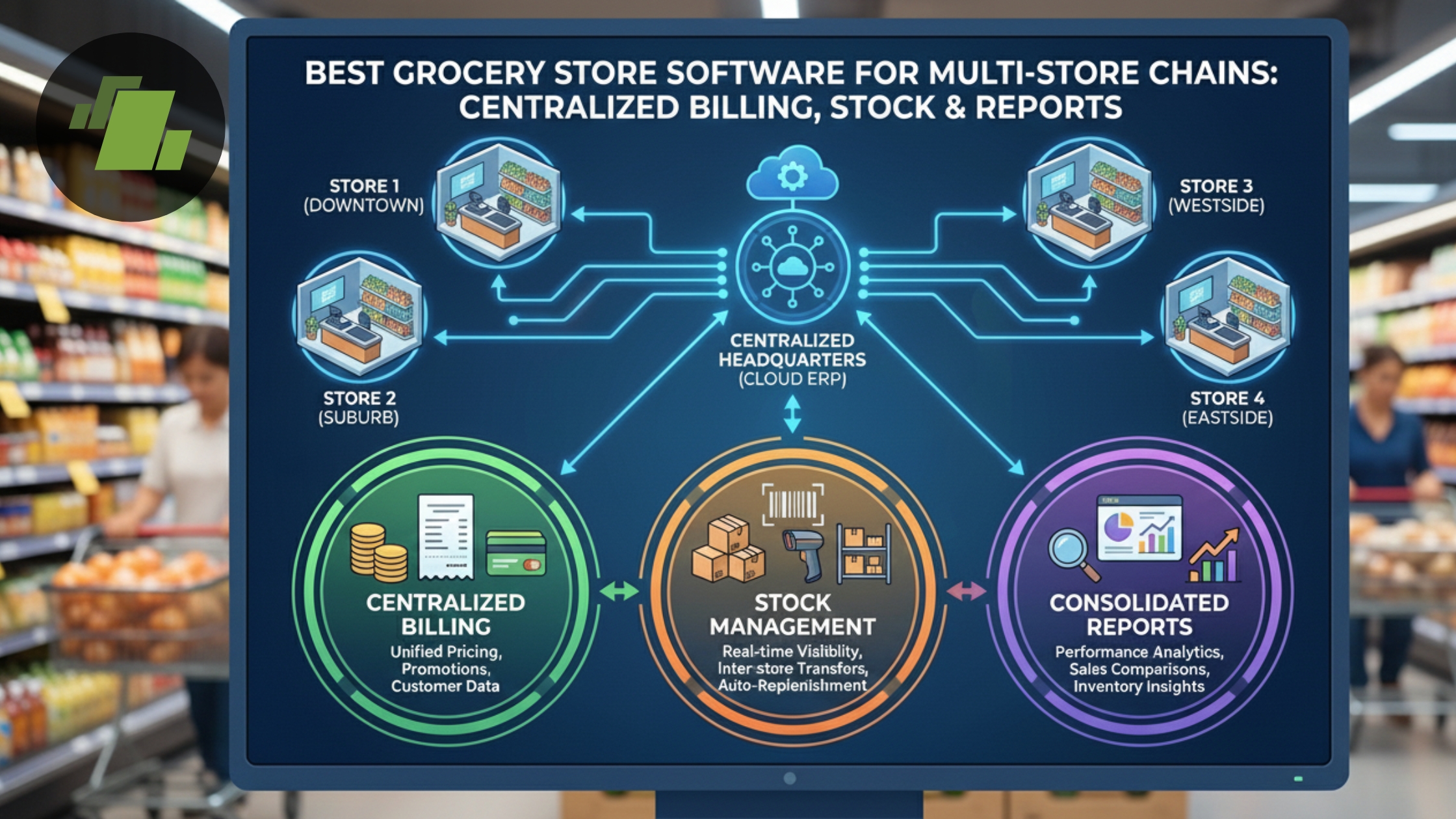
Advanced supermarket/grocery chain software combining POS + inventory + ERP + CRM + analytics, addresses these challenges comprehensively.
Unified Multi-Store Management
All outlets, warehouses, and the head office connect to a single centralized database. Master data: SKUs, pricing, tax slabs, promotions, purchase orders, is managed centrally and pushed uniformly across stores. That means consistent prices, offers, and processes across all stores, regardless of location.
Real-Time Inventory Accuracy & Stock Control
Every sale, return, stock transfer, or purchase gets updated in real time. Stock levels across stores reflect accurately. Features like low-stock alerts and automated reorder triggers help prevent stockouts or over-stocking, reduce capital locked in inventory, and improve cash flow.
Fast, Accurate POS Billing & Checkout
Integrated POS supports barcode scanning, eliminating entries and errors, speeding up billing. For grocery items sold by weight (fruits, vegetables, grains), weighing-scale integration ensures correct billing and updates inventory accurately. Multiple payment methods (cash, UPI, cards, wallets) and support for loyalty discounts streamline checkout, even during rush hours.
Batch & Expiry Tracking (for perishables)
For perishable inventory (dairy, produce, meat, packaged goods), the software tracks batch numbers, expiry dates, and shelf-life. It can enforce FIFO/FEFO methods, generate expiry alerts, and suggest markdowns or promotions for items nearing expiry, reducing spoilage and waste.
Integrated Accounting & GST / Tax Compliance
Sales and purchase data automatically sync with ledgers. Billing becomes GST-ready; invoices are accurate and compliant. Returns, supplier payments, purchase entries, and expense tracking get consolidated. Audit-ready financial reports reduce regulatory risk and simplify bookkeeping.
Robust Reporting, Analytics & Business Intelligence
With all data centralized, chains can access dashboards for: store-wise sales, category-wise profits, SKU performance (fast-moving vs slow-moving), turnover rates, wastage, stock valuation, purchase efficiency, profitability analysis. This enables data-driven decisions when to reorder, what to promote, which stores to expand, where to cut losses.
Customer Management & Loyalty Programs
CRM modules store customer purchase history, preferences, and behaviour. Loyalty points, member discounts, digital receipts, personalized offers, all managed centrally, help improve customer retention and lifetime value.
Scalability & Future-Ready Infrastructure
As your chain grows, new outlets, warehouses, online ordering, home-delivery, centralized software scales with you. Cloud-enabled systems allow remote management, automatic backups, and integration with e-commerce/delivery channels essential for omnichannel retail.
Key Features to Look for in Grocery Store Chain / Multi-Store Software
Here’s a checklist of core features every grocery chain must demand when choosing software:
1. Multi-Store / Central Branch / Warehouse Management
- Central master data (SKUs, tax, pricing, barcodes)
- Inventory across stores + central warehouse
- Inter-store stock transfers with tracking
- Central purchase order (PO) and vendor management
- Warehouse & distribution center support
- Store-level price lists / location-based pricing (if needed)
2. POS Billing with Grocery-Specific Capabilities
- Barcode scanning
- Weighing-scale integration (for items sold by weight)
- Fast checkout & support for multiple tills / counters
- Multiple payment modes: cash, UPI, wallets, cards
- Automatic discount/offer application, loyalty integration
- Split billing, returns and exchange support
- GST/tax-ready invoice generation
3. Real-Time Inventory & Stock Control
- Stock updates on sale/return/transfer/purchase
- Low-stock alerts and reorder triggers
- Batch-wise tracking, expiry management
- FIFO/FEFO management for perishables
- Stock adjustments, wastage & damage tracking
- Dead-stock or slow-moving item reports
4. Integrated Accounting & Compliance
- Automatic ledger entries (sales, purchases, returns, expenses)
- Supplier and vendor payment tracking
- GST / tax calculations and invoice generation
- Audit-ready financial reports
- Expense and cash-flow management
- User roles & access control for secure operations
5. Analytics & Reporting / Business Intelligence (BI)
- Real-time dashboards for sales, inventory, margins
- Store-wise, category-wise, SKU-wise performance reports
- Trend analysis, seasonality, demand forecasting
- Wastage/spoilage reports, stock valuation, stock turnover metrics
- Purchase optimization reports, vendor performance tracking
- Exportable reports for management, audit, accounting
6. Customer Management & Loyalty / CRM Features
- Customer database linked across stores
- Purchase history tracking, customer preferences
- Loyalty points, membership or reward programs
- Personalized promotions and offers
- Digital receipts, SMS/email integration (if applicable)
7. Hardware & Deployment Support
- Compatibility with barcode scanners, weighing scales, POS terminals, receipt printers, cash drawers
- Support for multiple billing counters/tills
- Cloud-based deployment (or hybrid) for remote access, real-time sync, backups
- Offline mode (where internet may be unreliable) with auto sync once online
- Support for multiple payment methods
8. Scalability & Future-Proofing
- Ability to add more stores / warehouses without re-setup
- Support for omnichannel, i.e. online ordering, home delivery, dark store model
- Modular architecture allows activation of features as chain grows
- Regular software updates, compliance support, security patches
How to Choose the Right Software For Your Grocery Multi-Store Chain Store?
Every grocery chain has unique needs. The goal is to select software that fits your specific scale, business model, and growth plans. Use this step-by-step framework:
Step 1: Evaluate Your Business Size & Complexity
- How many outlets do you operate (or plan to operate)?
- What is the daily/weekly customer footfall and transaction volume?
- How many SKUs do you manage: number of unique products?
- Do you sell perishables, bulk items sold by weight, or only packaged goods?
- Are you planning to add a warehouse, distribution centre or multiple branches?
Step 2: Map Your Required Features
Based on the above, note which features you must have. E.g.:
- For perishables: Expiry tracking, batch-wise inventory, FIFO.
- For multi-store: Centralized master data, inter-store transfer, consolidated reporting.
- For fast-paced billing: Barcode scanning, scale integration, multiple payment methods.
- For compliance: GST billing, audit-ready accounting.
- For customer retention: Loyalty/CRM, digital receipts.
Step 3: Check Hardware & Infrastructure Readiness
- Do you have POS terminals, barcode scanners, weighing scales, receipt printers, etc.?
- Do you have a stable internet for cloud deployment? If not, choose a software with offline + sync mode.
- Do you have the capacity to train staff on new systems?
Step 4: Evaluate Ease of Use & Vendor Support
- Is the user interface intuitive for store staff?
- Does the vendor offer training, documentation, and support?
- Can the system manage role-based access (cashier vs manager vs admin)?
- Does the software support local/regional language or local compliance (for example for India)?
Step 5: Assess Cost vs Return on Investment (ROI)
- Calculate upfront cost: License/subscription fees, hardware, setup, training.
- Evaluate ongoing costs: Maintenance, upgrades, cloud storage (if applicable).
- Estimate benefits: Reduced stockouts/overstock, reduced wastage, faster billing (more throughput), reduced manual errors, better stock turnover, improved customer retention.
- Compare cost with expected benefits: If time saved, reduced wastage and improved sales outweigh cost over 6–12 months, it’s justified.
Step 6: Check Scalability & Future-Readiness
- Will software support adding new stores/warehouses without major rework?
- Does it support omnichannel, i.e. online ordering, home-delivery, app integration?
- Does the vendor provide regular updates and support for regulatory changes (tax laws, compliance)?
Grocery Multi-Store ERP Software Implementation Best Practices: How to Deploy Software Successfully
Buying software is one thing, but implementing it properly is what ensures success. Here are best practices for smooth deployment and long-term operational efficiency:
1. Accurate Master Data Setup from Day One
- Create a clean, standardized SKU list: Unique barcode/identifier for every item, products categorized properly, units and pricing standardized.
- For perishables: Maintain batch numbers, expiry dates, shelf-life details.
- Maintain vendor/supplier master: With supplier details, cost prices, lead times, helps for centralized procurement and reorder planning.
- Build uniform tax slabs (GST/tax codes), categories and product definitions to avoid errors during billing and reporting.
2. Standardize Processes Across All Stores
- Define standard operating procedures (SOPs) for: procurement / purchase orders, goods receipt, inter-store transfers, wastage/expiry handling, stock audits, billing, returns, discounts/offers, loyalty.
- Ensure every store follows the same SOPs to maintain consistency, data integrity, and operational clarity.
3. Train All Staff Thoroughly
- Cashiers: billing, barcode scanning, weighing scale usage, payment modes, handling discounts/returns.
- Store managers: stock receiving, transfers, batching, expiry management, stock audits.
- Head-office/admin: reporting, analytics, purchase orders, vendor management, accounting entries.
Training and role-based access ensures staff know what to do — and avoid errors or misuse.
4. Schedule Regular Stock Audits & Reconciliation
Even though software tracks inventory, periodic physical audits (monthly/quarterly) are important. They help detect: shrinkage, theft, mis-scans, damaged stock, expired items, especially in stores dealing with perishables or high stock movement.
5. Use Reports & Analytics Actively for Decision Making
- Monitor SKU-wise sales to identify fast-moving versus slow-moving items.
- Identify seasonal or regional demand patterns and adjust purchase orders, pricing, or promotions accordingly.
- Keep track of wastage/spoilage and expired stock, adjust procurement or discounts based on that.
- Use store-wise performance reports to reallocate stock, plan transfers, or decide on expansion/downsizing.
6. Roll Out Gradually for Multi-Store Chains
Start with 1–2 stores initially to test the system, identify issues, train staff, and fine-tune processes. Once stable, roll out to other outlets. This reduces risk and ensures smoother adoption.
7. Maintain Data Hygiene & Consistency Continuously
- Ensure barcodes, SKUs, product details, and pricing remain updated.
- Keep vendors and purchase information up-to-date.
- Ensure accurate entry of batch and expiry details.
- Ensure returns, wastage, and damaged stock get recorded properly.
Consistent data hygiene ensures that reporting, analytics, and inventory control remain accurate and reliable.
Future Trends in Grocery Chain Software
As technology and consumer expectations evolve, grocery chain software is also advancing. Here’s what to expect, and why you should choose future-ready systems:
1. AI-Driven Demand Forecasting & Stock Optimization
Emerging solutions use advanced analytics and AI models (e.g. time-series forecasting) to predict demand, optimize replenishment, and reduce wastage, especially important for perishables.
2. Omnichannel Grocery Retail: Online Ordering + In-Store + Delivery
Grocery chains are expanding beyond physical stores, offering home delivery, online ordering, app-based shopping, and hybrid fulfillment (dark stores, cloud inventory). Software must support omnichannel sync, inventory & order management across channels.
3. Cloud-Native, Mobile & Remote Management
Cloud-based POS/ERP systems allow store owners to monitor operations remotely from inventory levels to sales dashboards from any device. This enables scalability and flexibility for multi-store chains.
4. Automated Expiry & Waste Management Modules
Better batch and expiry tracking, automated alerts, markdown/clearance suggestions, wastage logging important for perishables-heavy chains to reduce losses.
5. Integrated CRM, Loyalty, Personalization & Digital Engagement
With more data on customer behaviour, grocery chains can personalise offers, tailor promotions, and build customer loyalty, boosting repeat business and lifetime value.
6. IoT, Smart Shelves & Smart Checkout (Future Possibilities)
As technology evolves, expect integration with IoT for shelf monitoring, automated checkout (self-checkout), or smart cart systems potentially reducing manpower needs and improving checkout speed.
By choosing software that’s modular, cloud-ready, and regularly updated, grocery chains can stay ahead of these trends and build a future-proof retail operation.
Next Steps: What You Should Do Now
- List your requirements : Number of stores, SKU count, perishables, expected scale, hardware availability, staff readiness.
- Shortlist 2–3 software vendors based on the feature checklist above and compatibility with your business model.
- Run a pilot at one or two stores: setup master data, train staff, process procurement/billing/stock transfers.
- Monitor performance: Check billing speed, inventory accuracy, wastage, customer feedback, reporting correctness.
- Scale gradually: Roll out to other stores, warehouses, or integrate online/offline channels.
- Use reports & analytics actively: Optimize inventory, pricing, promotions, store layouts, expansion plans.
Conclusion
In 2026, managing a multi-store grocery chain without integrated, centralized software is no longer viable. The complexity from inventory and perishables to billing, compliance, customer expectations, and growth demands a comprehensive solution.
The right grocery chain software does much more than billing. It becomes the backbone of your operations enables real-time inventory control and stock accuracy, automates billing & checkout with speed and precision, handles accounting, GST, compliance, and audit-ready reporting, provides analytics and business intelligence for data-driven decisions, manages perishables, expiry, wastage, and stock transfers across stores, supports customer loyalty, CRM, and consistent brand experience and offers scalability and flexibility for store expansion or omnichannel growth.
If you plan carefully, choose wisely, implement systematically, and use data proactively, the right software will help you build a scalable, efficient, profitable, and future-ready grocery business. Call at +91-73411-41176 or send us an email at sales@logicerp.com to book a free demo today!
Frequently Asked Questions (FAQs)
1. What is the best software for multi-store grocery chains?
LOGIC ERP is the best software for multi-store grocery chains that offers centralized billing, unified inventory management, accounting, CRM, POS, and real-time analytics.
2. Why do grocery chains need centralized billing software?
Centralized billing helps maintain consistent pricing, faster checkout, accurate invoicing, and real-time financial visibility across all outlets.
3. What features should grocery shop billing software for multi-stores include?
Must-have features include barcode billing, GST invoicing, expiry alerts, stock transfers, loyalty programs, and real-time reporting.
4. Can grocery retail software for multi-stores help reduce wastage?
Yes. With expiry tracking, batch management, and analytics, software significantly reduces wastage and improves margin control.
5. Is cloud-based grocery billing software for multi retail stores better than offline?
Cloud-based systems offer real-time sync, secure backups, remote management, and multi-location support for expanding chains.

Author
Sharanjit Ghuman
Director of Communications | LOGIC ERP Solutions Pvt. Ltd.
Leading and managing the company’s internal and external communication strategies and working closely with senior leadership to develop and execute communication plans.


