An invoice reference number is a unique identifier assigned to each billing document. It allows your business, your customer, your bank, and your tax authority to locate and verify a single invoice without ambiguity.
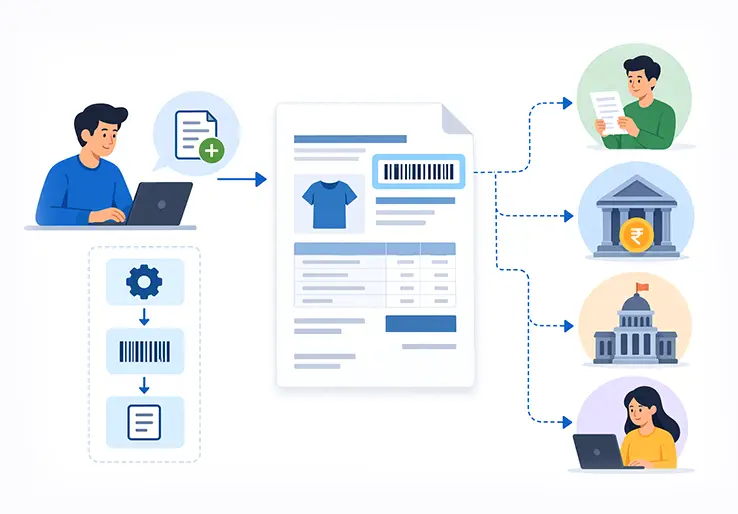
Every invoice your business sends carries a number that does far more than fill a header field. That number is how you track payments, settle disputes, file taxes, and prove your records are clean during an audit. Yet many businesses treat invoice numbering as an afterthought — until a duplicate causes a payment mix-up or a tax portal rejects a filing.
This guide covers everything you need to know about invoice reference number generation: what these numbers mean, how to structure them, how to generate them (manually or automatically), and how tools like LOGIC ERP make the entire process painless.
An invoice reference number is a unique identifier assigned to each billing document. It allows your business, your customer, your bank, and your tax authority to locate and verify a single invoice without ambiguity. Invoice numbers are legally required for all invoices in most jurisdictions, and each invoice must have a unique number to avoid confusion.
For many small businesses and invoicing software tools, "invoice reference number" and "invoice number" mean the same thing — one field, one value. In larger ERPs like LOGIC ERP, additional references (purchase order number, project code, customer ID) may sit alongside the primary invoice number to provide richer context.
Why does this matter? A well-structured reference number helps you get paid faster, gives you improved cash flow visibility, prevents duplicate numbers, and simplifies audits. Consider this example:
LOGIC-INV-2026-08-24-0152
This single string tells you who raised it, what it is, when it was raised, and where it falls in the invoice sequence.
In day-to-day business operations, an invoice reference number acts as the thread connecting your sales, accounting, and compliance workflows. For Indian businesses managing GST filings, and for growing SMEs handling dozens or hundreds of invoices monthly, this number is what keeps your books from unraveling.
The reference number connects the invoice to the customer (via customer ID), the transaction date, the order or project (PO or job number), and the corresponding ledger entry in your accounting software. Unique invoice numbers help track payments efficiently — when a customer pays, your finance team matches the payment to the exact invoice using that reference.
Here is how reference numbers support core processes:
Banks and payment gateways often require a reference number in the payment narration so incoming online payments can be matched automatically. Without it, reconciliation becomes time consuming and error-prone.
LOGIC ERP uses invoice reference numbers as the backbone of its invoicing, stock, and tax reports, helping businesses create invoices and reconcile data from a single dashboard.
In many free invoice generator tools and invoice generator apps, "invoice number" and "invoice reference number" are interchangeable. You type a number, it prints on the PDF, and that is your reference. For most freelancers and small businesses, that is perfectly fine.
However, in larger ERPs and regulated environments, the two can differ:
| Term | What It Is | Example |
|---|---|---|
| Invoice number | The unique ID printed on each invoice, assigned by the seller | INV-2026-00025 |
| Invoice reference number | Can be the same, or a more detailed code linking to orders, contracts, or projects | REF-PO-9812-INV-00025 |
Use-cases where keeping them distinct helps:
LOGIC ERP allows mapping external references (like e-way bill, LR number, purchase order) alongside the primary invoice number, so your entire business stays organized without overloading one field.
If you are issuing your first invoice, it is safe to treat invoice number and invoice reference number as the same value. Keep it simple, and add complexity only when your business needs it.
A well-structured reference number helps you manage thousands of invoices over multiple years without losing track. Here are the key components you can combine:
Each element serves a purpose. The prefix tells you the document type at a glance. The date helps sort chronologically. The branch code separates series across locations. The sequence ensures uniqueness and an audit trail.
Example breakdowns:
LOGIC ERP can automatically populate these elements based on master settings — financial year, series, branch — so users do not build codes manually. Invoice numbers can include up to 16 characters under Indian GST rules, so keep invoice numbers concise to avoid rejection by tax portals.
There is no single "correct" format. Use a standard format for invoice numbers to maintain consistency, and match it to your business needs, industry, and tax rules. Common formats include sequential, alphanumeric, and date-based approaches.
Simple Numeric Format
Date-based Format
Alphanumeric Format
Indian GST-style Format
A common format is INV-2026-0001 for yearly tracking. Invoice numbers can be sequential, alphanumeric, or date-based — choose what fits and stick with it.
Many businesses start creating invoices by generating invoice numbers manually in Excel, Google Sheets, or printed bill books before adopting ERP or accounting software.
Here is a clear process:
Choose a Starting Number
Businesses can start invoice numbering at any number, like 1000. Starting at 1001 instead of 0001 looks more established when businesses start out.
Decide on a Prefix
Pick something like INV, GST, or TAX that appears on every invoice.
Include the Year or Date
Adding FY26-27 or 2026 makes year-end filtering easy.
Increment by 1 for Every New Invoice
Sequential invoice numbers simplify tracking and record-keeping. Never skip or repeat.
Place the number at the top-right of your invoice template, labeled "Invoice No." or "Invoice Reference No." — whether on paper invoices or digital invoices.
Example manual sequence:
| Date | Invoice Reference |
|---|---|
| 24 Aug 2026 | INV-2026-1001 |
| 24 Aug 2026 | INV-2026-1002 |
| 25 Aug 2026 | INV-2026-1003 |
Never reuse an invoice number even if it is canceled. Always double check before sending to ensure the sequence is not skipped or duplicated. Once you are handling over 50 invoices per month, manual generation becomes risky — migrating to LOGIC ERP or similar invoicing software is recommended.
Advanced accounting software and ERPs — including LOGIC ERP — can handle invoice reference number generation using rules you define. Automate the generation of invoice numbers to reduce human error and save time.
Typical Configuration Options:
How it Works in LOGIC ERP:
Advantages Over Manual Methods:
Businesses can start with simple LOGIC ERP invoice tools and expand into full ERP modules as they grow.
Planning your numbering system upfront prevents painful renumbering when your volume grows or you add branches. Keep invoice reference numbers unique, predictable, and easy to reconcile.
Core Best Practices:
Industry-specific Tweaks:
Align your format with tax and audit expectations. Tax authorities require unique, sequential invoice numbers for audits — officers should see a clean, continuous sequence without unexplained gaps.
Document your numbering policy in one internal note (e.g., "LOGIC ERP Invoice Series Policy – FY 2026–27") so new staff follow the same rules. Double check transitions carefully: year-end rollovers, new branch openings, and migration from one system to another are common failure points.
You can customize your format, but regulators require invoice numbers to be unique and systematic. Here is what the major jurisdictions expect:
India (GST):
EU VAT / UK (HMRC):
US (IRS):
Risks of Non-compliance:
Sequential numbering simplifies tax filing and audit compliance. When in doubt, consult your CA or tax advisor and configure invoice series in LOGIC ERP to match their recommendations.
Invoice reference numbers are the anchors for tracking whether you actually get paid. Invoice numbers aid in identifying paid and unpaid invoices across your accounts.
Tracking Paid Invoices: Accounting software matches incoming payments to invoice reference numbers. When a bank narration reads "REF INV-2026-0046," the system can auto-apply the payment to that invoice. This works across UPI, NEFT, and payment gateways — provided the reference is included in remarks.
Tracking Unpaid and Overdue Invoices: Run aging reports (0–30, 31–60, 61–90 days) filtered by invoice numbers and due date. You can spot patterns — like a specific client consistently delaying due payments on project-coded invoices.
Practical Workflows:
Consistent references reduce disputes. Both customer and seller refer to the same ID in calls, chats, and legal notices. Small improvements — like always including the reference in UPI payment remarks — significantly improve reconciliation speed.
Many businesses start with a free invoice generator or simple app to create invoices, customize layout with brand colors and a business logo, and assign unique invoice numbers. That works when volume is low.
| Feature | Free Invoice Generator | Full ERP (LOGIC ERP) |
|---|---|---|
| Series control | Basic or none | Multi-branch, multi-GSTIN |
| Duplicate prevention | Limited | Automated checks |
| GST e-invoice integration | Rarely | Built-in |
| Inventory and expenses linking | No | Yes |
| Scalability | Low | High |
Pain points that appear as volume grows:
LOGIC ERP bridges the gap. It offers configurable invoice number generation while remaining user-friendly. Businesses can migrate from spreadsheets without losing historical unique invoice numbers.
Guidance: micro businesses with fewer than 20 invoices per month can start with basic tools. Once volume, branches, or GST complexity grows, move to LOGIC ERP for reliability and tax compliance.
Invoice numbering should adapt to your business model. What works for a freelance designer will not suit a multi-location retailer. Here are practical approaches:
Retail and POS:
Freelancers and Consultants:
Manufacturing and Distribution:
Professional Services (CA, legal, IT):
Indian Businesses with Multi-GST Registrations:
LOGIC ERP can manage multiple series without confusion, letting you track sales performance across locations while keeping each branch’s numbering compliant.
Duplicate invoice numbers can cause payment confusion — customers pay the wrong amount, ledgers mismatch, and finance teams waste hours on reconciliation. Invoice numbers prevent confusion and errors from duplicates, but only when the system is reliable.
Consequences of Errors:
Preventive Controls:
Verification Habits:
Correction Guidelines:
Uniqueness prevents payment confusion and tracking errors. LOGIC ERP can automatically alert users to out-of-sequence or duplicate attempts.
LOGIC ERP is built for Indian and global businesses that need reliable, compliant invoice numbering integrated with their entire business operations — from sales and inventory to GST returns and financial statements.
What LOGIC ERP Offers:
Scales with Your Growth:
Integration Benefits:
Time-saving Results:
A well-designed invoice reference number system pays dividends every single day — fewer errors, faster payments, cleaner audits. If you want scalable, compliant invoice reference number generation that grows with your business, explore LOGIC ERP’s invoicing and accounting modules to start building your system today.
An invoice reference number is a vital element in business invoicing, serving as a unique identifier that streamlines payment tracking, compliance, and record-keeping. Whether you are a small business owner manually creating invoices or a large enterprise using advanced ERP systems like LOGIC ERP, having a clear, consistent, and compliant invoice numbering system is essential. It not only helps prevent costly errors such as duplicate or missing invoice numbers but also facilitates faster payments, smoother audits, and better financial management.
By understanding the meaning, generation process, and formats of invoice reference numbers, you can design a system tailored to your business needs and regulatory requirements. Leveraging automation through software like LOGIC ERP further enhances accuracy and efficiency, allowing you to focus on growing your business while ensuring your invoicing processes remain robust and reliable.
Start implementing a well-structured invoice reference number system today to enjoy improved cash flow, simplified tax compliance, and a professional image that builds trust with your customers and stakeholders.
Call at +91-73411-41176 / +91-73411-41175 or send us an email at sales@logicerp.com to book a free demo today!
Many systems use 4–8 digits for the numeric part. Under Indian GST, the total invoice number (including letters and separators) can be up to 16 characters.
Yes, this is a common method in India and many other countries. Use a year prefix (e.g., INV-26-27-0001) so each year’s series remains uniquely identifiable. Discounts or changes in volume do not affect numbering rules.
Typically at the top-right or header area, labeled "Invoice No.", "Invoice #", or "Invoice Reference No." — on both printed and digital invoices. In Indian e-invoices, the IRN also appears alongside or embedded in the QR code.
Yes, and it is recommended for clarity. Branch codes, year codes, and document type prefixes are all allowed under GST and most VAT rules.
Document the skipped number in a note or issue a voided/cancelled invoice with that number so the audit trail stays continuous. Never delete an invoice record.
Many businesses start at 1001 or another clearly documented starting point. Do not reuse earlier experimental numbers. Pick your format, document it, and start creating invoices consistently from day one using your mobile device or desktop.
Creating invoices efficiently involves using a consistent invoice reference number system, automating invoice generation with accounting software like LOGIC ERP, and including all necessary details such as customer information, payment terms, and invoice numbers. This helps streamline billing and reduces errors.
Invoice reference numbers enable quick identification and tracking of paid, unpaid, and overdue invoices. This clarity helps businesses follow up on outstanding payments promptly, improving overall cash flow and financial management.
Invoice numbering should be tailored to your business needs, including factors like industry, volume of invoices, and regulatory requirements. For example, Indian businesses must comply with GST rules, ensuring invoice numbers are unique and sequential within the financial year.
Indian businesses must ensure invoice numbers comply with GST regulations, including having a unique and consecutive serial number for each financial year. Using software like LOGIC ERP helps maintain compliance by automating invoice reference number generation and managing multiple GSTINs.
Businesses typically start using automated invoice reference number systems as their invoice volume grows beyond manual handling capacity often when issuing more than 50 invoices per month. Automation reduces errors, prevents duplicates, and simplifies tax compliance.
Double checking invoice reference numbers before sending invoices prevents duplicate or skipped numbers, which can cause payment confusion and audit issues. Verification ensures the accuracy and integrity of your financial records.
Clear, unique invoice reference numbers improve communication with customers and payment gateways, enabling faster payment reconciliation. Including the reference number in payment remarks helps automate matching payments to invoices, speeding up cash collection.
An Invoice Reference Number Generator is a tool or software feature that automatically creates unique, sequential, or formatted invoice numbers for billing documents. It works by applying predefined rules such as prefixes, date stamps, branch codes, and incremental sequences to ensure every invoice has a distinct identifier. This automation reduces human error, prevents duplicates, and streamlines invoicing workflows.
An Invoice Number Generator typically creates a unique number specifically for the invoice itself, often a simple sequential or numeric code. An Invoice Reference Number Generator may produce a more complex identifier that includes additional context like project codes, customer IDs, or branch details alongside the invoice number, providing richer information for tracking and compliance.
Effective generation involves defining a clear numbering format (prefix, date, sequence), starting from a unique base number (e.g., 1000), incrementing sequentially without gaps or duplicates, incorporating relevant contextual codes if needed (branch, client), automating the process with software to reduce errors, and regularly auditing for continuity and compliance.
Unique invoice numbers prevent payment confusion, reduce reconciliation errors, and ensure compliance with tax authorities. They enable efficient tracking of paid, unpaid, and overdue invoices, support audit readiness, and maintain clear financial records.
Look for automated unique invoice number generation, customizable numbering formats, integration with tax compliance modules (such as GST or VAT), and the ability to manage multiple invoice series for different branches or projects. The software should also prevent duplicate invoice numbers automatically and support sequential numbering to maintain audit trails. Other important features include user-friendly interfaces, options for manual overrides when necessary, support for electronic invoicing (e-invoicing), and seamless integration with your accounting and payment systems. Additionally, consider software that offers reporting tools to track paid, unpaid, and overdue invoices, along with automated payment reminders to improve cash flow management.
Popular Products