Serial number tracking assigns a unique serial number to each individual unit of a product and records that number across every stage of its lifecycle — giving you item-level visibility instead of just knowing quantities on a shelf.
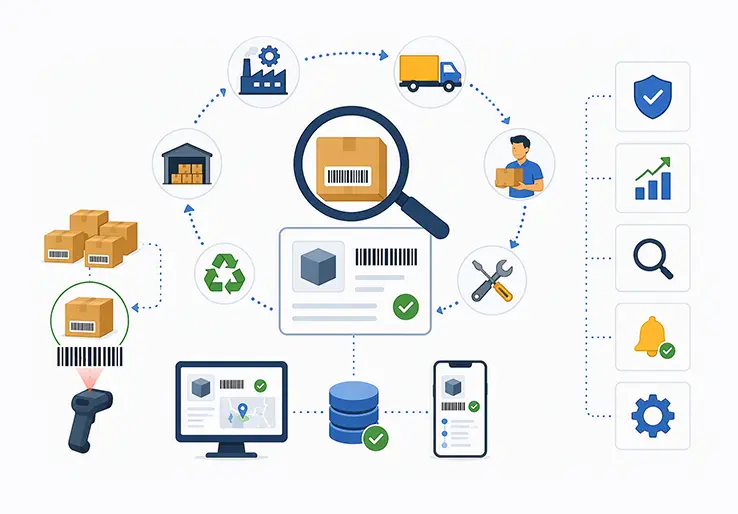
Serial number tracking is the practice of assigning a unique serial number to each individual unit of a product and recording that number across every stage of its lifecycle from purchase and receipt to storage, sale, warranty service, return, and disposal. It gives businesses item-level visibility and complete traceability instead of just knowing quantities on a shelf.
For retailers, distributors, manufacturers, and service businesses handling serialized stock such as electronics, equipment, auto parts, medical devices, and other high-value or warranty-controlled products, that level of control is no longer optional. In 2024–2026, supply chains are more complex, regulatory requirements are stricter, and customers expect faster resolution when something goes wrong. Serial number tracking lets you pinpoint one unit among thousands, verify warranty status, prevent return fraud, support targeted recalls, maintain auditable inventory records, and trace a product’s full history in seconds.
Typical use cases span consumer electronics (tracking a mobile phone by IMEI), auto parts (linking components to vehicles for recalls), IT hardware (managing laptop and server assets), medical devices (regulatory compliance and maintenance logs), and high-value retail items like jewelry and watches. Businesses across India, the Middle East, and North America are adopting serialized inventory management at an accelerating pace.
Modern inventory management software and ERP systems like LOGIC ERP automate serial number capture at goods receipt (GRN), stock transfer, POS billing, and service centers — eliminating the manual effort that makes spreadsheet-based tracking unreliable. The sections ahead explain what serial number tracking is, the benefits it delivers, how to implement it, which software features matter, best practices to follow, where it is used, how it differs from related identifiers, why manual methods fail, and how LOGIC ERP supports end-to-end serial number management.
A serial number is a unique identifier assigned to exactly one unit. It is never reused. For example, a serial like TV-2026-000493 identifies one specific 55-inch LED TV, distinguishing it from every other TV of the same model. This is fundamentally different from a SKU, which identifies a product variant (model, size, color) but applies to multiple units sharing the same attributes.
With SKU-level tracking, you know you have 200 units of a particular laptop model. With serial tracking, you know which specific unit is in which warehouse, who the customer received it from, when its warranty expires, and whether it has been serviced before. That is the difference between quantity-based and unit-level visibility.
Serial number tracking links each unit to its purchase order, supplier, warehouse location, customer invoice, and service history. Consider this example: a 55-inch LED TV is purchased via a PO in LOGIC ERP, its serial number is scanned at GRN, it moves to a retail store, it is sold at POS with the serial captured on the invoice, and two years later, the customer raises a warranty repair request — the system instantly pulls the TV’s complete history using that one serial number.
Serial number tracking lets you:
A serialized tracking approach should cover the product lifecycle from receiving to after-sales. The end-to-end flow looks like this: Supplier → Purchase Order → Goods Receipt (GRN) → Warehouse/Bin → Stock Transfer → Store/POS → Customer Invoice → Warranty & Service → Return/Replacement → Scrap.
At each stage, the system captures serial numbers at critical milestones such as receiving, manufacturing, and shipping. Serial numbers are either manufacturer-assigned (like IMEI numbers on phones) or system-generated using configurable patterns — prefixes, fixed lengths, and a sequential number scheme. For instance, LOGIC ERP can auto-generate serials like LAP-DEL-2026-00001 for laptops received at a Delhi warehouse.
Barcode scanning, QR code scanning, or RFID scanning is used at each touchpoint to avoid manual typing errors and prevent duplicate serial numbers from entering the system. Every movement — GRN, pick, pack, dispatch, stock adjustment, service job card — writes a transaction record against that serial number in the inventory management software. This gives you serialized items that provide complete traceability throughout their lifecycle.
Here is a concrete example: a laptop is imported via a purchase order. At GRN, its manufacturer serial is scanned and recorded. The laptop is assigned to Bin A-14 in Warehouse 3. It transfers to a retail store, where it is sold at POS with the serial printed on the invoice. Six months later, the end user reports a defect. An RMA (return merchandise authorization) is raised, and the service team instantly pulls up the item’s history — purchase date, supplier batch, warehouse path, sale invoice, and previous service notes. Serial number tracking provides end-to-end traceability in manufacturing and distribution workflows like this.
Key lifecycle stages and what is captured:
If your business is moving from spreadsheets to serial number tracking software, here is a practical implementation roadmap for 2025–2026.
Define which SKUs need serialization
Not every inventory item needs a serial number. Focus on high-value equipment and warranty-controlled products — items that require serialization include electronics above a certain price threshold (e.g., mobiles above ₹5,000), medical devices, auto spares, and industrial equipment. Use cost, warranty obligation, and regulatory requirement as your decision criteria.
Design serial numbering rules
Decide whether to use manufacturer serials, internal serials, or both. Standardizing serialization formats helps create a logical naming convention — define prefixes, lengths, alphanumeric patterns, and rules that prevent reuse. Unique serial numbers must remain unique throughout a product’s life.
Configure your software
Enable the serialization module in your ERP software or inventory management software. Set rules that enforce serial capture at receiving, packing, POS billing, and service entries. Configure validation to reject duplicate serial entries.
Set up labeling and scanning
Ensure every serialized unit carries a legible barcode or QR label. Equip warehouse and store staff with scanners or mobile devices. Barcode management is essential for accuracy at scale.
Train staff
Warehouse teams, POS operators, and service technicians must understand why serial capture matters and how to scan or enter serials correctly. Document SOPs.
Pilot in one location
Run a pilot in one warehouse or store. Identify gaps — missed scans, label issues, process bottlenecks — and refine before rolling out broadly.
Roll out and monitor
Expand to remaining locations. Implementing strict warehouse workflows enhances inventory accuracy and management across the board.
Record serials on purchase orders and GRNs
Assign serial numbers at receiving, link them to PO line items, and verify counts. This is where your traceability chain begins.
Enforce serial capture at sales orders and POS
Every outbound transaction must record which serial left your inventory and which customer received it.
The flow your system must support: Supplier → Warehouse (serial captured at GRN) → Store (serial tracked during transfer) → Customer (serial on invoice) → Service/Return (serial referenced for warranty or RMA).
Minimum steps to implement serial number tracking successfully:
Serial number tracking software is a dedicated module or system that manages the creation, capture, movement, and reporting of serial numbers across the product lifecycle. Businesses outgrowing Excel need serial number software that enforces rules, prevents errors, and provides instant lookup — something spreadsheets simply cannot do.
When evaluating inventory management software, use these features as your checklist:
Integration matters: serial number tracking should link with accounting, GST billing (for India), CRM, and service management. Integrate serialization data with existing ERP or WMS for improved traceability rather than running isolated tools. Mobile apps on Android and iOS can serve as serial number scanning apps for goods receipt, cycle counts, and stock audits — even with intermittent connectivity.
Why is serial number tracking important? Because it transforms inventory from an approximate count into a precise, auditable record of every individual unit. Serial number tracking improves inventory accuracy by recording unique identifiers, and businesses implementing it consistently report accuracy levels above 95%.
Implementing serial number tracking gives item-level visibility that directly impacts fraud prevention, warranty management, and customer satisfaction. Here are the key benefits:
Consider a practical example: a smartphone customer raises a warranty claim. The service team scans the IMEI, confirms the purchase date, checks the warranty period, reviews past service records, and processes the claim — all in under a minute. Without serial tracking, this would involve manual invoice searches and uncertain verification. You can verify warranty claims with confidence because every claim is tied to a specific, traceable unit.
These terms are frequently confused. Here is what each one means and when to use it.
A serial number uniquely identifies a single unit. A lot number (or batch number) groups individual items produced together under similar conditions — useful for tracking expiry dates or manufacturing quality. A SKU (stock keeping unit) identifies a product variant by model, size, or color, but multiple units share the same SKU. A barcode or QR code is a data carrier — it encodes a serial number, SKU, or lot number for fast scanning, but is not an identifier itself. A model number describes a product’s design or configuration and is shared across all units of that model.
| Identifier | Uniqueness | Typical Use | Example |
|---|---|---|---|
| Serial Number | One per unit | Warranty, traceability, recalls | LAP-15-8GB-2026-00421 |
| Lot/Batch Number | One per production group | Expiry, quality control, raw materials | LOT-MAR-2026-07 |
| SKU | One per product variant | Demand planning, stock levels, sales orders | LAP-15-8GB |
| Barcode/QR/RFID | Encoding mechanism | Scanning at touchpoints | Encodes any of the above |
| Model Number | One per design | Product identification, individual product specs | Model X-500 |
You can use serial numbers and lot numbers together. For example, raw materials may use lot tracking for batch quality control, while finished goods use serial numbers for unit-level traceability. Inside a serialized assembly, high-value components might each carry their own serial number, creating a product genealogy.
When should you use each in inventory tracking?
Serial number tracking is no longer limited to pharmaceuticals and consumer electronics. It is now common across manufacturing, distribution, and retail in markets like India, the Middle East, and North America.
Serial number tracking also supports field service teams managing AMC (annual maintenance contract) obligations, preventive maintenance schedules, and managing repairs for installed equipment in HVAC, electrical, and IT infrastructure businesses.
Serial number tracking extends inventory management beyond quantity and location to unit identity and complete history. Instead of knowing “50 routers in Warehouse B,” you know which 50, where each came from, and where each is headed.
In a warehouse management software environment, serial numbers are captured at receiving, verified during put-away to specific bin locations, validated at picking and packing, and recorded on dispatch documents. A warehouse operator scanning a serial at pick confirms the right unit is being shipped against the right sales order — eliminating wrong-item shipments.
ERP-based serial number tracking connects Procurement → Inventory → Warehouse → Production (if applicable) → Sales & POS → Accounting → CRM → Service into one integrated flow. LOGIC ERP, for example, ties the serial number thread through every module so that a service technician looking up a serial can see the purchase order, GRN date, warehouse transfers, customer invoice, GST details, and every prior service event — all from one screen.
Centralizing serial data in an ERP versus using disconnected spreadsheets or point tools eliminates data gaps, ensures consistent audit trails, and makes reporting meaningful. When serial data lives in isolated files, reconciliation across locations becomes nearly impossible.
What good ERP-based serial tracking should support:
Many businesses start with Excel or paper logs to record serial numbers. This works for a handful of items, but breaks down quickly as quantity, locations, and staff count grow. Spreadsheets cannot enforce validation rules, cannot prevent duplicate serial numbers, and cannot provide real-time visibility across operations.
Common challenges of manual serial tracking:
Here is how serial number tracking software solves each problem:
| Challenge | Software Solution |
|---|---|
| Incorrect data entry | Barcode scanning eliminates manual typing errors |
| Duplicate serials | System validation rejects duplicates at entry |
| Lost or fragmented records | Centralized database with full audit trail |
| No real-time visibility | Serial-level inventory updated in real time |
| Difficult warranty verification | Automated warranty dates linked to sale records |
| Slow serial searches | Instant serial number search across all locations |
| Multi-location complexity | Centralized tracking across warehouses and stores |
| Shadow spreadsheets | Single source of truth in ERP |
The transition from manual to software-based serial tracking is not just a convenience upgrade — it is a fundamental shift in operational efficiency and accuracy that directly impacts bottom-line results.
Use this as a practical internal policy guide for companies planning to implement or clean up serial number tracking in 2025–2026.
Choosing the right serial number tracking software is a strategic decision that will affect your inventory accuracy, service quality, and compliance posture for years. Do not treat it as a quick fix.
Use this buyer’s checklist when evaluating options:
Avoid generic inventory tools that only store a serial number field without lifecycle tracking, movement history, or warranty management. Before full rollout, run a pilot or proof of concept in one location to validate that the system meets your scan-to-report workflow.
ERP platforms like LOGIC ERP provide serial number tracking as part of an integrated inventory, POS, and service solution rather than a bolt-on tool — ensuring that serial data flows seamlessly across every business function.
LOGIC ERP is an integrated ERP and inventory management platform with robust serial number tracking capabilities designed for retailers, distributors, and manufacturers handling serialized stock.
Key capabilities include:
LOGIC ERP helps businesses manage serialized inventory across the entire product lifecycle — from the moment a unit enters your supply chain to its final disposition.
Serial number tracking transforms inventory management from approximate quantity counts into a precise, auditable system where every individual unit has an identity and a traceable history. Whether you are managing consumer electronics, auto parts, IT assets, or medical devices, knowing exactly where each unit is — and where it has been — is the foundation of effective operations, warranty management, and fraud prevention.
Moving from spreadsheets to serial number tracking software or ERP delivers measurable results: faster audits, smoother recalls, reduced write-offs, and higher customer trust. In 2024–2026, as regulatory pressure increases and supply chains grow more complex, businesses that lack unit-level traceability will find themselves at a competitive and compliance disadvantage.
Review your current inventory tracking methods against the features, best practices, and checklist in this guide. If you are ready to implement or upgrade serial number tracking, explore how LOGIC ERP integrates serial number management with inventory, POS, warehouse, and service workflows — giving you complete traceability from a single platform. Reach out for a demo or consultation to see how it works in your specific industry and operational setup.
Call at +91-73411-41176 / +91-73411-41175 or send us an email at sales@logicerp.com to book a free demo today!
Serial number tracking is the process of assigning a unique serial number to each individual unit of a product and monitoring it through every stage of its lifecycle — purchasing, warehousing, sale, warranty, service, and return. It gives businesses item-level traceability and precise inventory control instead of just tracking quantities.
Serial number tracking is crucial for inventory control and warranty management. It improves inventory accuracy, prevents return fraud, enables targeted recalls, and ensures compliance with industry regulations. Businesses handling high-value or warranty-controlled products cannot maintain accurate records without it.
At each milestone — goods receipt, stock transfer, sale, and service — the system records the serial number against the transaction. Barcode or QR scanning captures serials automatically. Every movement creates a log entry, building an audit trail that covers the product lifecycle from receiving to after-sales.
Serial number tracking software is a dedicated application or ERP module that manages serial number creation, capture, validation, movement tracking, warranty dates, and reporting. It replaces spreadsheets with enforceable rules, real-time visibility, and centralized data — functioning as core serial number software for operations teams.
A serial number identifies a single unit uniquely. A lot number groups multiple units produced together under similar conditions. Serial numbers enable unit-level traceability for warranty and recalls, while lot numbers support batch-level tracking for expiry management and quality control. Lot tracking is common in pharma and food; serial tracking in electronics and equipment.
Yes. Barcodes and QR codes are encoding mechanisms that carry serial numbers for quick scanning. Scan a barcode at receiving, and the serial number is captured instantly without manual typing — reducing errors and speeding up operations across warehouses and stores.
Electronics, automotive, IT hardware, medical devices, industrial equipment, high-value retail, solar energy, and pharmaceuticals are the primary industries. Any business dealing with warranty-controlled, regulated, or high-value individual items benefits from serialized inventory tracking.
Yes. LOGIC ERP tracks serial numbers across multiple warehouses, retail stores, and franchise outlets from a centralized system. Every stock transfer, sale, and service event is recorded against the serial, providing real-time visibility regardless of where the unit is located.
It links each serial number to its sale date, customer, warranty period, and service history. When a customer raises a claim, the system instantly verifies eligibility and shows past repairs. This eliminates guesswork, reduces fraudulent claims, and speeds up service resolution.
Absolutely. Serial number tracking improves inventory accuracy by recording unique identifiers for every unit. It prevents return fraud by verifying that the returned serial matches what was originally sold. If someone attempts to return a different unit or a stolen device, the mismatch is flagged immediately.
A SKU identifies a product variant — model, size, color — and is shared by multiple units. A serial number identifies one specific individual unit within that SKU. You need both: SKUs for demand planning and stock levels, serial numbers for unit-level traceability and warranty management.
Yes. With centralized serial number tracking software or ERP, serial numbers are tracked as they move between warehouses, distribution centers, and retail stores. Each transfer is logged, so you always know the current location and complete movement history of every serialized unit.
Inventory management software is a digital tool that helps businesses track, manage, and optimize their stock levels, orders, sales, and deliveries. It automates inventory tracking processes, reduces errors, improves accuracy, and provides real-time visibility into stock across multiple locations.
Inventory tracking is the process of monitoring stock quantities, locations, and movements throughout the supply chain. It ensures businesses know what items are available, where they are stored, and when to reorder, helping prevent stockouts and overstocking.
Serial number software is a specialized inventory tool that assigns, records, and tracks unique serial numbers for individual product units. It provides item-level traceability, supports warranty management, prevents return fraud, and enables detailed reporting on each serialized item.
Serial numbers can be assigned either by the manufacturer or internally by a business using predefined rules and formats. Inventory or serial number software typically automates this process at receiving or production, ensuring each unit gets a unique, non-reusable identifier for accurate tracking.
A purchase order (PO) is a formal document issued by a buyer to a supplier detailing the products, quantities, agreed prices, and delivery terms. It initiates the procurement process and serves as a reference for receiving and recording serial numbers in inventory management systems.
Popular Products