Understanding E-invoice Sample and Templates For Businesses

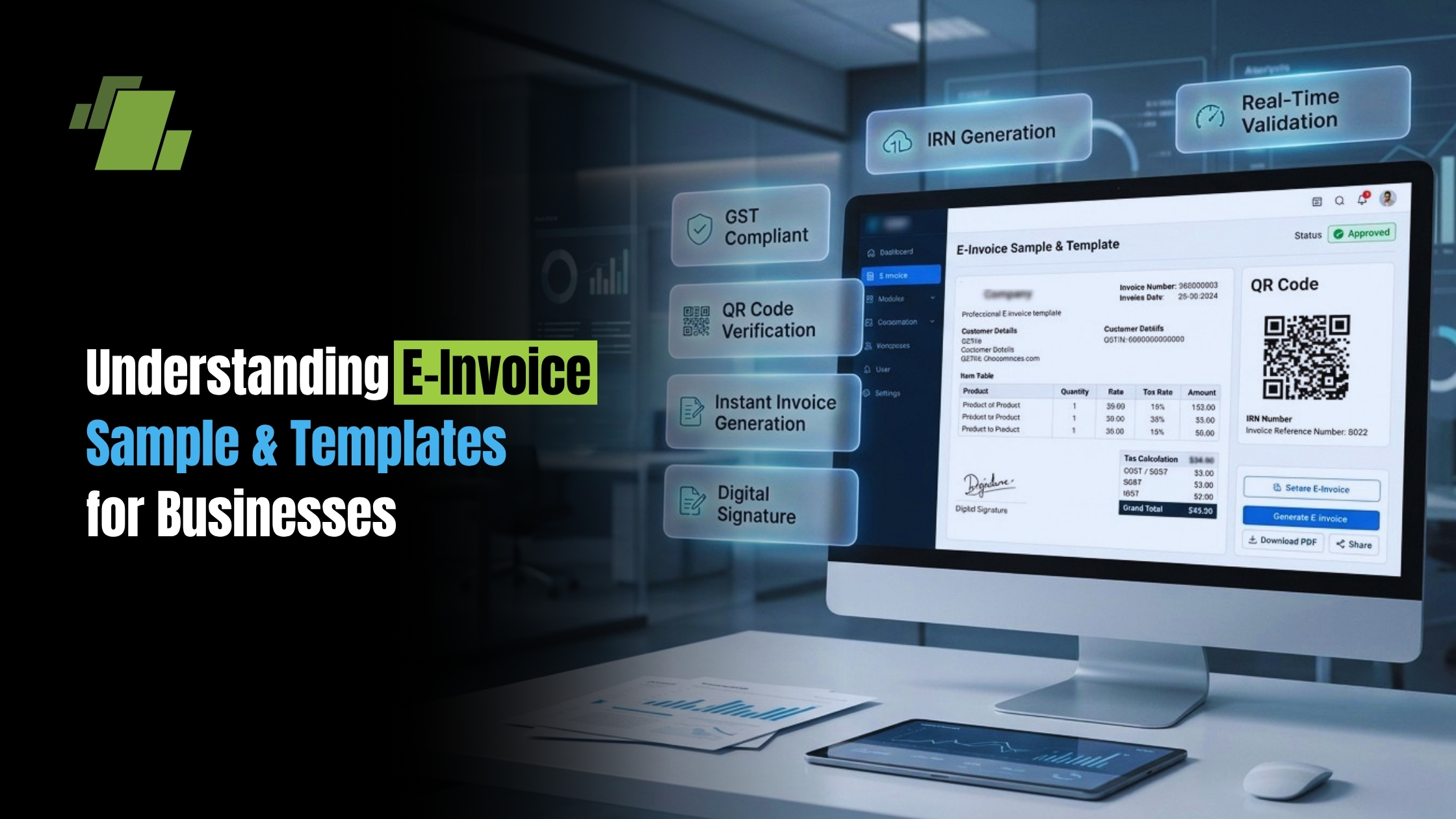
E-invoices are transforming how businesses handle billing with advanced e-invoice software. They replace traditional paper invoices with digital versions. This shift offers many benefits. For quick reference, this guide includes an e invoice sample alongside a digital invoice sample to illustrate typical fields and structure.
Businesses save time and reduce errors with e-invoices. They streamline the invoicing process, making it more efficient. E-invoices also support environmental goals by cutting paper use. Many teams also start with an online invoice template to accelerate setup.
Contact Us
Free Demo Request
Understanding e-invoice samples is crucial for businesses. These samples guide companies in creating their own digital invoices. They ensure all necessary details are included. A sample e invoice provides a practical blueprint for layout and compliance.
E-invoice templates are customizable. They can be tailored to fit specific business needs. This flexibility helps maintain a professional image. You can begin with an e-invoice template and adapt sections as needed.
In this guide, we explore e-invoice samples. Learn how to create, customize, and implement them effectively. We also outline how to choose an e-invoicing format or e invoice format that fits your systems.
What Is an E-Invoice?
E-invoices are digital documents replacing traditional paper invoices. They are used to bill customers or clients electronically. This method streamlines the financial transaction process.
An e-invoice contains key information necessary for payment. It includes details such as the invoice number and issue date. Payment terms and due dates are also featured prominently.
E-invoicing promotes accuracy in financial operations. Businesses reduce the risk of errors seen with manual data entry. E-invoices offer easy access and quick updates to billing data.
E-invoices are generally exchanged in standardized formats, often defined by an e-invoicing format or e invoice format such as XML or PDF. These formats ensure compatibility and ease of processing. This compatibility simplifies integration with other digital financial systems.
Below is a typical list of components found in an e-invoice:
- Company name and contact information
- Client or customer details
- Invoice number and date
- Description of goods or services
- Total amount due and payment terms
Understanding these elements is fundamental to implementing e-invoicing. Businesses gain efficiency and reliability by adopting this digital solution. You can compare these fields with the sample e-invoice shown later.
Key Components of an E-Invoice Format
Every e-invoice format (that is, an e invoice format used for exchange) must include specific details to be effective. These components are essential for clarity and compliance. Proper structuring helps facilitate smooth transactions.
The first essential element is the seller’s information. This includes the seller’s name and contact details. A company logo often enhances credibility and recognition.
Next is the buyer’s contact information, vital for accurate delivery. This involves the customer’s name and address. Accurate client details prevent confusion and ensure proper invoicing.
The invoice number plays a critical role in tracking. It acts like an identification code for sorting and reference. Unique numbers reduce errors in financial management.
Following this, the e-invoice lists the items or services provided. Each entry includes a description, quantity, and unit price. This section culminates in a total amount due.
A list summarizing the key components:
- Seller and buyer information
- Unique invoice number
- Itemized list with descriptions
- Total amount and payment terms
Using these components effectively optimizes the invoicing process. They ensure compliance with legal and industry standards. Accurate invoices lead to smoother business operations.
Benefits of Using E-Invoice Templates
E-invoice templates bring efficiency to business operations. They simplify the invoicing process, saving valuable time for companies. With templates, businesses can focus more on their core activities. Even a basic e-invoice template can cover regulatory essentials.
Consistency is another significant advantage of using e-invoice templates. Uniformity in invoicing ensures a professional appearance and brand consistency. This consistency helps in building trust with clients.
Customization is a key feature of these templates. Businesses can tailor templates to fit specific needs and preferences. Customizable templates ensure that all necessary details are included.
Finally, e-invoice templates enhance financial management. They integrate seamlessly with accounting systems, providing accurate financial records. This integration improves tracking and analysis of cash flow.
Here are the key benefits summarized:
- Time-efficient invoice creation
- Consistent and professional formatting
- Easy customization for specific needs
- Better financial tracking and management
Employing templates streamlines tasks and improves efficiency across various business facets.
E-Invoicing Formats: Types and Standards
E-invoicing formats vary to meet diverse business needs. They cater to different industries and regulatory requirements. Understanding these formats helps in selecting the most suitable one for your company.
Standardized e-invoicing formats are crucial for compliance. They ensure invoices meet both local and international regulations. Staying compliant avoids legal issues and maintains business integrity.
There are several types of e-invoice formats to consider. PDF and XML are among the most popular. Each type serves different purposes and offers unique advantages.
Choosing the right format depends on business needs. Some formats are better for easy sharing and storage. Others focus on compatibility with accounting systems.
Here’s a quick look at common e-invoicing formats:
- PDF: Easy to share and view; ideal for an invoice sample pdf
- XML: Good for system integrations
- Excel: Customizable and familiar to users
- HTML: Suitable for online platforms and works well with online invoice template libraries
Selecting the appropriate e-invoice format optimizes business operations. It also ensures that the invoicing process is smooth and hassle-free.
How to Create a Digital Invoice Sample
Creating a digital invoice sample involves several key steps. It’s important to start with a clear template or a digital invoice sample to ensure consistency. A well-organized invoice simplifies both creation and management.
First, choose an e-invoice template that aligns with your brand. Templates can be downloaded or designed with software tools. Ensure that the layout is clean and professional for the best effect.
Next, enter essential business details. Include your company name, contact information, and logo. This establishes your identity and builds trust with clients.
Afterwards, add client details to personalize the invoice. Accurate client data ensures that the invoice reaches the correct recipient. Such details usually include the client’s name, address, and contact information.
Now, list the products or services with their prices. Make sure to include quantities and any applicable discounts or taxes. Clear itemization prevents misunderstandings and disputes.
Here’s a quick checklist to guide you:
- Choose a suitable template
- Enter business and client information
- List items with prices and terms
- Review for accuracy and completeness
Once everything is entered, review the digital invoice sample. Ensure that all details are correct and the format is consistent. When satisfied, save it as a PDF or another preferred format for distribution; keeping an invoice sample pdf helps teams reuse, review, and share quickly.
Crafting a digital invoice carefully saves time and effort in the long run. This approach can lead to smoother operations and enhanced client relations.
Sample E-Invoice: Downloadable Templates and Examples
E-invoices have become an essential tool for businesses of all sizes. Having access to downloadable templates simplifies the invoicing process significantly. These templates offer a quick and efficient way to manage billing tasks.
Many online platforms provide free e-invoice templates. These templates come in various formats, such as PDF, Excel, and Word. Selecting the right format can streamline your billing process. Look for an e-invoice template you can edit in your accounting app or download as a sample e-invoice.
Using a sample e-invoice gives a glimpse into professional invoicing. Sample templates typically include all the necessary components, like invoice numbers, company details, and payment terms. These features help ensure you meet industry standards and best practices. Many sites also feature an online invoice template gallery and a ready-to-send e invoice sample.
Here’s what you can typically find in a downloadable e-invoice template:
- Invoice number and date
- Business and client contact details
- Description of goods or services
- Payment terms and methods
- Total amounts and applicable taxes
By using these resources, businesses can maintain a polished and uniform invoicing system. Downloadable e-invoice templates offer both convenience and consistency, aiding in financial management.
These templates serve as a guide and can be tailored to suit specific business needs. With minor edits, they can easily reflect your branding and requirements. This flexibility makes downloadable templates invaluable for modern businesses.
Ensuring Authenticity: Avoiding Fake Invoices and Handling Complaints
Maintaining authenticity in e-invoices is crucial. Fake invoices can lead to financial losses and damaged reputations. Therefore, implementing measures to prevent fraudulent activities is essential for any business.
One way to ensure invoice authenticity is by using digital signatures. Digital signatures add a layer of security. They help verify the origin and integrity of the document, reducing the risk of tampering.
Handling complaints about fake invoices requires a structured approach. Businesses should establish protocols for clients to report suspicious invoices. By encouraging open communication, companies can address concerns promptly and efficiently. Consider providing a fake invoice complaint e mail sample so customers know how to report suspicious documents.
Here are steps to help prevent and manage invoice fraud:
- Use e-invoicing software with security features.
- Implement verification processes for incoming invoices.
- Educate staff about recognizing and handling fake invoices.
- Develop a system for reporting and resolving invoice issues.
By following these guidelines, businesses can protect themselves and maintain trust with their clients. Building robust systems to address authenticity boosts both security and customer confidence.
Best Practices for Implementing E-Invoicing in Your Business
Implementing e-invoicing effectively requires planning and strategy. Start by assessing your existing invoicing processes. Identify areas where digital invoicing can streamline operations and reduce errors.
Ensure you’re choosing the right e-invoicing software for your business needs. Look for features like integration with accounting systems and customization options. These features can enhance efficiency and fit your unique business processes.
Training your team is crucial for a smooth transition to e-invoicing. Conduct workshops or webinars to familiarize them with new tools and processes. This step minimizes disruptions and promotes consistent use of the new system.
Remember to communicate changes to your clients. Clearly explain the benefits of the new e-invoicing system. Highlight conveniences like faster processing and more accurate records.
Here are some best practices to guide your implementation:
- Choose a reliable e-invoicing platform.
- Ensure compliance with industry standards.
- Provide regular training and support.
- Set clear communication channels with clients.
- Evaluate and adapt processes continuously.
Adopting these practices leads to a more efficient, transparent, and customer-friendly invoicing system. By embracing e-invoicing, businesses can enhance accuracy, reduce overhead, and improve cash flow.
Conclusion: Embracing E-Invoicing for Business Success
Adopting e-invoicing can revolutionize how businesses handle their finances. Its streamlined processes and improved efficiency offer tangible benefits. Transitioning can seem complex but yields long-term rewards.
E-invoices provide a seamless and secure way to handle billing. They reduce errors, speed up payments, and enhance record-keeping. Choosing to adopt e-invoicing reflects a commitment to innovation and sustainability.
Embrace e-invoicing to position your business for success. It’s a step towards greater accuracy, efficiency, and professionalism in financial operations. The future of invoicing is digital; ensure your business is part of it.
Call at +91-73411-41176/75 or send us an email at sales@logicerp.com to book a free demo today!
Frequently Asked Questions
When stepping into e-invoicing, queries often arise. Addressing these can ease the transition and maximize benefits. Here, we answer some of the common questions.
1. What Are E-Invoice Samples?
E-invoice samples are examples of completed electronic invoices. An e invoice sample or sample e-invoice serves as a guide for businesses new to digital invoicing.
2. Why Use an E-Invoice Template?
Templates ensure consistency and compliance. They save time by providing a pre-set format for new invoices. An e-invoice template can also align with your accounting software.
3. Can E-Invoices Be Customized?
Yes, most e-invoicing platforms allow for customization. Businesses can add logos, change formats, or include additional information as needed.
4. How Do E-Invoices Improve Cash Flow?
By speeding up invoice delivery and reducing errors, e-invoices hasten payment cycles. This improvement positively impacts cash flow.
5. Are E-Invoices Secure?
E-invoices often include security features like encryption and digital signatures. These measures protect sensitive information and authenticate documents.
Understanding these points helps businesses implement e-invoicing smoothly. Leverage e-invoice samples to enhance your invoicing process efficiently.
6. What’s the Difference Between an E-Invoice, a Digital Invoice, and an Invoice Sample PDF?
An e-invoice is an electronic billing document exchanged in standardized formats (like XML or PDF) to ensure compatibility and efficient processing. A digital invoice is simply the invoice in a digital form (often a human-readable layout such as PDF or HTML) used for viewing and sharing. An invoice sample PDF is an example or template you can reference or reuse to understand typical fields and structure.
7. Which Components are Essential in Every E-Invoice?
Include clear seller and buyer details, a unique invoice number, dates, an itemized list, and totals with terms. Specifically:
- Seller information (name, contact details; logo can enhance credibility)
- Buyer/customer information (name, address, contact)
- Unique invoice number and issue date
- Itemized descriptions with quantities and unit prices
- Total amount due, applicable taxes, and payment terms/due date
- Optional: payment methods
8. How do I Choose the Right E-Invoice Format for my Business?
Match the format to how you work and what your systems need:
- PDF: best for easy sharing and viewing (great for an invoice sample PDF or final copies)
- XML: best for system integrations and automated processing
- Excel: familiar and customizable for drafting or internal use
- HTML: suited for online platforms and web-based templates Also consider compliance needs and compatibility with your accounting software.
9. How Can I Customize an E-Invoice Template without Losing Consistency?
Start with a clean, professional template and make brand-aligned tweaks while preserving required fields:
- Add your logo and maintain consistent branding (colors, fonts)
- Keep core sections (seller/buyer info, invoice number/date, items, totals, terms) in predictable places
- Include all necessary details to meet regulatory and client expectations
- Test the template with your accounting/invoicing system and review for accuracy before rollout
10. How do we Prevent Fake Invoices and Handle Related Complaints?
Combine security features with clear processes:
- Use e-invoicing software that supports security measures
- Apply digital signatures to verify origin and integrity
- Implement verification steps for incoming invoices
- Train staff to spot and escalate suspicious documents
- Provide customers with a clear reporting channel (e.g., a fake-invoice complaint email sample)
- Respond promptly and document resolutions to maintain trust

Author
Gurbir Singh
Co-founder & Managing Director | LOGIC ERP Solutions Pvt. Ltd.
With 30+ years of experience in the tech industry, I took the helm of technology & product development, ensuring LOGIC ERP’s continuous innovation & leadership in the evolving tech landscape.