Understanding the Mobile Shop Bill Format

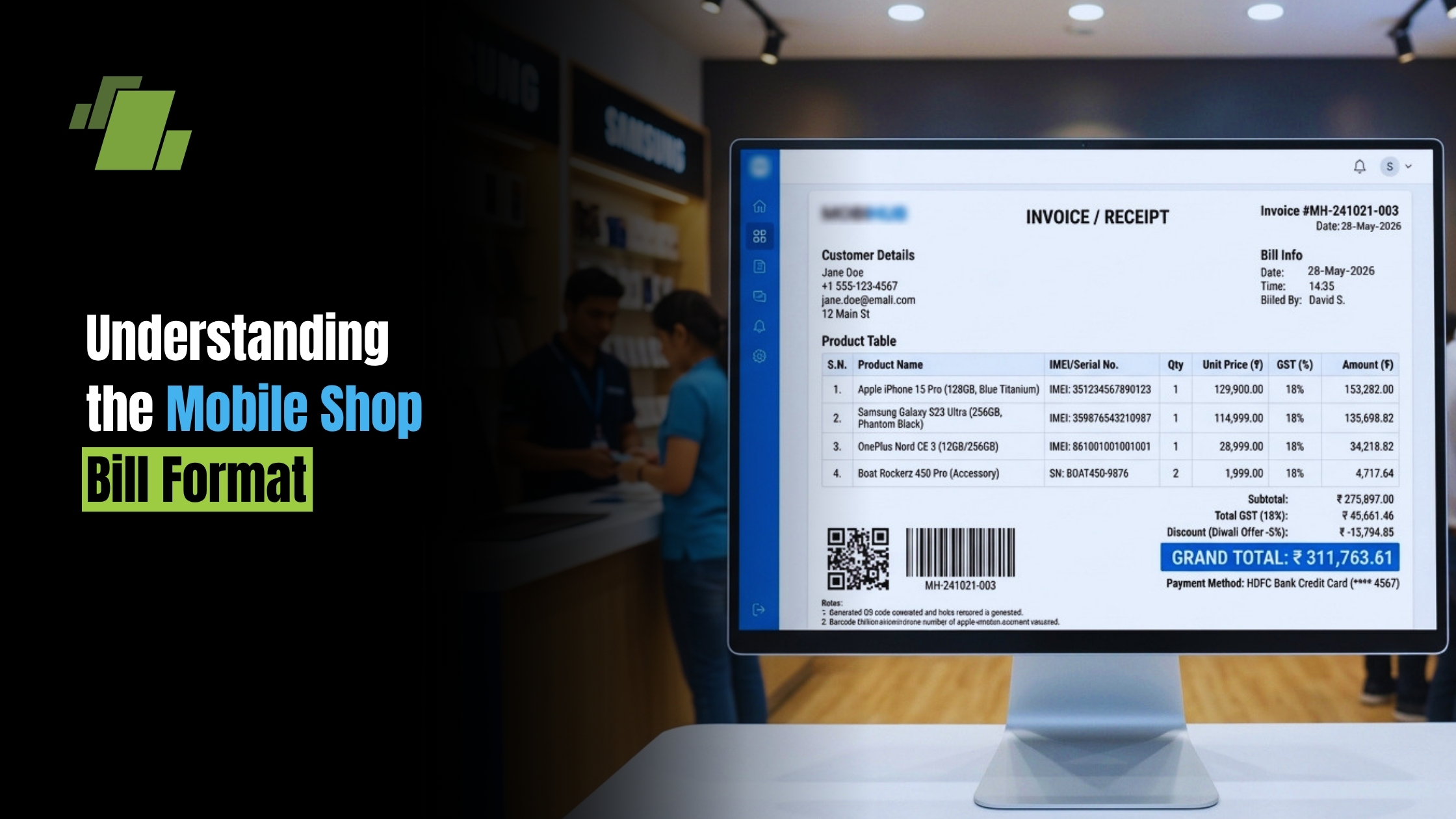
In today’s fast-paced retail world, having a clear and efficient billing system is important for smooth operations and better customer experience. Mobile shop bill formats and choosing the right mobile bill format for your store play a vital role in this process. They ensure accurate record-keeping and enhance customer satisfaction.
Whether you’re a mobile shop owner or a retail business manager, understanding bill formats is essential. These formats can be digital or paper-based, each with its own benefits, and may start from a blank mobile bill that you customize into a reusable template. Clear guidance helps you issue a compliant mobile shop bill every time.
A well-structured bill format not only aids in inventory management but also boosts professionalism. It reflects the credibility of your business and builds trust with customers.
In this guide, we’ll explore various mobile shop bill formats. You’ll learn how to create, customize, and download them for your business needs, including where a quick mobile bill download can speed up setup.
Contact Us
Free Demo Request
What is a Mobile Shop Bill Format?
A mobile shop bill format serves as a structured blueprint for creating invoices. It ensures all necessary details are captured accurately and is suitable for both printed receipts and a mobile bill pdf download shared with customers. This format is essential for maintaining organized sales records.
The format typically includes the shop’s name, address, and contact information. It also lists customer details, purchase date, item description, quantity, price, and total amount. These details are crucial for both the seller and the buyer.
Bill formats can vary from simple to intricate, based on business needs. Some prefer a minimalist approach, while others might include additional information. Key elements like tax details and a unique bill number are often part of the format.
Here’s a typical structure of a mobile shop bill format:
- Shop name and logo
- Customer information
- Date of purchase
- Itemized list of products
- Total amount and taxes
The bill format ensures clarity and comprehensiveness in every transaction.
Key Elements of a Mobile Shop Bill
A mobile shop bill contains various crucial elements that make it functional and informative. At its core, it ensures that both the seller and buyer have a clear record of the transaction. This helps prevent disputes and confusion.
The header typically includes the shop’s name and logo. This not only brands the bill but also adds a professional touch. Following that, there’s space for customer information, such as name and contact details. This can be vital for follow-ups or for warranty purposes.
One of the most critical sections is the itemized list of products. It typically details each product sold, along with the quantity and unit price. The bill also specifies the total amount due, including any applicable taxes.
Additional elements can enhance the bill’s utility:
- Terms and conditions
- Payment methods accepted
- Warranty or return policy details
- Contact information for customer support
These elements ensure that all parties have the necessary information, promoting transparency and trust.
Types of Mobile Shop Bill Formats
Understanding the various types of bill formats is crucial for choosing the right one for your business. Mobile shop bills can be broadly classified into two categories: paper-based and digital. Each format has its unique advantages, depending on the shop’s needs and customer preferences.
Paper-based formats remain popular for their simplicity and directness. They don’t require technical skills and are easily available. These bills are often issued from a mobile shop bill book, pre-printed for convenience. However, they require physical storage space and can be more prone to loss or damage.
Digital formats, on the other hand, are rapidly gaining favor due to their accessibility and efficiency. They can be stored electronically, saving physical space, and are easily accessible for future reference. Digital bills can also be shared via email or messaging apps for convenience, or offered as a mobile bill pdf download.
Choosing between these formats depends on various factors, such as transaction volume and shop operations. However, many mobile shops now use a combination of both to cater to different customers’ needs.
- Paper-based: traditional, no tech skills needed, easy to manage
- Digital: eco-friendly, easy to store, shareable
Understanding these options helps mobile shop owners streamline operations and meet customer expectations effectively.

Paper-Based Bill Formats
Paper-based bill formats are the traditional choice for many mobile shops. They are tangible, which can be reassuring for some customers. Commonly, these bills are stored within a mobile shop bill book.
Advantages of paper-based bill formats include:
- Simplicity in use and management
- Immediate availability
- Tangibility for record-keeping
However, they require manual storage and are less environmentally friendly. They’re ideal for small shops with lower transaction volumes or customers who prefer physical receipts.
Digital Bill Formats
Digital bill formats offer a modern alternative with increased efficiency. They utilize technology to streamline the billing process, benefiting both the shop and its customers. These bills can be created using software applications like Excel or specialized billing software. Many tools also let you export a mobile bill format as PDF for quick mobile bill pdf download.
Advantages of digital bill formats include:
- Eco-friendly and paperless
- Easy to store and retrieve electronically
- Capability to share via digital platforms
They not only reduce physical clutter but also simplify record-keeping. For shops with high transaction volumes, digital formats increase operational efficiency and enhance the customer experience.
How to Create a Mobile Shop Bill Format
Creating a mobile shop bill format involves careful planning and design to meet business needs. Start by identifying the key elements your bill needs to include, such as shop details, transaction information, and pricing.
Next, choose the platform for your bill format this could be paper-based or digital. For digital formats, software tools like Microsoft Excel or Word are useful for creating templates. Alternatively, specialized billing software can provide more advanced features and customization options. If you prefer to begin with a blank mobile bill, convert it into a saved template for repeated use.
When designing your bill, make sure it aligns with your brand. Incorporate logos and color schemes to present a professional appearance. A well-branded bill can enhance customer trust and loyalty.
Here’s a quick checklist for creating your bill format:
- Identify key elements: shop details, transaction info
- Choose a format: paper-based or digital
- Design with branding: logos, colors, and layout
Consider testing your format with a few transactions before full-scale implementation. This ensures everything functions smoothly and meets your business’s operational needs. Regularly review and update the bill format to stay current with industry standards and customer preferences.
Downloadable Mobile Shop Bill Templates
For those seeking convenience, downloadable mobile shop bill templates offer an efficient solution. These templates are ready-made and can save you time in setting up your billing system. If you need a quick mobile bill download, many libraries offer ready-to-edit files. Often you can get a mobile bill pdf download alongside Word or Excel versions.
Downloading these templates is straightforward. Many websites offer free and paid options that you can modify to match your shop’s specifics. Look for templates that include essential elements, such as item descriptions, prices, and tax details. These templates often come in PDF, Word, or Excel formats, making them easy to use and print.
When selecting a template, consider whether it aligns with your brand image. You might find templates with customizable features, allowing you to incorporate your logo and color scheme. Here’s what you can expect with downloadable templates:
- Various design styles
- Essential billing elements included
- Options for customization
These templates serve as a great starting point, enabling you to quickly establish a consistent billing approach.
Customizing Your Mobile Shop Bill
Customizing your mobile shop bill offers a personalized touch to your transactions. Tailor the format to reflect your shop’s brand identity and operational requirements. A unique bill format can set your business apart and build customer trust.
Begin by choosing elements that align with your brand, such as color schemes and logos. Also, consider including fields that may be specific to your shop, like warranty details or promotional messages. This personalization can enhance the overall customer experience.
Customization also involves making the bill format practical for your business. Ensure it allows for easy updates and modifications. Essential customization elements might include:
- Logo and brand colors
- Custom fields for specific details
- Adaptable layout for future changes
With a well-customized bill, you create a memorable and smooth buying experience for your customers.
Best Practices for Using Mobile Shop Bill Formats
Utilizing mobile shop bill formats effectively can streamline your business operations and enhance customer satisfaction. Start by ensuring the format is easy to read and understand. This helps prevent misunderstandings during transactions.
Regularly review and update the bill format to keep it relevant. Stay informed about changes in tax regulations or business operations. Timely updates can save you from legal issues and customer disputes.
Using technology can further improve billing efficiency. Digital formats allow for easy storage and retrieval of bills. They also support seamless integration with point-of-sale systems and accounting software.
To make the most of your mobile shop bill format, consider these best practices:
- Maintain clarity and simplicity in design
- Regularly update for compliance and relevance
- Integrate with POS and accounting systems
By following these practices, you not only enhance operational efficiency but also build a strong rapport with your customers. Keep billing processes smooth and reliable for long-term success.
Conclusion
In conclusion, selecting the right mobile shop bill format is vital for smooth operations. Whether choosing digital or paper-based, a well-crafted bill aids in inventory control and financial management.
Staying compliant with legal standards while maintaining clear records enhances credibility and customer trust. By customizing your bill format, you reflect your brand, cater to customer needs, and ensure efficient transactions. This effort ultimately contributes to your business success.

Call at +91-73411-41176/75 or send us an email at sales@logicerp.com to book a free demo today!
Frequently Asked Questions
1. What information should every mobile shop bill include?
At minimum, include the shop’s name (and logo), address, and contact info; customer details; date of purchase; a unique bill/invoice number; an itemized list of products (description, quantity, unit price); applicable taxes; and the total amount due. You can enhance clarity and support with terms and conditions, accepted payment methods, warranty/return policy details, and customer support contacts.
2. How do I choose between paper-based and digital bill formats?
Consider your transaction volume, storage needs, and customer preferences. Paper-based bills are simple and tangible good for lower volumes or customers who prefer physical receipts but require manual storage. Digital bills are eco-friendly, easy to store and retrieve, and shareable (e.g., via a mobile bill PDF download), making them ideal for higher volumes and streamlined operations. Many shops use both to cover all scenarios.
3. What steps should I follow to create a mobile shop bill format from scratch?
- Identify key elements (shop details, customer info, itemized products, taxes, totals, bill number).
- Choose a platform (paper or digital via Word, Excel, or billing software).
- Design with branding (logo, colors, clear layout) and, if starting from a blank mobile bill, save it as a reusable template.
- Test with a few transactions and refine.
- Review periodically to stay aligned with business changes and regulations.
4. Where can I get downloadable templates, and what should I look for?
Many websites offer free and paid mobile shop bill templates in PDF, Word, or Excel. Look for essential fields (item descriptions, quantities, prices, tax details, totals), a place for a unique bill number, and customization options (logo, colors). If you need speed, opt for a quick mobile bill download or a ready-to-share mobile bill PDF download that you can brand and reuse.
5. What are best practices for using mobile shop bill formats effectively?
Keep the design clear and simple; include all essentials to prevent disputes. Update the format regularly to reflect tax or process changes. If using digital bills, integrate with your POS and accounting systems for efficiency and reliable record-keeping. Periodically review customer feedback to ensure the bill remains easy to understand and aligned with expectations.

Author
Gurbir Singh
Co-founder & Managing Director | LOGIC ERP Solutions Pvt. Ltd.
With 30+ years of experience in the tech industry, I took the helm of technology & product development, ensuring LOGIC ERP’s continuous innovation & leadership in the evolving tech landscape.


