Billing Machine with Barcode Scanner for Retail Stores

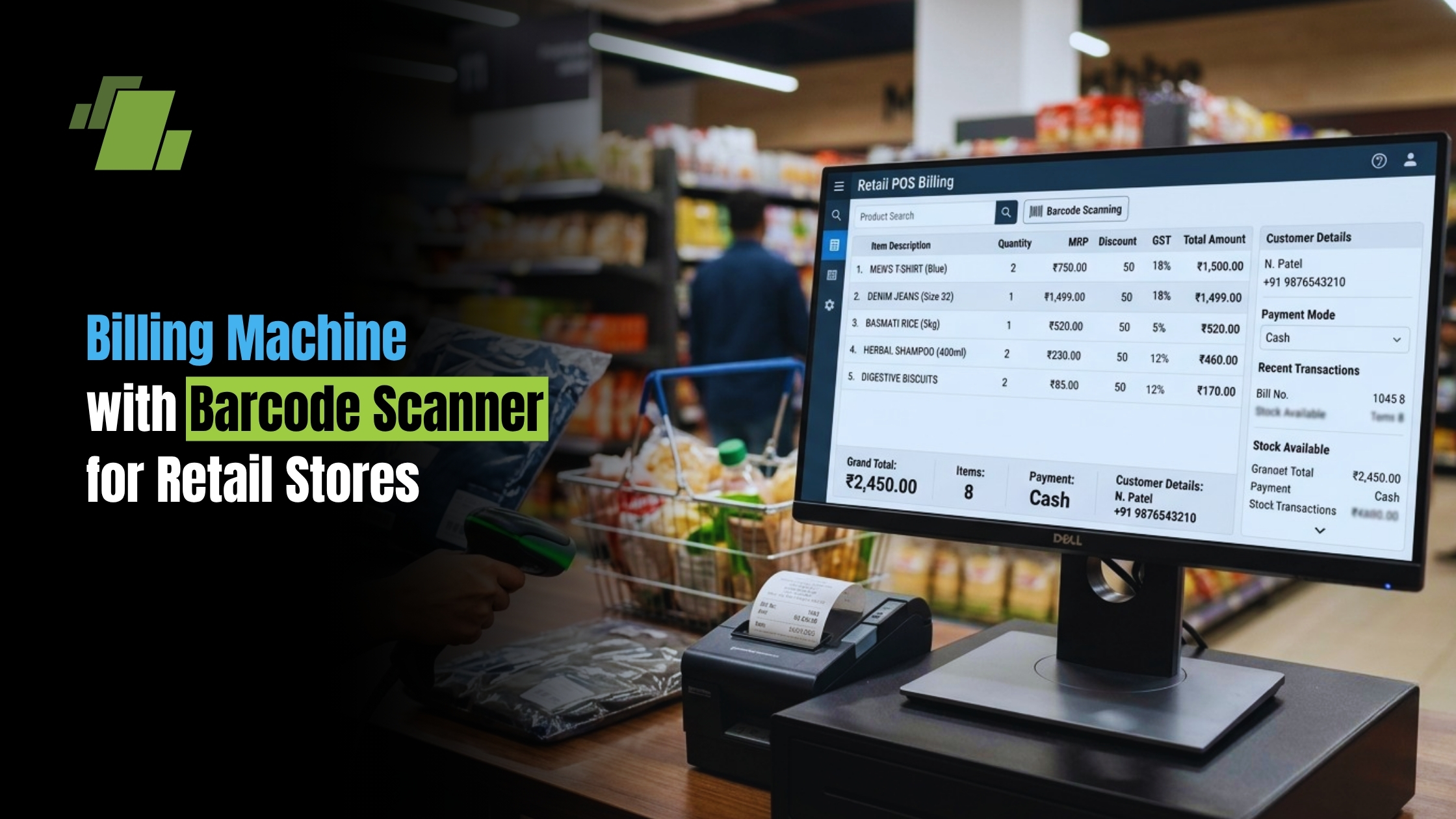
A billing machine with barcode scanner helps retail and grocery shops bill faster, cut manual entry errors, and keep stock records cleaner at the counter. Staff can scan items, weigh loose goods when needed, apply tax rules, print invoices, and update inventory in one smooth flow. For small shops, supermarkets, pharmacies, and convenience stores, the right setup can turn billing from a daily bottleneck into a better business process.
Contact Us
Free Demo Request
How Does a Barcode Billing Machine Improve Daily Checkout?
A barcode billing machine speeds up checkout by reading product data through a point of sale scanner and adding it to the bill without manual typing. This matters most during busy hours, when a few extra seconds per item can create long queues, frustrated customers, and rushed staff. With a barcode billing machine, packaged goods can be scanned, loose items can often be weighed, and the final invoice can be generated with tax details and payment options in one flow.
In a grocery store, the difference is easy to see. A customer may bring rice packets, biscuits, oil, vegetables, and household items to the counter. The packaged items are scanned, the loose produce is weighed if the machine supports scale integration, and the system calculates the amount from stored item data. The cashier does not need to remember prices, search paper lists, or work out totals by hand.
This faster process also protects accuracy. Manual billing depends on memory and attention, especially when prices change or discounts are active. A pos billing machine with barcode scanner uses stored product details, so the same item is billed the same way across shifts and counters.
The Biggest Practical Benefits for Retail and Grocery Stores
A retail billing machine with barcode scanner is not just a faster calculator. It connects billing, product data, inventory, and compliance into a more dependable daily system. That is why many stores move from simple calculators or handwritten bills to a pos barcode machine once their item range grows.
Key benefits include:
- Faster billing: Scanning a barcode is quicker than entering item codes or names by hand, especially in stores with hundreds or thousands of SKUs.
- Fewer billing mistakes: Prices, tax rates, and product names are pulled from saved records, which cuts wrong entries and missed items.
- Cleaner inventory tracking: Each scanned sale can reduce stock automatically when linked to barcode billing software.
- Better customer experience: Shorter queues and clear invoices make checkout feel more professional.
- Simpler staff training: New cashiers can learn scanning much faster than memorizing item codes and price changes.
- Support for GST-ready invoices: Many systems can store tax rates and print itemized invoices for smoother record keeping.
- More control over discounts: Offers, price changes, and schemes can be managed through software instead of verbal updates.
For grocery stores, this is even more useful because billing includes both packaged and loose items. A machine that supports scanning and weighing can help staff follow a simple weigh, scan, bill flow. That means fruits, vegetables, grains, snacks, and branded goods can all move through the same counter with less confusion.
Barcode scanning makes inventory more reliable
Inventory errors usually begin at the counter. If an item is billed under the wrong name, skipped during a rush, or entered at an old price, stock reports become shaky. Over time, this creates problems in purchasing, shelf planning, and cash balancing.
A billing machine with barcode scanner helps by linking each product to a unique code. When the item is scanned, the system identifies the exact product and records the sale. If the machine is connected to barcode billing software, that sale can update the stock count automatically.
This is especially valuable for stores that handle:
- Similar-looking products in different sizes
- Multiple brands in the same category
- Fast-moving packaged food items
- Medicines, cosmetics, or electronics accessories
- Seasonal discounts or combo offers
- Multi-outlet stock transfers
For a small store, this can prevent everyday confusion. For a supermarket, it can support better purchasing decisions because managers can see what is selling, what is slow-moving, and what needs replenishment. The practical gain is not only knowing stock. It is making fewer emergency purchases, cutting dead stock, and avoiding missed sales because shelves are empty.
Which Setup is Better: Standalone Machine or Billing Software?
The better choice depends on counter volume, budget, product range, and whether you need deeper reports. A standalone bill scanner machine can work well for a compact shop that wants simple billing, printing, and scanning in one place. A software-based POS setup is usually better when the business needs detailed inventory reports, multiple users, cloud access, GST records, customer management, or links to different devices.
A standalone barcode billing machine is often preferred by small grocery stores, kirana shops, and quick-service counters because it is straightforward. It may include a display, keypad or touchscreen, thermal printer, scanner support, and item storage. Some models are portable, while others are built for fixed counters.
Barcode billing software, on the other hand, runs on a computer, Android device, or POS terminal and connects with hardware such as barcode scanners, printers, cash drawers, and weighing scales. This approach is more flexible because the business can upgrade devices or add features over time.
Consider these practical differences:
- Choose a standalone machine if you want a compact setup, limited setup work, fast billing, and basic reports.
- Choose software with scanner integration if you need detailed inventory, GST reports, purchase tracking, staff roles, customer records, or multi-branch views.
- Choose a touchscreen POS if your counter handles high volume and staff need a faster, more visual interface.
- Choose a handheld billing machine with barcode scanner if you need mobility for queues, warehouse billing, delivery billing, or table-side ordering.
In many cases, the best answer is a combined setup: a pos billing machine with barcode scanner supported by capable software. Hardware handles the speed at the counter, while software manages the business data behind it.
Understanding Price and Value Before Buying
The billing machine with barcode scanner price can vary widely because businesses may buy a simple device, a full POS terminal, a scanner-printer bundle, or a software subscription with hardware. When people search for billing machine with barcode scanner price in India, they often see different numbers because features, brand, warranty, printer type, scanner quality, battery support, and software capability all affect the final cost.
As a broad market pattern, entry-level machines may suit small shops with moderate billing needs, while touchscreen POS systems and cloud-connected setups usually cost more. Some market examples sit around the lower five-figure range, while larger POS systems cost more. The final price still changes by seller, configuration, taxes, and included accessories.
Before comparing prices, compare what is included:
- Scanner type: A wired scanner may be enough for a fixed counter, while a wireless or handheld scanner helps in larger stores.
- Printer quality: Built-in thermal printers are handy, but check paper size, print speed, and roll availability.
- Item storage: A grocery store needs enough memory or software capacity for current and future SKUs.
- GST support: The system should allow tax rates, GST invoices, and useful sales reports.
- Scale integration: Grocery stores that sell loose goods should check whether weighing scale integration is supported.
- Connections: USB, Bluetooth, Wi-Fi, LAN, or cloud access can affect how easily the setup grows.
- Power backup: Battery support can help where power cuts are common.
- After-sales support: Installation, training, warranty, and service access matter as much as the device itself.
A low-cost retail billing scanner may look attractive, but if it does not connect well with your software or cannot handle your item list, it may create more work later. The better purchase is the one that fits your billing volume, reporting needs, and growth plan.
Features that Matter Most in a POS Barcode Machine
A good pos barcode machine should be easy for staff to use under pressure. Retail counters are busy, noisy, and repetitive, so the system must be quick, stable, and simple. Advanced features are useful only when they make daily work easier.
Look for these features when shortlisting a retail billing machine with barcode scanner:
- Fast barcode recognition so cashiers do not need to scan the same item again and again.
- Product database management for item names, prices, categories, tax rates, and stock levels.
- GST billing support for clean, itemized invoices and easier accounting.
- Discount and offer management for seasonal promotions, loyalty benefits, and combo deals.
- Multiple payment support so cash, card, UPI, and other digital options can be recorded properly.
- Barcode payment system support if your checkout process includes QR-based or digital payment workflows.
- Reports and analytics for sales, stock movement, cashier activity, and daily closing.
- Backup and data security so billing records are not lost if the device fails.
- User permissions to control who can edit prices, cancel bills, or apply discounts.
If you are comparing a tvs billing machine with barcode scanner or any other branded option, judge it by these practical points rather than the brand name alone. The right device should match your counter traffic, product category, and support needs.
Software Turns Scanning into Business Control
The scanner captures the item, but barcode billing software turns that scan into useful business data. Every bill can become a record of what sold, when it sold, who billed it, what tax applied, and how payment was received. Without good software, scanning may speed up billing but still leave inventory and reporting incomplete.
For growing businesses, software can support purchase entries, supplier records, stock alerts, customer details, loyalty programs, invoice sharing, and daily sales summaries. Some systems also support Android or Windows devices, which can help shops that do not want a large desktop setup. If iOS support, cloud syncing, or multi-outlet management matters, confirm compatibility before buying.
This is where a simple counter tool becomes a management system. A supermarket owner can track department-wise sales. A pharmacy can reduce product mix-ups. A clothing store can manage sizes and variants. A grocery owner can check which items move quickly and reorder with more confidence.
Common Buying Mistakes to Avoid
Many businesses buy billing equipment only by looking at the initial price. That can lead to problems if the scanner is slow, the printer is unreliable, the software is hard to use, or the system cannot grow with the store. A slightly better setup often saves more time than the cheapest device.
Avoid these mistakes:
- Buying a machine before listing your needed features
- Ignoring GST, inventory, and reporting needs
- Choosing hardware that does not support your preferred software
- Forgetting to check scanner fit with existing barcodes
- Overlooking weighing scale integration for grocery billing
- Not asking about installation, training, and service support
- Assuming every handheld billing machine with barcode scanner can handle full POS reporting
- Comparing prices without checking what accessories are included
A simple rule helps: map your billing workflow first. Count how many bills you generate each day, how many products you manage, whether you sell loose goods, how many staff use the counter, and what reports you need at closing time. Then choose the machine, scanner, printer, and software around that workflow.
A Smarter Checkout Counter Starts with the Right Fit
A barcode billing machine can make retail billing faster, more accurate, and easier to manage, but the real benefit comes from choosing a setup that matches your store. For a small grocery shop, that may mean an affordable all-in-one machine with scanner and printer. For a supermarket, it may mean a touchscreen POS, weighing scale integration, cloud reporting, and multiple point of sale scanner units across counters.
The goal is not just to print bills. It is to build a checkout process that cuts mistakes, supports GST records, keeps inventory updated, and gives customers a smoother experience. When your billing machine with barcode scanner, software, and payment flow work together, the counter becomes more than a sales point. It becomes a control point for the whole business.
Call at +91-7341141176/75 or send us an email at sales@logicerp.com to book a free demo today!
Frequently Asked Questions
Is a Barcode Billing Machine Useful For a Small Grocery Shop, or Only For Supermarkets?
It can help both. A small grocery shop may benefit from a simple all-in-one billing machine with scanner and printer because it reduces manual price entry, speeds up checkout, and helps keep basic stock records cleaner. A supermarket may need a more advanced setup with touchscreen POS terminals, multiple scanners, weighing scale integration, cloud reporting, and detailed inventory controls.
Why is Weighing Scale Integration Important For Grocery Billing?
Grocery stores often sell both packaged products and loose goods such as fruits, vegetables, grains, and snacks. Barcode scanning works well for packaged items, but loose items need weight-based billing. A machine with scale integration lets staff follow a simple weigh, scan, bill flow, which cuts manual calculations and keeps billing more consistent.
Should Price be the Main Factor When Choosing a Billing Machine with Barcode Scanner?
Price matters, but it should not be the only factor. The article stresses scanner type, printer quality, GST support, item storage, scale integration, connections, power backup, and after-sales support. A cheaper machine may cost more later if it cannot handle your product list, connect with your software, or support daily billing.
How Does Barcode Billing Software Improve Inventory Management?
Barcode billing software links each scan to a product record, so every sale can update stock automatically when inventory tracking is turned on. This helps reduce errors caused by skipped items, wrong product names, old prices, or manual entries. Over time, it supports better buying choices, fewer emergency purchases, less dead stock, and fewer missed sales because shelves are empty.

Author
Gurbir Singh
Co-founder & Managing Director | LOGIC ERP Solutions Pvt. Ltd.
With 30+ years of experience in the tech industry, I took the helm of technology & product development, ensuring LOGIC ERP’s continuous innovation & leadership in the evolving tech landscape.

