Efficient POS Billing Machines for Retail Success

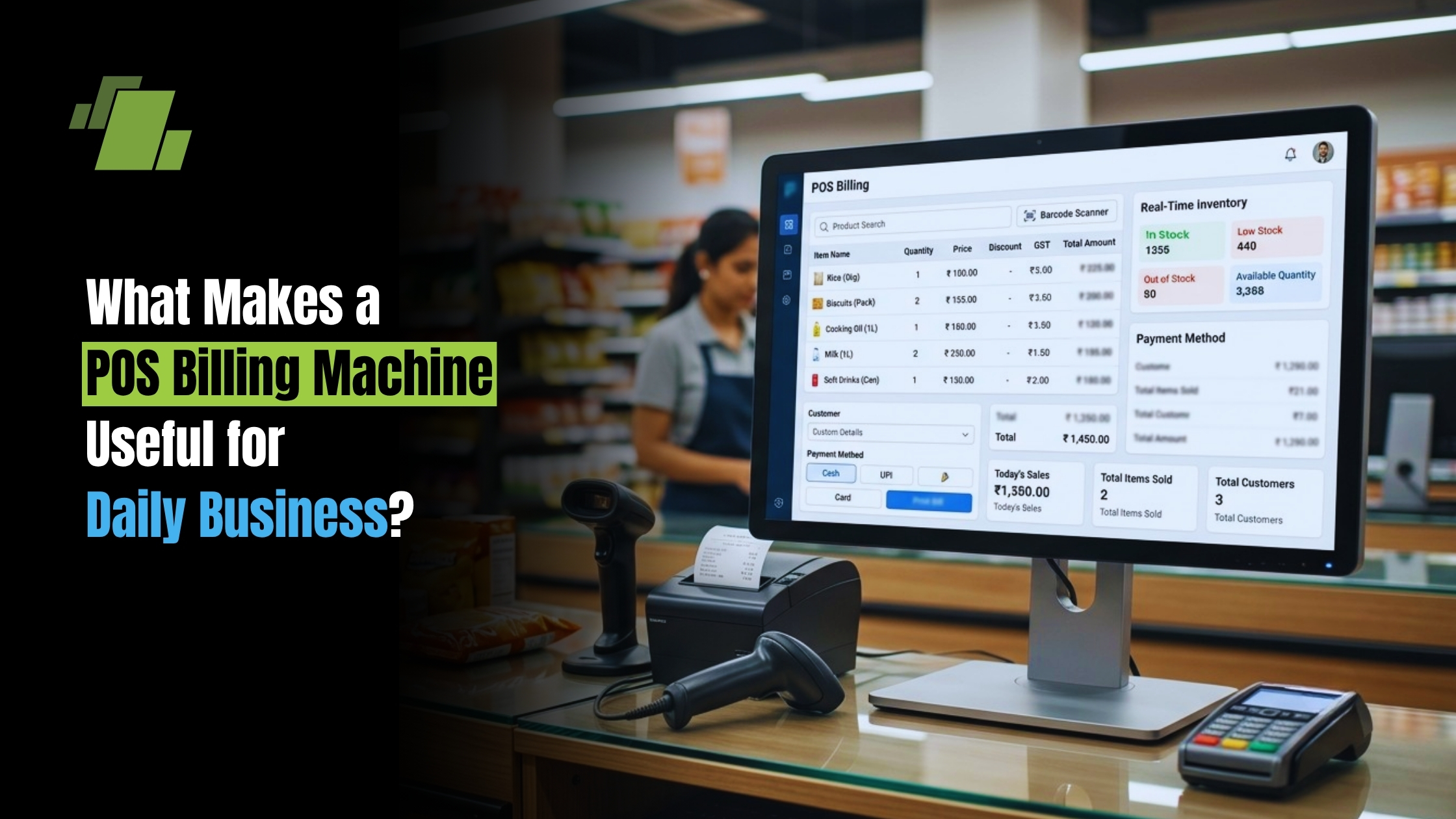
A POS billing machine brings billing, payments, inventory visibility, and sales records into one practical setup. Instead of treating checkout as a simple cash collection point, it turns every sale into useful business data. For retailers, restaurants, service counters, kiosks, and small shops, the right pos system can reduce manual work, improve transaction processing, and create a smoother customer experience.
Contact Us
Free Demo Request
What Makes a POS Billing Machine Useful for Daily Business?
A POS billing machine is useful because it helps a business complete sales quickly, record them accurately, accept modern payments, and generate bills or invoices from one place. It replaces the limitations of a traditional cash register with billing software, a payment terminal, product lookup, reporting, and often barcode or inventory tools. The result is a faster checkout process and better control over what is being sold, paid, returned, or restocked.
At a basic level, a pos machine for billing works as the point of sale where the customer pays and the business records the transaction. Depending on the setup, it may include a billing computer, receipt printer, barcode scanner, card reader, cash drawer, customer display, or cloud-connected software. Some businesses use a compact android pos billing machine, while others prefer a larger retail pos counter with more accessories.
The main advantage is not just speed. It is consistency. Every product, price, discount, tax, and payment can be handled in a structured way, so the business is less dependent on memory, handwritten notes, or end-of-day guesswork.
Faster Billing and Smoother Checkout
Long billing queues can frustrate customers and put pressure on staff. A POS billing machine speeds up checkout by letting the cashier scan products, apply preset pricing, select payment methods, and print or send receipts in a few steps. When the system is properly configured, the cashier does not need to manually calculate totals or search through paper price lists.
A pos billing machine with barcode scanner is especially helpful for stores with many items. Scanning a barcode pulls up the product name and price instantly, which reduces typing errors and keeps the line moving. This is useful in supermarkets, pharmacies, apparel shops, hardware stores, gift shops, and any business where products come in different sizes, variants, or price points.
Faster checkout also improves staff confidence. New employees can learn a guided billing process more quickly than a manual register system. When menus, item codes, taxes, and discounts are already built into the billing software, the chance of charging the wrong amount becomes lower.
Better Accuracy in Transaction Processing
Manual billing leaves room for small errors that can become expensive over time. A miscalculated discount, missed item, incorrect tax, or wrong change amount may look minor in a single sale, but repeated mistakes can affect profit and customer trust. A pos billing machine reduces these risks by standardizing transaction processing.
Accurate transaction records also help during returns, exchanges, and customer disputes. If a customer comes back with a receipt, staff can usually find the sale details quickly. That makes it easier to verify what was purchased, when it was purchased, and how the payment was made.
A well-set-up system can support:
- Itemized billing, so every product or service appears clearly on the receipt.
- Automatic totals, including taxes, discounts, and payment splits.
- Multiple payment modes, such as cash, card, wallet, or other digital options supported by the business.
- Transaction history, which helps owners review sales without depending on handwritten registers.
- User access controls, so managers can track who handled specific billing actions.
This level of detail gives the business a cleaner sales register and a more reliable view of daily operations.
Easy Integration with Electronic Invoicing
Electronic invoicing has become an important part of modern billing because it keeps records organized and reduces dependence on paper. A POS billing machine can often create digital invoices, send receipts by email or message, and store past bills for future reference. This is useful for both customer convenience and internal recordkeeping.
For businesses that serve repeat customers, digital records can make the experience more professional. A customer may ask for a duplicate bill, a tax invoice, or proof of payment days after the purchase. Instead of searching through piles of paper, staff can retrieve the invoice from the system if the billing software supports that feature.
Electronic invoicing can also reduce clutter at the counter. Paper receipts are still useful in many businesses, but digital options give customers more choice. They also help owners maintain cleaner billing archives and prepare information more easily for accounting review.
Stronger Inventory Awareness
A modern pos system does more than collect money. When connected to product data, it can update stock levels as items are sold. This gives business owners better visibility into what is moving, what is slow, and what may need to be reordered.
For example, if a retail pos setup records every sale through barcode scanning, the owner can review which products are selling most often. That information can support smarter purchasing decisions. Instead of ordering based only on habit, the business can look at actual sales movement.
Inventory visibility is valuable because it helps prevent two common problems:
- Stockouts, where popular items run out and customers leave without buying.
- Overstocking, where too much money is tied up in products that sit unsold.
Even a small shop can benefit from this discipline. A POS billing machine brings the sales counter and stockroom closer together, helping owners make decisions based on real activity rather than rough estimates.
Better Payment Flexibility for Customers
Customers increasingly expect payment choice. A payment terminal connected to a POS billing machine can help a business accept more payment methods without slowing down checkout. Instead of handling cash only, the business can support card payments or other digital options depending on the terminal and local payment setup.
This flexibility matters because different customers prefer different ways to pay. Some still want the familiarity of cash. Others expect a quick card tap or digital payment. When the point of sale can handle multiple methods, the business reduces friction at the final step of the purchase.
A POS setup also makes split payments easier in many scenarios. For example, a customer may want to pay partly in cash and partly by card, or a group may divide a bill. With manual billing, that can become confusing. With the right billing software, it becomes a guided process.
Mobile POS Supports Flexible Selling
Mobile pos options are useful for businesses that do not want to be tied to one counter. A compact device can help staff bill customers on the shop floor, at a table, in a queue, at a pop-up stall, or during delivery. This can improve service speed and create a more convenient buying experience.
An android pos billing machine is often chosen for portability and ease of use. It may combine billing, receipt generation, digital payment acceptance, and basic reporting in a handheld or compact format. For small businesses, events, food counters, and service providers, this can be more practical than a large desktop-based billing computer.
Mobile billing is also helpful when space is limited. Not every business has room for a full counter setup with a large screen, printer, scanner, and cash drawer. A smaller online billing machine or mobile POS device can offer many of the same core benefits in a simpler footprint.
Clearer Sales Reports and Business Decisions
A traditional cash register can tell you how much cash came in, but a POS billing machine can tell you much more. It can help show what sold, when it sold, which payment methods were used, and which employees handled sales. These insights support better business decisions.
Sales reports can help owners identify patterns such as:
- Best-selling products or services.
- Slow-moving inventory.
- Busy hours, days, or seasons.
- Average bill value.
- Discount usage.
- Cash versus digital payment trends.
- Returns or cancelled bills.
This information is practical, not just technical. If a shop knows that certain products sell faster on weekends, it can plan stock and staffing accordingly. If a restaurant sees peak billing hours, it can prepare counters and staff schedules more effectively. Better information leads to fewer assumptions.
More Professional Customer Experience
Billing is often the final impression a customer has before leaving. A slow, confusing, or error-prone checkout can weaken an otherwise good experience. A POS billing machine helps create a cleaner, more professional process from product selection to receipt.
Itemized receipts make customers feel more confident about what they paid for. Clear totals, proper discounts, and quick payment confirmation reduce awkward conversations at the counter. In service businesses, electronic invoicing can also make the brand feel more organized and trustworthy.
Professional billing does not have to mean a complicated setup. Even a simple pos billing machine can make a small store look more reliable than a handwritten bill book. For growing businesses, that perception matters.
How Should You Think About POS Billing Machine Price?
POS billing machine price should be evaluated based on business fit, not only the lowest upfront cost. A cheaper device may be enough for a small counter with limited products, while a growing retail business may need barcode scanning, inventory tools, reporting, and payment integration. The best value comes from choosing a system that supports today’s workload while leaving room for reasonable growth.
When comparing options, think about the total setup rather than only the machine. A complete point of sale may include hardware, billing software, installation, training, support, accessories, and possible subscription costs. It is better to understand the full requirement before buying than to discover later that essential features are missing.
Use this checklist before choosing:
- Do you need a fixed counter system, mobile pos device, or both?
- Will you scan products with barcodes?
- Do you need electronic invoicing or only printed receipts?
- How many products, services, or menu items will you manage?
- What payment methods should the payment terminal support?
- Do you need inventory tracking and sales reports?
- Will multiple staff members use the system?
- Is support available if something stops working during business hours?
The right answer depends on the business model. A busy retail pos environment may need a more complete system than a small service counter with only a few billable items.
POS Billing Creates Room for Growth
As a business expands, manual billing becomes harder to manage. More products, more customers, more staff, and more payment methods all add complexity. A POS billing machine creates a foundation that can handle that complexity in a more organized way.
It also helps owners step away from constant supervision. When every sale is recorded properly, reports become easier to review and staff accountability improves. The owner can spend less time reconstructing what happened during the day and more time improving products, service, purchasing, and customer relationships.
A POS setup is not only for large retailers. Small shops, cafés, salons, clinics, kiosks, and local service providers can all benefit from structured billing. The key is choosing a system that matches the size and style of the business.
Conclusion
A POS billing machine improves the checkout experience while giving the business better control over sales, payments, invoices, and inventory. Compared with a basic cash register, it offers more accurate transaction processing, clearer reporting, electronic invoicing options, and better support for modern customer payment habits.
Whether you choose a counter-based billing computer, a mobile pos device, or an android pos billing machine, the goal is the same: make billing faster, cleaner, and easier to manage. For any business that wants to reduce manual errors and understand its sales more clearly, a well-chosen POS system is a practical step forward.
Call at +91-7341141176/75 or send us an email at sales@logicerp.com to book a free demo today!
Frequently Asked Questions
1. What is a POS Billing Machine?
A POS billing machine is a system that helps businesses manage billing, payments, sales records, and inventory from one place.
2. What are the Benefits of Using a POS Billing Machine?
A POS billing machine can speed up checkout, improve billing accuracy, support multiple payment methods, provide sales reports, and improve inventory visibility.
3. Can a POS Billing Machine Manage Inventory?
Yes. When connected to product data, a POS system can update stock levels as items are sold and help businesses monitor fast-moving and slow-moving products.
4. How Does a POS Billing Machine Improve Customer Checkout?
It allows cashiers to scan products, apply prices and discounts, process payments, and print or send receipts in a streamlined process, helping reduce billing time and errors.
5. What Should I Consider When Choosing a POS Billing Machine?
Consider your business size, barcode requirements, payment methods, inventory needs, reporting requirements, number of users, hardware setup, and available support.

Author
Gurbir Singh
Co-founder & Managing Director | LOGIC ERP Solutions Pvt. Ltd.
With 30+ years of experience in the tech industry, I took the helm of technology & product development, ensuring LOGIC ERP’s continuous innovation & leadership in the evolving tech landscape.

