Bill Book Format in India: GST Invoice Templates Guide

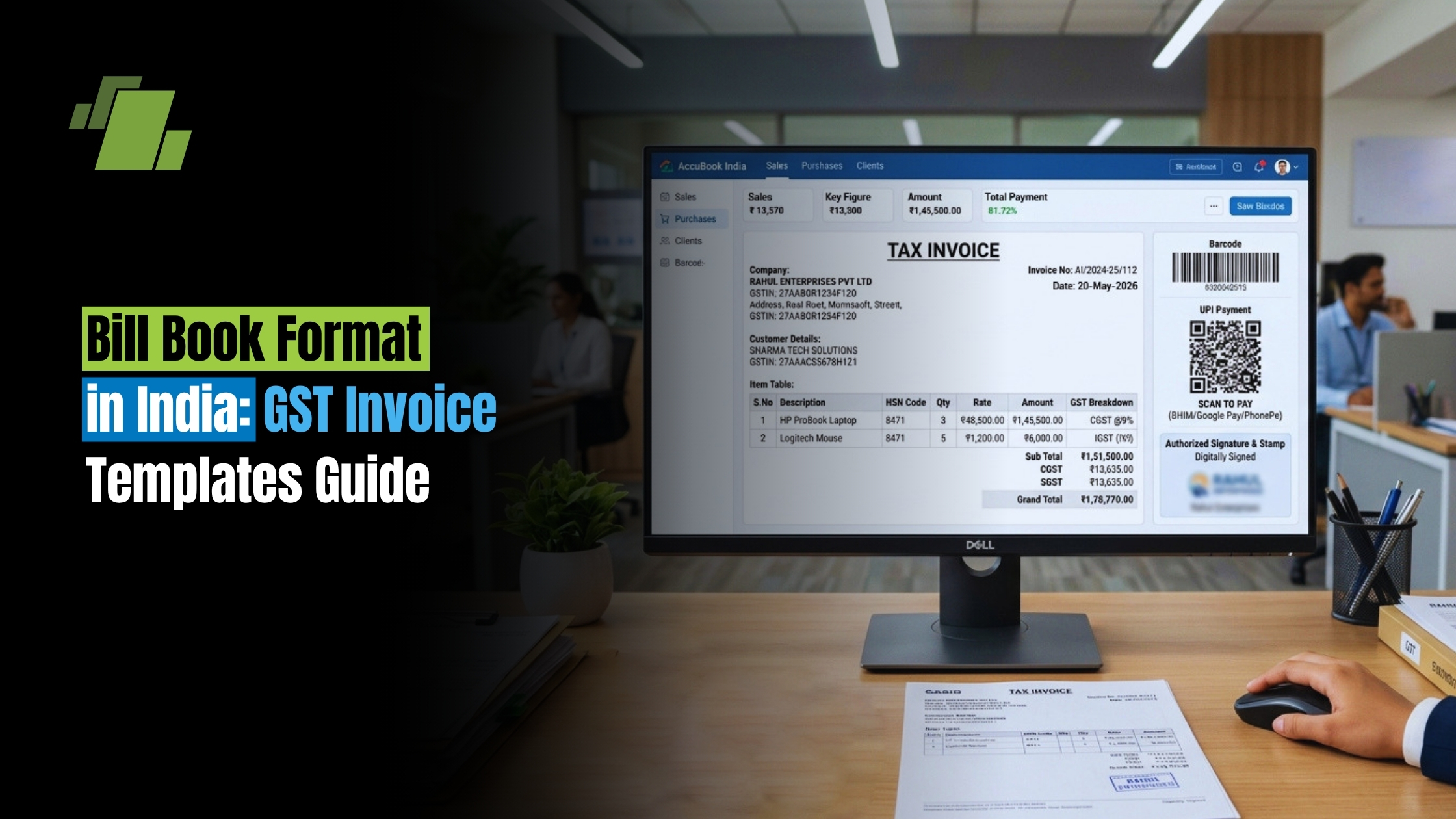
Whether you run a bustling retail shop in Mumbai, a freelance graphic design business in Bengaluru, or a manufacturing unit in Gujarat, invoicing is the lifeblood of your cash flow. Creating a professional bill book format is no longer just a good business practice; under India’s Goods and Services Tax (GST) regime, it is a strict legal requirement.
A well-crafted invoice serves as a demand for payment, a record of the transaction, and a crucial document for tax filing. If you are wondering how to make bill format that ticks all the boxes for compliance, professionalism, and ease of use, you are in the right place.
In this comprehensive guide, we will explore everything you need to know about designing the perfect invoice bill book. From choosing between Word, Excel, and PDF formats to understanding GST rules, we will provide actionable tips to help you streamline your billing process.
Contact Us
Free Demo Request
The Basics: What is a Bill Book?
At its core, a bill book is a bound collection of invoices (if physical) or a standardized digital template used to generate bills for customers. It details the products sold or services rendered, the prices, taxes applied, and the total amount due.
Historically, businesses relied heavily on physical printed books. Today, the debate of manual vs digital invoicing systems is prominent. While digital invoicing is faster and more accurate, many small businesses in India still prefer physical books for quick, on-the-spot transactions.
For those using physical books, understanding the carbonless duplicate paper benefits is vital. Carbonless paper (NCR paper) allows you to write on the top sheet and instantly create a duplicate (and triplicate) copy without using messy blue carbon paper. This ensures you can hand the original cash bill to the customer while retaining a clean, legible copy for your accounting records.
Regardless of the medium, an invoice is a legally binding sales documentation. It protects both the buyer and the seller in case of disputes.
Decoding the Anatomy of a Tax Invoice
To remain compliant with Indian tax laws, you cannot just scribble an amount on a piece of paper. You must adhere to specific GST invoice requirements.
So, what information should be on a bill ? Whether you are using a simple gst bill format or a complex enterprise template, the essential components of a tax invoice must include:
- Header & Business Details: Your company name, logo, registered address, contact details, and GSTIN (Goods and Services Tax Identification Number).
- Customer Details: The buyer’s name, billing address, shipping address, and their GSTIN (if they are a registered business).
- Invoice Number & Date: Organizing sequential invoice numbering is mandatory under GST rules. Your bill number must be consecutive, unique for the financial year, and can contain alphabets, numbers, or special characters (like hyphens or slashes).
- Item Description: A clear description of the goods or services.
- HSN/SAC Codes: Harmonized System of Nomenclature (HSN) for goods, or Services Accounting Code (SAC) for services.
- Quantity and Rate: The number of items and the price per unit.
- Taxable Value: The amount before tax is applied.
- Tax Breakdown: Proper bifurcation of CGST (Central), SGST (State), and IGST (Integrated) based on whether the sale is intra-state or inter-state.
- Total Amount: The final amount payable, often written in both numbers and words.
- Authorized Signature: A physical or digital signature of the authorized supplier.
By incorporating these elements, you establish a standard business billing layout that keeps your chartered accountant happy and your business safe from penalties.
How to Create a Bill: Step-by-Step
If you want to know how to create a bill from scratch, the process is straightforward once you know your business needs. Here is a brief guide on how to make invoice bill documents that look professional:
1. Choose Your Medium
Decide if you want a physical printed book or a digital format. If you want to know how to make bill in computer, you will need basic software like MS Word, MS Excel, or dedicated billing software.
2. Select a Template
You don’t need to reinvent the wheel. You can find a bill book design template free download online to serve as your foundation. A good bill form or bill book template will already have the standard fields mapped out.
3. Customize and Brand
Adding company branding to transaction records is crucial for brand recall. Add your logo, use your brand colors, and choose clean, readable fonts. Customizing invoice templates for small business operations helps you stand out from competitors who use generic stationary.
4. Define Payment Terms
Clear communication prevents delayed payments. You must include your terms at the bottom of the invoice. Here are a few payment terms and conditions examples:
- “Net 30” — Payment is due within 30 days of the invoice date.
- “Due on Receipt” — Payment is expected immediately upon delivery of the invoice.
- “Late fees of 1.5% per month will be charged on overdue balances.”
- “Goods once sold will not be taken back or exchanged.”
5. Generate and Send
Once your template is ready, learning how to create invoice bill for individual clients takes just minutes. Fill in the specific transaction details, save as a PDF, and email it—or print and hand it over.
Choosing the Right Format: Excel vs Word vs PDF
When designing your online bill book format , you will likely choose between Microsoft Word, Microsoft Excel, or a PDF editor. Understanding Excel vs Word for creating bills will help you choose the best tool.
Bill Format in Word
A bill format in word is highly customizable from a design perspective. It is perfect for service-based businesses (like freelancers or consultants) where the descriptions vary greatly, and complex calculations are not required. Word allows for beautiful bill paper design and flexible text wrapping.
- Pros: Easy to design, great for text-heavy invoices.
- Cons: No automatic calculations. You must calculate taxes manually.
GST Bill Format in Excel
For retail and wholesale businesses, Excel is the undisputed king. If you want to know how to make bill format in excel , it involves setting up a spreadsheet with columns for Item, Quantity, Price, and Tax. By using simple formulas (e.g., =Quantity*Price), a gst bill format in excel automates the math. You can even create a gst invoice format in excel that automatically calculates 9% CGST and 9% SGST on the subtotal. Learning how to make bill format in excel saves hours of manual calculator work and drastically helps in reducing errors in manual bookkeeping.
Bill Book Format PDF
Ultimately, no matter which software you use to create the bill, you should always send it to your client as a PDF. A bill book format pdf locks the data in place so the customer cannot alter the amounts or item descriptions.
Tailoring Formats to Specific Businesses
Every business is unique. What works for a massive warehouse won’t work for a local corner store. Let’s look at how to tailor your bill book format to different industries.
1. General Store and Retail Shop
A shop bill format needs to be fast and easy to read. A general store bill format usually features a compact design, often optimized for 3-inch thermal printers or A5-sized bill book sample pads. Because general stores have high foot traffic, their cash bill formats usually prioritize the item list, total amount, and a quick “Thank You” over detailed terms and conditions.
2. Mobile and Electronics Shops
A mobile shop bill template requires specific fields that a grocery store doesn’t. When designing a mobile bill format pdf, you must include a dedicated column or field for the IMEI number, serial number, and warranty period. Without these details, customers cannot claim manufacturer warranties.
3. Bookstores and Stationery Shops
A book store bill format in word can be relatively simple. It should include columns for the Book Title, Author/Publisher, ISBN (optional but helpful), Quantity, and Price. Since books often have different GST rates (many educational books are exempt from GST in India), having an easily editable Word template makes it easy to adjust tax rates on the fly.
Designing Your Bill Book: Tips for a Professional Look
Your invoice is often the last point of contact you have with a customer during a transaction. Therefore, bill design matters. If you want to know how to design professional receipts, keep these aesthetic rules in mind:
- Keep it uncluttered: A clean bill book design with plenty of white space is easier to read. Don’t cram too much text into a small area.
- Emphasize the Total Due: The final amount and the due date should be the most prominent elements on the page. Use bold fonts or a slightly larger text size.
- Professional Fonts: Avoid overly decorative fonts. Stick to professional, clean fonts like Arial, Calibri, Helvetica, or Roboto.
- Color Scheme: If you are printing in color, use your brand’s primary color for the headers and borders. If you are learning how to make bill book files for black-and-white laser printers, use varying shades of grey to create visual hierarchy.
Moving from Manual to Digital: Invoicing Software
While knowing how to create a tax invoice format in Word or Excel is a great starting point, as your business grows, you will eventually outgrow spreadsheets. This is where dedicated billing software comes in.
Modern tax-compliant billing software features include auto-populating client details, real-time inventory tracking, automatic GST calculation, and one-click E-way bill generation. Software solutions completely eliminate the headache of organizing sequential invoice numbering because the system generates the next unique number automatically.
Furthermore, digital systems allow you to store your gst bill book format safely in the cloud, preventing data loss from physical damage or misplacement. They also generate financial reports instantly, making tax season a breeze for your accountant.
Conclusion
Understanding the proper bill book format is essential for any business operating in India today. Whether you choose to download a bill book design template free download , build your own automated gst invoice format in excel, or invest in premium billing software, the goal remains the same: accurate, compliant, and professional billing.
Take the time to assess your current invoicing process. Ensure your tax invoice format contains all the necessary GST requirements, features clear payment terms, and reflects your brand’s identity. By streamlining your billing documentation today, you guarantee faster payments, fewer accounting errors, and a more professional image for your business tomorrow.

Call at +91-73411-41176/75 or send us an email at sales@logicerp.com to book a free demo today!
Frequently Asked Questions
1. What exactly is a bill book, and why does it matter under GST?
A bill book is either a bound set of pre-printed invoices (physical) or a standardized digital template used to generate customer bills. It lists what was sold, prices, taxes, and the total due. Under India’s GST regime, issuing a proper, compliant invoice is a legal requirement it serves as a demand for payment, a transaction record, and a key tax document that protects both buyer and seller. If you use physical books, carbonless (NCR) paper helps create instant duplicate/triplicate copies without messy carbon sheets, so you can hand the original to the customer and keep a clean copy for your records.
2. What must a GST-compliant invoice include, and how should invoice numbers be structured
Every tax invoice should have: (1) your business name, logo, registered address, contact details, and GSTIN; (2) customer name, billing/shipping addresses, and GSTIN (if registered); (3) a unique, sequential invoice number and date (consecutive within the financial year; can include letters, numbers, hyphens, or slashes); (4) clear item/service descriptions; (5) HSN (goods) or SAC (services) codes; (6) quantity and rate; (7) taxable value; (8) a tax split showing CGST and SGST for intra-state sales or IGST for inter-state sales; (9) total amount in numbers and words; and (10) an authorized physical or digital signature.
3. Should I make my invoices in Word, Excel, or PDF?
Use Word if you want maximum design flexibility and your invoices are text-heavy with fewer calculations (e.g., freelancers, consultants). Use Excel if you need automated math set up columns for item, quantity, price, and tax so totals and GST compute automatically (you can even build formulas for typical splits like 9% CGST and 9% SGST on the subtotal). Whatever you use to create the bill, send or share it as a PDF to lock the content so it can’t be altered.
4. How do I tailor invoice formats for different business types?
Match fields to your industry:
- General store/retail: Keep it compact and fast to read (A5 or 3-inch thermal layout), prioritize item list, total amount, and a brief thank-you.
- Mobile/electronics: Add fields for IMEI/serial numbers and warranty period these are essential for manufacturer warranty claims.
- Bookstores/stationery: Include Book Title, Author/Publisher, ISBN (optional), Quantity, and Price. A simple, editable template helps adjust differing GST rates (e.g., many educational books are GST-exempt).
5. When should I switch to invoicing software, and what are the benefits?
As transaction volume grows beyond what’s comfortable in Word/Excel, move to dedicated billing software. Modern systems auto-populate client details, track inventory in real time, calculate GST automatically, generate E-way bills with one click, and handle sequential invoice numbering for you. They also store invoices securely in the cloud and produce instant financial reports reducing errors, preventing data loss, and saving time during tax filing.

Author
Gurbir Singh
Co-founder & Managing Director | LOGIC ERP Solutions Pvt. Ltd.
With 30+ years of experience in the tech industry, I took the helm of technology & product development, ensuring LOGIC ERP’s continuous innovation & leadership in the evolving tech landscape.


