How to Amend Purchase Orders with Audit Trail Tracking in LOGIC ERP (Complete Guide)

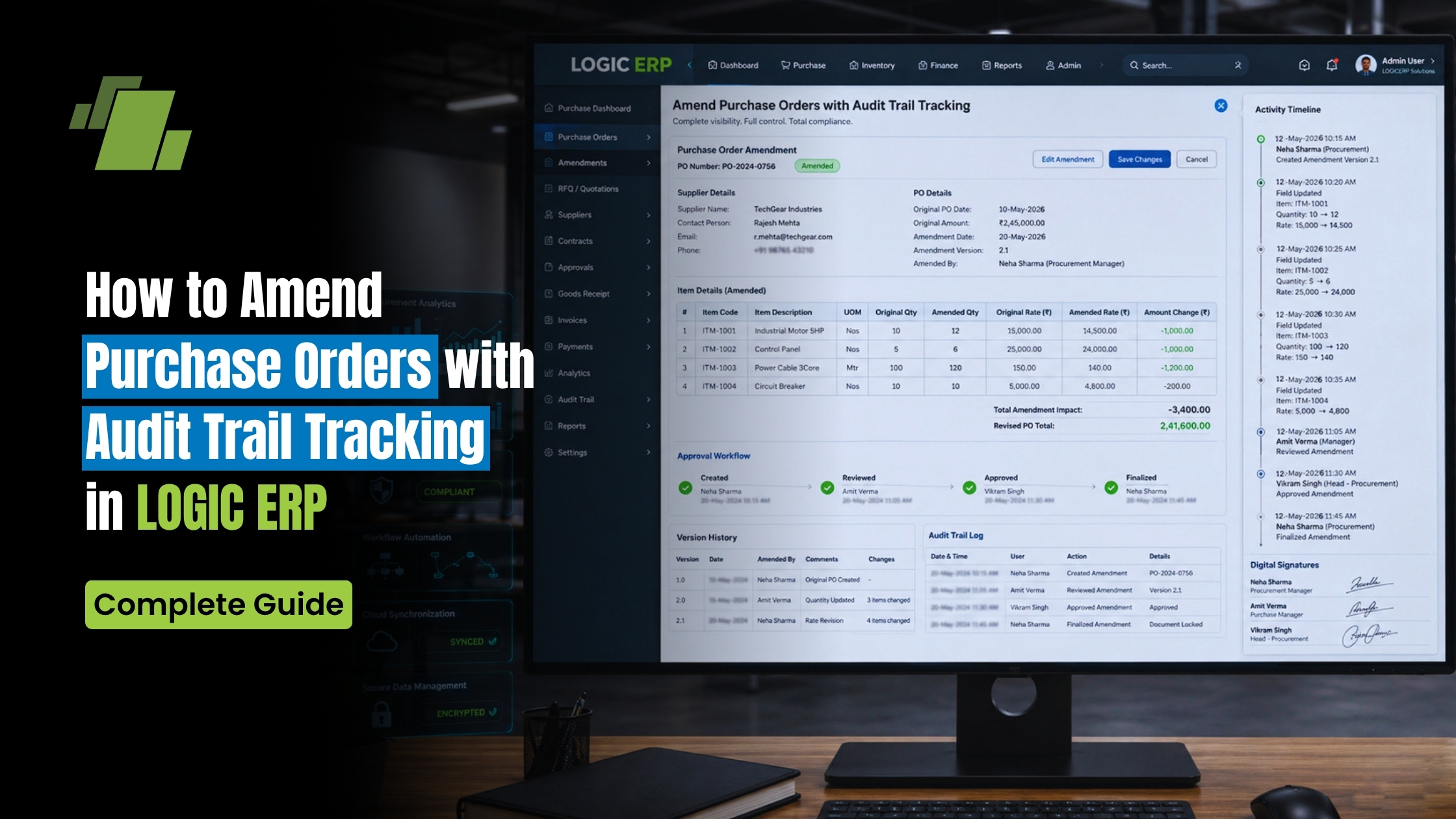
Maintaining accuracy in procurement is critical for any business. However, changes in quantity, pricing, agents, or logistics often require updates to existing purchase orders. Without proper tracking, these changes can lead to confusion, financial discrepancies, and audit risks.
Contact Us
Free Demo Request
LOGIC ERP solves this challenge with its Purchase Order Amendment feature, allowing businesses to modify purchase orders while maintaining a complete audit trail of all changes.
This guide explains how to amend purchase orders, track changes, and review amendment history in a structured and compliant manner.
What is Purchase Order Amendment in LOGIC ERP?
A Purchase Order (PO) Amendment allows you to:
- Modify existing purchase order details
- Update item quantities, rates, or header information
- Maintain a history of all changes for audit purposes
This ensures:
- Transparency in procurement
- Better control over vendor transactions
- Accurate documentation for internal and external audits
Why Use Purchase Order Amendment with Audit Trail?
Accuracy in Procurement
Easily update incorrect or changed order details without creating new POs.
Complete Audit Trail
Track every modification made to the purchase order over time.
Compliance & Control
Maintain proper documentation for audits and approvals.
Operational Efficiency
Avoid duplication and confusion by editing existing orders instead of recreating them.
Step-by-Step: How to Amend a Purchase Order in LOGIC ERP
Step 1: Review the Purchase Order
- Open the Purchase Order module
- Identify the PO you want to amend
Example: Purchase Order No. 35
Step 2: Open Purchase Order Amendment Module
- Navigate to Purchase Order – Amendment
- Select the relevant purchase order
The system will display:
- Complete document details
- Item and header-level information
Step 3: Amend Purchase Order Details
You can update both header-level and item-level details:
Header-Level Changes:
- Agent Name
- Transport Name
Item-Level Changes:
- Rate
Make the required updates based on revised requirements.
Step 4: Save the Amendment
- Click Save after making changes
The system will:
- Update the purchase order
- Record the amendment in history
How to Verify Amended Purchase Order
After saving:
- Reopen the purchase order
- Check that:
- Updated quantities and rates are correctly reflected
- Modified agent and transport details are updated
This ensures the amendment has been applied successfully.
How to View Purchase Order Amendment History
LOGIC ERP provides a detailed audit trail of all amendments.
Step 1: Open Amendment History
- Go to Purchase Order – Amendment module
- Click on PO Amendment History
Step 2: Select Purchase Order
- Choose the relevant PO
- Click Refresh
Step 3: View Reports in Two Formats
1. Detailed Format
- Displays item-wise and field-wise changes
- Shows what was modified, when, and how
2. Document-wise Summary
- Provides a consolidated overview of all amendments
- Ideal for quick review and reporting
Key Benefits of PO Amendment with Audit Trail
Full Transparency
Every change is recorded and traceable.
Improved Decision-Making
Track historical changes for better procurement analysis.
Strong Internal Controls
Prevents unauthorized or unnoticed modifications.
Audit-Ready Documentation
Ensures compliance with financial and operational audits.
Business Use Cases
Retail & Distribution
Handle frequent order revisions due to demand fluctuations.
Manufacturing
Adjust raw material quantities and pricing based on production needs.
Procurement Teams
Maintain accurate vendor communication and documentation.
Best Practices
- Always review the original PO before making amendments
- Maintain proper authorization for changes
- Regularly check amendment history reports
- Use summary reports for quick analysis and approvals
Common Mistakes to Avoid
- Editing POs without using the amendment module
- Not reviewing amendment history after changes
- Making frequent changes without documentation
- Ignoring audit trail for compliance
How This Improves Procurement Control
With LOGIC ERP’s amendment feature, businesses can:
- Maintain accurate purchase records
- Reduce errors in procurement
- Improve vendor accountability
- Ensure complete visibility of changes
- Strengthen financial and operational controls
Conclusion
The Purchase Order Amendment feature in LOGIC ERP enables businesses to update purchase orders efficiently while maintaining a complete audit trail. This ensures transparency, accuracy, and compliance across procurement operations.
By using this feature, organizations can streamline workflows, reduce errors, and maintain audit-ready documentation for every purchase transaction.
Call at +91-73411-41176/75 or send us an email at sales@logicerp.com to book a free demo today!
Frequently Asked Questions and Answers
Q1. Can I track all changes made to a purchase order?
Yes, LOGIC ERP maintains a complete amendment history.
Q2. What details can be amended in a PO?
You can update both header-level (agent, transport) and item-level (quantity, rate) details.
Q3. Is amendment history available in report format?
Yes, in both detailed and document-wise summary formats.
Q4. Does amendment overwrite original data?
No, the system keeps a record of all changes for audit tracking.

Author
Gurbir Singh
Co-founder & Managing Director | LOGIC ERP Solutions Pvt. Ltd.
With 30+ years of experience in the tech industry, I took the helm of technology & product development, ensuring LOGIC ERP’s continuous innovation & leadership in the evolving tech landscape.


