Discover how configure-to-order (CTO) manufacturing enables customer-specific product customization with standardized processes. Learn about the CTO process, benefits, examples, challenges, and how ERP software like LOGIC ERP supports efficient CTO production.
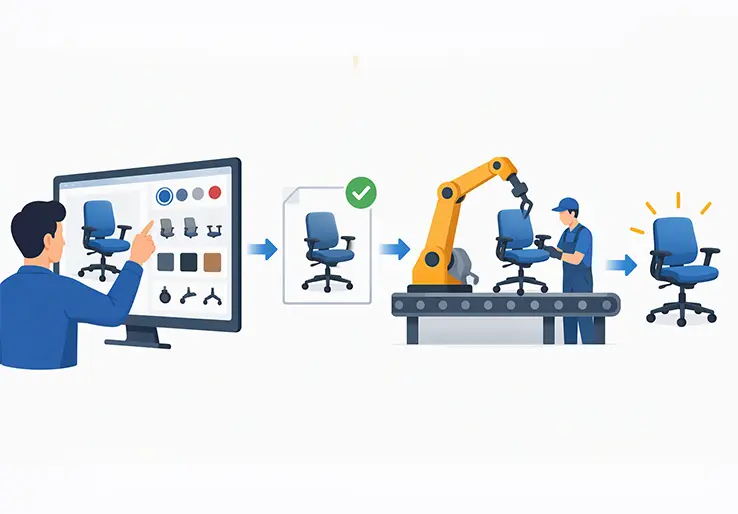
Configure to order manufacturing is a production strategy where customers choose from predefined features, options, and modules, and the manufacturer builds the product only after that configuration is locked in. Rather than shipping identical products from a warehouse or engineering a brand-new design for every buyer, CTO gives customers real choices within a controlled framework. LOGIC ERP supports manufacturers that want to adopt this approach, connecting product configuration, inventory, production planning, and financials in one system.
The core challenge CTO solves is straightforward: how do you deliver customized products while keeping standardized processes, controlled inventory, and efficient production? A make to stock model forces you to guess what customers want and stock finished goods accordingly. An engineer to order model gives customers unlimited freedom but buries your engineering team in repetitive work. Configure to order sits between these extremes, letting customers configure products from validated options while your factory runs on repeatable, well-defined manufacturing processes.
For manufacturers facing growing customer expectations for personalization without the budget for full bespoke engineering, CTO is often exactly that sweet spot worth pursuing. LOGIC ERP helps manufacturers move from pure make-to-stock or engineer-to-order toward a scalable configure to order process that balances flexibility with discipline.
Configure-to-order (CTO) is a production model where customers select from predesigned, pre-validated options and the manufacturer assembles or produces the final product only after the configuration is chosen. CTO combines standardized product platforms — shared frames, modules, electronics, and base designs — with customer-specific configurations governed by engineering rules. CTO relies on pre-engineered, tested parts that ensure design integrity and compatibility across all valid combinations.
Engineers define compatibility rules, sizing constraints, and reinforcement requirements once. Those rules then enable valid combinations to be built repeatedly without new engineering work for each customer order. This is what separates CTO from engineer to order, where each order may trigger significant design effort, and from make to stock, where no configuration happens at all.
CTO has been widely adopted since the early 2000s, particularly in industries producing configurable CNC machines, HVAC units, industrial conveyors, and rack-mount servers. These products share a common architecture but vary significantly in performance ratings, materials, accessories, and regional specifications.
Key terms you will encounter throughout this article include configurable bill of materials (BOM), option classes (groups of related choices), and configuration rules (the logic that prevents invalid combinations). Understanding configure to order starts with these building blocks.
The configuration process typically follows a structured workflow with option selection, validation, costing, order creation, material allocation, and production. Here is how configure to order works in six steps.
Customer Selects Product Options
A sales rep or the customer directly uses a product configurator or guided selling interface to choose among dimensions, capacity levels, materials, accessories, and regulatory options. Configuration options typically include functional specs, aesthetics, materials, and accessories. For example, a buyer specifying an industrial pump might select flow rate, wetted-part material (stainless steel vs. cast iron), seal type, motor horsepower, and control panel options. Dynamic visual previews allow buyers to inspect the exact look of their build in some advanced configurator setups, while 3D modeling tools visualize customized products before production even starts.
Configuration Rules Validate the Selections
The system applies predefined compatibility rules that prevent invalid or unsafe combinations. Real-time validation checks the compatibility of selected components during configuration. If a customer picks a high-torque motor that exceeds the frame’s structural rating, the system blocks that combination or suggests an upgraded frame. CTO uses rules-based product configurators to validate options, ensuring that only approved configurations move forward. A well-designed product configurator should provide clear choices and compatibility checks at every step.
Price, Components, and Requirements are Determined
Once selections pass validation, the system builds a variant bill of materials, determines which routing (sequence of operations) applies, estimates lead time, and calculates pricing. Dynamic pricing updates occur as configuration selections are made, so customers and sales teams see cost impacts instantly. LOGIC ERP can serve as the system where this costing logic lives, pulling component costs, labor rates, and overhead factors together.
Order and Production Requirements are Generated
When the customer accepts the quote, the configuration becomes a formal sales order. A bill of materials is generated once the order is submitted, along with linked production orders and material requirements. Product configurators handle customer-selected configurations and pass them downstream so that manufacturing knows exactly what to build.
Materials are Allocated and Production is Scheduled
The ERP’s material requirements planning module checks stock levels, existing allocations, and incoming purchase orders. If stocked components are available, they are reserved. If certain components are missing, the system raises purchase suggestions or triggers sub-assembly production. Capacity planning positions the configured order through work centers, balancing workloads and setup times.
Product is Manufactured, Checked and Delivered
The final product is assembled using stocked components and any newly produced sub-assemblies. Operations may include in-house fabrication, final assembly, testing or calibration, quality control, packaging, and shipping. After delivery, configuration data and serial or batch-linked traceability support future service and warranty work.
The level of automation in the CTO process — whether BOMs and routings are generated automatically or require manual intervention — depends on the configurator and ERP capabilities in place. LOGIC ERP can serve as the backbone for this data flow, connecting front-end configuration tools with back-end production and financial systems.
Most manufacturers do not operate with a single production strategy. Many mix CTO with other approaches depending on product lines, customer segments, and order complexity. Here is how the primary production models compare.
Make to stock produces goods based on demand forecasts, stocking finished products before any customer order arrives. Customization is minimal, but lead time is short. Make to order starts production after a customer order is received for a defined product, though it may not involve formal configuration logic. Make-to-order requires building products from scratch after orders, which means lead times are longer. MTO models significantly reduce waste and environmental impact by aligning production with actual demand rather than forecasts.
Assemble to order focuses on assembling stocked components and subassemblies after orders arrive, offering moderate customization with relatively short lead times. Engineer to order involves new or heavily modified designs for each order, with intensive engineering work and the longest lead times.
Configure to order (CTO) sits between ATO and ETO. Customers configure products from validated options, and CTO allows for customization without starting production from zero. In real factories, these models overlap. A company might run MTS for base models, CTO for configurable options, and ETO for rare, highly specialized projects.
The following table summarizes how CTO differs from related production strategies.
| Model | How It Works | Level of Customization | Inventory Focus | Typical Lead Time |
|---|---|---|---|---|
| Make-to-Stock (MTS) | Products manufactured to forecast and stocked before orders arrive | Low — no per-order configuration | High finished-goods inventory | Shortest |
| Make-to-Order (MTO) | Production begins after a customer order for a defined product | Varies — not necessarily configurable | Raw materials and WIP | Medium to long |
| Assemble-to-Order (ATO) | Standard subassemblies stocked; final assembly after order | Moderate — assembly-level choices | Components and subassemblies | Short to medium |
| Configure-to-Order (CTO) | Customers choose from predefined, rule-validated options before production | Moderate to high within defined rules | Components, modules, subassemblies | Medium |
| Engineer-to-Order (ETO) | Significant engineering design triggered by each order | Highest — includes new engineering | Raw materials; minimal pre-stock | Longest |
CTO is faster than make-to-order manufacturing because modules and components are pre-engineered and often pre-stocked. However, CTO may lead to longer lead times compared to make-to-stock models, since assembly or production does not start until the configuration is confirmed. Some "build-to-order" strategies can be classified as MTO, ATO, or CTO depending on how much configuration logic and pre-engineering is involved.
Theory is useful, but seeing how configure to order works in specific manufacturing environments makes the concept concrete.
Industrial Pumps: A pump manufacturer offers a standard base frame, impeller design, and electrical control architecture. Customers configure motor size, materials for wetted parts (stainless steel, cast iron, or specialty alloys), seal types, regulatory certifications, and accessories such as pressure sensors or remote monitoring kits. The frame and control logic stay standardized; the BOM expands based on selected ratings and materials.
Rack Servers (Electronics): An electronics manufacturer building rack servers lets customers pick CPU type, RAM capacity, storage capacity, network cards, management modules, and rack rail kits. Only validated combinations are accepted — configurations that would exceed power draw or cooling limits are blocked by configuration logic. CTO manufacturing is common in automotive and electronics industries, where product variants can number in the thousands but share a common chassis or platform.
HVAC Systems: Customers choose voltage (110V, 230V, three-phase), duct orientation, filtration levels, mounting type, and sensor packages. Standardized enclosures, fan modules, and software control logic are reused across configurations, while the variable elements drive BOM expansion and supplier selection.
In each scenario, companies often evolve from engineer to order toward configure to order once they have accumulated enough repeatable solutions and product configuration knowledge to define rules-based product configuration rather than re-engineering each order.
The CTO process bridges customer-facing sales with backend manufacturing. Here is the business-level flow from first contact to payment.
Order processing tools automate accurate order fulfillment across these stages. Standardized CTO processes shorten sales cycles compared to ad-hoc engineering for each order, because the heavy lifting of validation and costing is handled by the system rather than by an engineer reviewing each quote manually.
CTO manufacturing delivers both flexibility and repeatability. It lets manufacturers serve diverse customer requirements without maintaining warehouses full of finished product variants or employing armies of engineers to handle every order individually. The benefits apply across industries such as industrial equipment, furniture, electrical equipment, and commercial vehicles. Configure-to-order can directly support higher customer satisfaction and competitive advantage in markets demanding tailored solutions.
CTO lets buyers personalize products — dimensions, capacity, aesthetics, features — using predefined and validated choices instead of starting a new design. Customers are willing to pay a premium for personalized or bespoke items, and CTO delivers exactly that without the cost structure of full custom engineering.
Customers feel as if they are getting a "made-for-me" product even though the manufacturer is reusing existing modules and engineering logic. Configuring a product to order can reduce return rates compared to off-the-shelf products because the buyer gets what they actually specified.
Standard product platforms and configurable BOMs reduce repetitive engineering and manual data entry. CTO manufacturing allows factories to plan around stable module demand patterns instead of endless one-off designs, maintaining operational efficiency even as order variety increases.
CTO shifts inventory from finished goods to components and subassemblies. Manufacturers stock common modules — frames, motors, enclosures, cables — and begin final assembly only once customer configurations are known. CTO reduces inventory costs by stocking components instead of finished goods, lowering the risk of obsolete variants and simplifying forecasting at the component level. Customizing a product to order reduces finished goods warehouse waste significantly.
Just-in-Time (JIT) assembly uses pre-stocked modules for customization, which means inventory management systems must provide accurate, real-time visibility into component availability. Without this visibility, manufacturers risk promising configurations that cannot be built on time. Inventory management tools track stock levels in real-time to prevent exactly that problem.
Each valid configuration can be costed from its underlying components, routing times, and overhead factors rather than broad estimates. Pricing engines or ERP-based costing calculate margins per configuration, enabling profitable discounting strategies and reducing margin erosion caused by misquoted special orders.
Linking sales orders to specific configurations, BOMs, and production orders in enterprise resource planning software gives real-time visibility into status and bottlenecks. Planners can see which configured orders are waiting for components, processing capacity, or approvals, supporting realistic promise dates.
Standardized CTO processes make it easier to provide customers with updates on order progress and expected shipping dates. This improved visibility leads to higher customer satisfaction and fewer internal escalations. When sales teams, planners, and the shop floor all see the same configuration data, coordination across the value chain improves dramatically. Materials management software ensures component availability stays visible across all functions.
Configure-to-Order allows customers to customize products before ordering across a wide range of industries. CTO combines predefined options with customer customization in each of these examples. CTO is common in industries like automotive and electronics, but the model extends far beyond those sectors.
Industrial Machinery (Conveyors, CNC Machines)
Furniture Manufacturing
A case study of a furniture manufacturer implementing ERP for CTO-style production showed a 25% reduction in production lead times, custom order accuracy reaching 94%, and operational costs dropping by 22% within six months.
Electrical Equipment (Switchboards, Control Panels)
Commercial Vehicles
In every case, customers choose from validated options that reuse existing engineering rules rather than requiring new design work per order. This is what makes CTO scalable.
CTO adds operational complexity that must be managed proactively. Here are the most common challenges and practical mitigations.
CTO requires ERP systems for resource management — connecting product data, inventory, production scheduling, and financials into a single system of record. LOGIC ERP serves as this backbone for configure to order CTO manufacturers, managing master data (items, BOMs, routings), material planning, production orders, costing, and financial reporting.
Not every ERP includes a full-blown CPQ or product configurator. When an external configurator is used, LOGIC ERP manages the downstream data: variant BOMs, material planning, production orders, costing, and financials. The key requirement is clean integration so that orders and configurations flow from front-end tools into LOGIC ERP without manual re-entry and errors.
ERP holds master records for configurable products, option items, and standardized components. Configurable BOMs (variant BOMs with option codes) expand into a specific component list once a configuration is chosen. LOGIC ERP supports multiple BOM versions and routing alternatives as products evolve over time. Accurate item attributes — dimensions, ratings, revision levels — are essential for reliable CTO processes. Without disciplined product data, even the best configurator produces garbage.
Material requirements planning in LOGIC ERP uses demand from configured orders plus forecasts to plan component purchases and production of sub-assemblies. Planners see on-hand, on-order, and allocated quantities for critical raw materials and modules used across many CTO variants. The system raises alerts for potential shortages that would delay specific configured orders, supporting proactive rescheduling or substitutions where configuration rules allow. This connects directly to efficient production and reduced risk of promising configurations that cannot be built on time.
Confirmed configurations generate production orders with the correct BOM and routing. Production planning and finite scheduling help sequence work centers for a mix of standard and configured orders. Planners can prioritize urgent or high-value CTO orders while maintaining resource utilization on shared equipment.
For example, a manufacturer producing configured enclosures might schedule paint booths by color family across multiple orders, reducing setup time and improving throughput. Production scheduling must also handle routing variants — some configurations add extra operations like special testing or additional sub-assembly steps.
LOGIC ERP collects material costs, labor, overhead, and subcontracting charges at the order or job level for each configuration. Variance analysis (planned versus actual cost and time) helps refine configuration pricing and identify problematic options that consistently run over budget. Standard operational reports — margin by configuration, component usage statistics, on-time delivery rates — give finance and operations teams the data to decide which options to promote, redesign, or discontinue. Data from customization processes provide valuable market insights on consumer preferences that drive catalog decisions.
Change control is critical in configure to order manufacturing because a rule or component change can impact hundreds of possible configurations. LOGIC ERP manages item revisions, effectivity dates, and BOM changes, ensuring past orders remain traceable to the exact configuration shipped. In regulated industries — electrical equipment, medical devices — each configured unit’s components and test results must be recorded for compliance. LOGIC ERP should integrate with PLM or engineering tools if customers require deeper change and configuration management beyond what ERP natively provides.
CTO is not ideal for every business. Here are signals that a configure to order process is worth pursuing:
A simpler make to order approach may be sufficient when product complexity is low and options are few. Engineer to order remains necessary for one-off, highly specialized systems requiring significant new design or heavy compliance engineering. A mid-sized machinery manufacturer recognizing three or more of these signals is likely ready to begin the transition.
For manufacturers currently running ETO, transitioning to CTO is a phased journey, not a weekend project. Here is a practical roadmap.
CTO improves customer satisfaction with faster delivery times compared to full engineer-to-order approaches while still delivering tailored solutions. CTO improves customer experience by offering tailored products that match actual customer preferences rather than forcing buyers into "close enough" standard offerings.
Interactive configuration — whether online or with a sales rep — helps customers understand trade-offs in price, lead time, and technical performance. This transparency builds trust. Faster and more accurate quoting boosts win rates in B2B markets where buyers compare multiple proposals within tight deadlines. CTO allows faster fulfillment than make-to-order models, giving manufacturers a competitive advantage.
The ability to offer customized products without long delays differentiates manufacturers in crowded markets. When your configure to order process delivers exactly what was ordered, on time, disputes and returns drop. Customer satisfaction rises, and repeat business follows.
CTO manufacturing gives you the flexibility customers demand without the chaos of reinventing each product from scratch. The manufacturers who invest in proper CTO infrastructure — clear product architecture, disciplined configuration rules, and an integrated ERP like LOGIC ERP — are the ones who will win orders, reduce operational costs, and keep customer satisfaction high in increasingly competitive markets.
Ready to explore how LOGIC ERP can support your configure-to-order journey? Visit LOGIC ERP’s manufacturing solutions to see how product data, inventory, and production planning come together for CTO manufacturers.
Call at +91-73411-41176 / +91-73411-41175 or send us an email at sales@logicerp.com to book a free demo today!
Configure to order manufacturing is a production strategy where customers select from predefined, validated product options — such as size, materials, capacity, and accessories — before production or final assembly begins. The manufacturer uses standardized components and configuration rules to build the product to the customer’s exact specifications without requiring new engineering for each order.
The CTO process follows six stages: the customer selects options, configuration rules validate compatibility, price and components are calculated, production orders are generated, materials are allocated and scheduled, and the product is manufactured, inspected, and delivered. Automation of these steps depends on the ERP and configurator tools in place.
Common examples include industrial equipment like configurable pumps and conveyors, rack-mount servers with selectable CPU and storage options, HVAC units with configurable voltage and filtration, commercial vehicles with optional trim and equipment packages, and office furniture with selectable dimensions and finishes.
CTO delivers greater product customization within repeatable processes, reduced inventory costs through component-level stocking, more accurate costing and quoting, shorter lead times compared to engineer-to-order, and better visibility across sales, production, and procurement functions.
In make to order, production starts after a customer order for a defined product, but there may be no formal configuration logic. In configure to order, customers choose from predefined, rule-validated options that drive BOM generation, pricing, and routing. CTO is generally faster because modules and components are pre-engineered and often pre-stocked.
Engineer to order involves significant new design or engineering for each order, resulting in long lead times and high engineering costs. Configure to order uses predefined options and rules, so engineering involvement per order is minimal. CTO is best for products with modular architectures; ETO suits truly unique, one-off designs.
CTO reduces inventory costs by stocking components and modules instead of finished goods for every possible variant. Manufacturers forecast at the component level, reducing obsolescence risk. However, accurate real-time inventory visibility is essential to avoid promising delivery dates the supply chain cannot support.
A configurable bill of materials is a template BOM that contains placeholders for variable options. When a customer’s configuration is finalized, the template expands into a specific component list — a variant BOM — listing exactly which parts, quantities, and operations are needed for that particular order.
CTO is widely used in automotive, electronics, industrial machinery, HVAC, furniture, electrical equipment, and commercial vehicle manufacturing. Any industry where products share a common platform but require customer-specific variations is a candidate for CTO.
LOGIC ERP manages master data (items, BOMs, routings), material planning, production scheduling, order costing, and traceability for CTO manufacturers. It connects sales orders to specific configurations and production requirements, providing the visibility and coordination needed to deliver configured products accurately and on time. When paired with an external configurator, LOGIC ERP serves as the operational backbone that turns configuration data into production reality.
Material requirements planning (MRP) is a key process in configure-to-order manufacturing that ensures all necessary components and materials are available for production. It helps coordinate inventory, production schedules, and procurement to meet customer-specific configurations efficiently.
Automation systems in CTO manufacturing streamline the configuration, validation, and production processes. They reduce manual errors, speed up order processing, and enable dynamic pricing and BOM generation, leading to faster and more accurate fulfillment of customized products.
Mass customization refers to producing personalized products at scale by combining standardized components with customer-selected options. CTO manufacturing supports mass customization by allowing customers to configure products within predefined rules, balancing customization with efficient production.
Inventory management systems provide real-time visibility into stock levels of components used in CTO manufacturing. This ensures that the right parts are available for assembly, reduces excess inventory, and supports just-in-time production to meet customer orders promptly.
Assemble to order (ATO) involves assembling pre-stocked components after receiving an order, with limited customization. Configure-to-order (CTO) allows customers to select from validated options and configurations before production, enabling greater customization while maintaining efficient processes.
Efficient production ensures that customized products are assembled quickly and accurately using standardized components and repeatable processes. This reduces lead times, lowers costs, and enhances customer satisfaction in CTO manufacturing.
Customized products created through CTO manufacturing meet specific customer preferences by offering tailored options without the complexity of fully bespoke designs. This approach increases product appeal and supports scalable manufacturing.
CTO offers a competitive advantage by enabling faster delivery of personalized products, reducing inventory costs, and improving order accuracy. Manufacturers using CTO can better meet diverse customer demands and differentiate themselves in the marketplace.
Configure-to-order differs by combining predefined, rule-validated options with customer-specific configurations, allowing moderate to high customization without new engineering for each order. This contrasts with make-to-stock, make-to-order, assemble-to-order, and engineer-to-order models, which vary in customization, inventory, and lead times.
Popular Products