Understanding Your Shopping Bill Breakdown

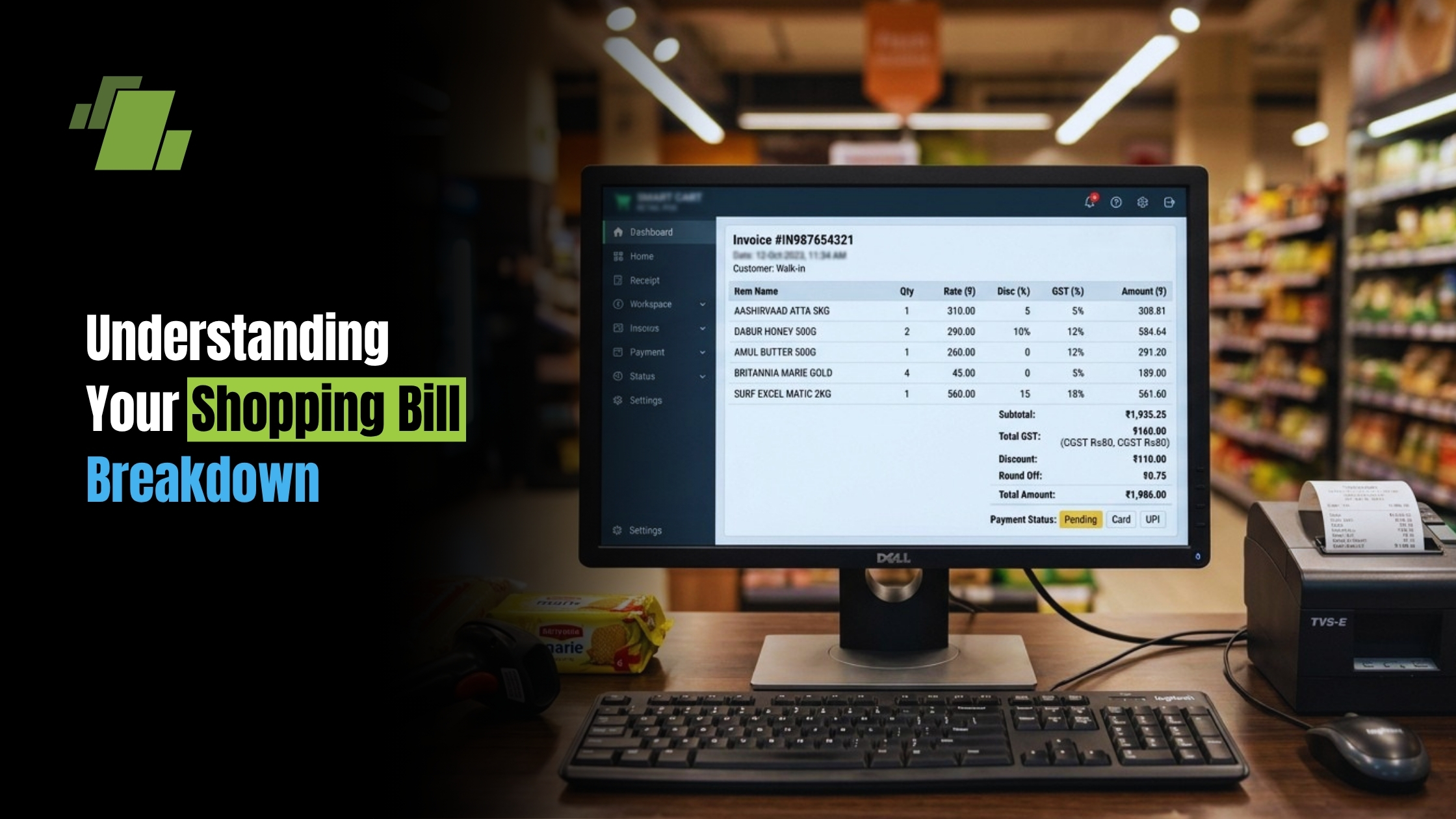
Understanding your shopping bill can be a game-changer for personal finance. It’s more than just a receipt; it’s a tool for financial insight and expense tracking. Every shopping bill tells a story of your spending habits. It breaks down costs, taxes, and fees. Analyzing these details can reveal patterns and opportunities for savings. It’s a step towards smarter spending and budgeting. With digital tools, managing and tracking expenses has never been easier. From Excel sheets to apps, options abound for deeper cost analysis. This guide will help you decode your shopping bill. Let’s dive into the details and optimize your expenses through clear cost analysis.
Contact Us
Free Demo Request
What Is a Shopping Bill?
A shopping bill is more than a mundane piece of paper. It is a snapshot of your purchase history. Every time you shop, this bill captures the essentials.
The primary elements of a shopping bill typically include a detailed list of purchased items. Each item comes with its quantity, unit price, and the total price. The subtotal provides a sum of the item costs before taxes.
Tax and additional fees are usually listed next. These can include sales tax and other region-specific charges.
In a shopping bill, you might also find discounts, promotions, and loyalty points applied. These features can help in understanding real savings made during purchase.
Beyond physical bills, shopping bills can also be digital. They provide easy access and storage. Digital formats often come in image files or as PDFs, making them versatile for various needs.
Key Components of a Shopping Bill
Understanding the key components of a shopping bill can enhance your financial literacy. These components provide vital insights into what you’re being charged for and support cost analysis. Let’s explore each part.
Firstly, there’s the itemized list of purchases. This section mentions every product, the quantity bought, and individual prices. Each entry details what makes up your total spending.
Next, there’s the subtotal. It sums up the total cost before additional charges. It’s important to identify this, as it reflects your base expenses without taxes.
Taxes and fees often appear following the subtotal. They vary depending on location and retailer policies. They can significantly affect the total bill amount.
Discounts, if any, are crucial elements. They show where savings have been applied. They might include promotional discounts or loyalty rewards.
Lastly, the total amount due encompasses all charges and discounts. This is the amount you’re ultimately responsible for paying.
Understanding these components can help in recognizing discrepancies or unauthorized charges in the bill.
Shopping Mall Bill vs. Regular Shopping Bill
A shopping mall bill often carries distinct features not always present in a regular shopping bill. These differences are worth noting to improve your cost management.
Mall bills frequently include extra charges. Service fees and parking costs are common. They add to the overall amount, which can be a surprise for some shoppers.
In contrast, a regular shopping bill, such as from a standalone store, might lack these extra fees. This absence can make budgeting simpler and more predictable.
Another difference lies in promotional offers. Mall stores sometimes provide mall-wide promotions, shown on the bills. Regular shops generally stick to store-specific discounts.
Here’s a quick comparison:
- Shopping Mall Bill: May include parking fees, service charges, mall promotions.
- Regular Shopping Bill: Typically excludes mall-specific charges, focuses on store-specific offers.
Understanding these distinctions helps in accurately tracking expenses across different shopping venues.
Common Shopping Bill Formats
Shopping bills come in various formats, but they usually share core elements for clarity and transparency. Recognizing these formats aids in quick comprehension and record-keeping. Knowing the standard shopping bill format helps you compare receipts across stores.
A typical shopping bill includes item descriptions. Each purchase is listed, often with a short description that helps in identifying the item later.
Another critical component is the unit price, showing the cost per individual item or unit. This allows for detailed price checks against promotional offers.
Quantities purchased are also listed. Knowing how many units of each product were bought prevents confusion.
Standard formats prominently display the total cost. This is vital for expense tracking and assessing if the tally matches planned spending.
Some bills may incorporate additional sections, like discounts or loyalty points information. These extras highlight savings and rewards.
To summarize, common shopping bill elements include:
- Item descriptions
- Unit price
- Quantity purchased
- Total cost
- Discounts and rewards
Understanding these components ensures you can efficiently handle your shopping receipts.
Using Shopping Bill Images for Record-Keeping
Keeping track of shopping bills can quickly become overwhelming. That’s where shopping bill images come in handy. Capturing bills digitally helps in organizing and referencing them whenever needed.
Digital record-keeping has several benefits. You avoid cluttering your physical space with endless paper receipts. Additionally, images are easy to categorize and store on cloud services or personal devices.
Digital systems can automatically scan and track expenses. This makes financial management simpler by having all records in one place. Moreover, it facilitates effortless searching and retrieval of past bills.
Advantages of using bill images include:
- Reducing paper clutter
- Easy tracking of expenses
- Efficient organization and retrieval
By adopting this approach, you streamline your expense management process while staying organized. It’s a simple yet effective way to keep your spending in check.
Expense Tracking and Cost Analysis with Shopping Bills
Tracking expenses is crucial for sound financial management. Your shopping bill holds valuable data for this purpose. Every item you buy reflects your spending behavior, which can be analyzed for insights.
Start by categorizing your purchases on the bill. Grouping similar items helps in understanding where your money goes. This breakdown can reveal surprising spending patterns.
Expense tracking is not just about saving; it’s about informed spending. By analyzing your bills, you can identify areas where costs can be cut. This leads to setting more realistic financial goals.
Shopping bills facilitate cost analysis by showing trends over time. Compare bills from different months to track changes in your expenses. This can highlight how economic factors affect your budget.
Digital tools and apps can automate this process. They can scan shopping bills, categorize items, and produce detailed reports. This leads to more precise financial planning.
Benefits of tracking and analyzing expenses:
- Better financial decision-making
- Identification of unnecessary spending
- More efficient budgeting
This proactive approach allows you to optimize spending, enhancing your overall financial health.
How to Organize Your Shopping Bill in Excel
Organizing shopping bills in Excel can simplify expense tracking. Begin by setting up a spreadsheet to record your purchases. This digital approach offers flexibility and clarity. If you prefer a ready-made layout, you can start with a simple shopping bill in excel template and customize it.
First, create columns for key components like date, item description, quantity, unit price, and total cost. Make sure to include spaces for taxes and discounts.
Excel allows you to sort and filter these entries. This helps in quickly identifying significant expenses and trends. You can also use formulas to automatically calculate totals, saving you time.
Charts and graphs are another advantage of using Excel. Visual representations of your spending can highlight patterns you might miss. This makes it easier to grasp your financial picture at a glance.
Moreover, Excel sheets can be updated and customized over time. Adding more categories or adjusting formats can make tracking more effective as your needs evolve.
Tips for using Excel effectively:
- Keep entries up-to-date
- Utilize automated functions
- Back up your files regularly
This organized approach aids in developing disciplined spending habits and better financial strategies.
Tips for Analyzing and Optimizing Your Shopping Expenses
Analyzing your shopping expenses can uncover areas for improvement. Start by reviewing bills regularly to spot patterns. Look for trends in unnecessary spending.
Consider these strategies for optimizing expenses:
- Categorize your purchases. Group similar items to see where most money goes.
- Identify recurring costs. Monitor subscriptions or memberships that add up.
- Negotiate better deals. Don’t hesitate to ask for discounts or better terms.
- Track seasonal spending. Notice spikes in expenses during certain times.
- Set financial goals. Use past bills to outline objectives and track progress.
Regular analysis fosters financial awareness and informs smarter choices. Use digital tools for easier data handling. Many apps can automate expense tracking, freeing up time for decision-making.
Additionally, involve family members in tracking if the budget is shared. Transparency helps in aligning goals and managing expectations. Ultimately, optimizing expenses can lead to greater savings and financial confidence.
Conclusion: Making the Most of Your Shopping Bill
Understanding your shopping bill is vital for managing your finances efficiently. By examining the details, you can uncover patterns in your spending habits. This awareness enables better budgeting and cost optimization.
Regularly reviewing your shopping bills leads to smarter financial decisions. It helps in identifying areas where you can cut unnecessary expenses and save more. Using digital tools can make this process seamless and less time-consuming.
By leveraging insights from your shopping bills through reliable billing software, you can enhance your financial health. Make informed decisions that contribute to a more sustainable and cost-effective lifestyle.
Call at +91-73411-41176/75 or send us an email at sales@logicerp.com to book a free demo today!
Frequently Asked Questions
1. How can I quickly audit a shopping bill to catch mistakes?
Use a simple top-to-bottom check.
- Match each item and quantity to what you actually bought.
- Verify unit prices align with shelf or advertised prices.
- Confirm the subtotal equals the sum of all line items.
- Ensure discounts, promotions, and loyalty points are applied where expected.
- Check taxes and fees; mall bills may include extras like parking or service charges.
- Verify the final total equals: subtotal + taxes/fees − discounts.
- Save a digital copy for easy retrieval if you need to dispute charges.
2. What’s the difference between a shopping mall bill and a regular store bill, and how should I budget for it?
Mall bills can include extra, venue-specific costs.
- Mall bills may list parking fees, service charges, or mall-wide promotions.
- Regular store bills typically exclude mall-specific fees and focus on store discounts.
- For budgeting, track “fees” separately so you can compare true product costs vs. venue-related add-ons and decide whether the convenience is worth the extra spend.
3. Which columns and formulas should I use in Excel to organize my shopping bills?
Start with core components, then add simple calculations.
- Recommended columns: Date, Store, Category, Item Description, Quantity, Unit Price, Line Total, Discounts, Taxes/Fees, Total Due.
- Formulas:
Line Total = Quantity × Unit Price
Subtotal = SUM of all Line Totals
Total Due = Subtotal + Taxes/Fees − Discounts
- Use sorting/filtering to find large expenses, and charts to visualize patterns over time.
4. How do digital bill images improve record-keeping?
They reduce clutter and make tracking/searching easier.
- Snap a clear photo or save the PDF of each bill.
- Store and categorize them on a device or cloud folder for quick retrieval.
- Many tools can scan images to extract and categorize expenses, speeding up analysis and reporting.
5. What’s a simple process to analyze and optimize my shopping expenses?
Review, categorize, compare, then act.
- Categorize items (e.g., groceries, household, personal care).
- Compare monthly bills to spot trends and seasonal spikes.
- Identify recurring or unnecessary costs and look for substitutions or discounts.
- Set goals (monthly category limits) and track progress with digital tools.
- Revisit regularly to refine your budget and improve savings.

Author
Gurbir Singh
Co-founder & Managing Director | LOGIC ERP Solutions Pvt. Ltd.
With 30+ years of experience in the tech industry, I took the helm of technology & product development, ensuring LOGIC ERP’s continuous innovation & leadership in the evolving tech landscape.


